

Key takeaways
- From your My Library, Team Library, or Request Library, click the three dots and then Delete.
- From the video’s Edit page, click the video, click the three dots, and choose Delete Video.
- In the Chrome Extension, click the delete button on the bottom left of the preview modal to remove a video you’ve just recorded.
- From the Recording Toolbar, once recording has started and your toolbar is on, you have the option to delete the video you’re working on.
- Clearing out several at once? Use bulk delete rather than working through them one at a time.
Delete videos from your Dashboard
From your My Library, Team Library, or Request Library, you can just click on the three dots and then on ‘Delete’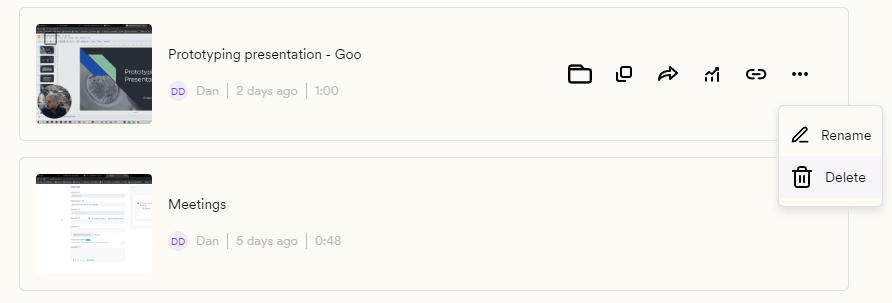
Delete videos from the video’s Edit page
Click on the video you want to delete, then click on the three dots and finally go to ‘Delete Video’.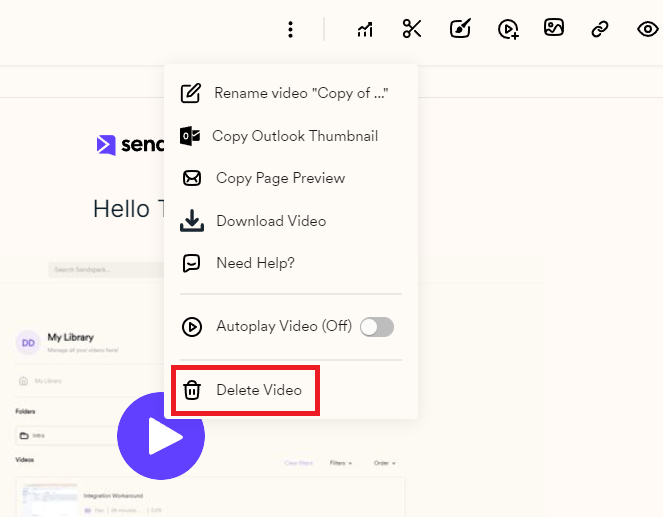
Delete from the Chrome Extension
If you want to delete a video you’ve just recorded, you can click the**‘delete’**button on the bottom left of the Sendspark Chrome Extension preview modal.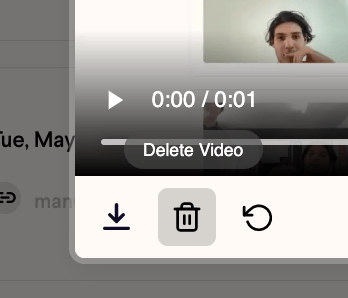
Delete from the Recording Toolbar
Once your recording has started, if your Toolbar is on, you’ll have the option to delete the video you are working on.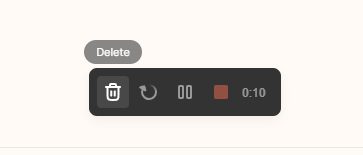
Frequently asked questions
How do I delete a video from my dashboard?
How do I delete a video from my dashboard?
From your My Library, Team Library, or Request Library, click on the three dots and then click Delete.
How do I delete a lot of videos at once?
How do I delete a lot of videos at once?
Use bulk delete: drag to select the videos, hover over any of them, open the three-dot menu, then type DELETE to confirm. Deleted videos can’t be retrieved, so move anything you might reuse into a folder first.
I want to update a video, not delete it. What are my options?
I want to update a video, not delete it. What are my options?
Replace the video while keeping the same link. The URL stays identical, so recipients who already have it see the new version rather than a broken page.
Can I delete a video from its Edit page?
Can I delete a video from its Edit page?
Yes. Click on the video you want to delete, then click the three dots and finally choose Delete Video.
How do I delete a video I just recorded in the Chrome Extension?
How do I delete a video I just recorded in the Chrome Extension?
Click the delete button on the bottom left of the Sendspark Chrome Extension preview modal.
Can I delete a video while I'm recording?
Can I delete a video while I'm recording?
Yes. Once your recording has started, if your Toolbar is on, you’ll have the option to delete the video you are working on from the Recording Toolbar.