

Key takeaways
- Enable it in a dynamic video campaign: click the Settings gear in the top right corner and select “Voice + Lip Model (Beta).”
- The AI prioritizes the first 10 seconds for lip sync calibration, so trim silent or unnecessary opening seconds and keep that section meaningful.
- Start recording with your mouth closed, and pause and close your mouth again after your greeting to set the rhythm for smoother sync.
- Good lighting matters — keep your face well-lit and your lips in focus, and follow voice cloning best practices (speak normally, no background noise, pause after saying “watermelon”).
- Minor lip sync imperfections may appear depending on the content, but most viewers find them subtle, and the Sendspark team keeps improving the model.
How to use the latest lip sync model
To use the latest lip sync model for AI-personalized videos, follow these steps:
- When creating a dynamic video campaign, open the … overflow menu in the top right corner
- Select “Voice + Lip Model (Beta)”
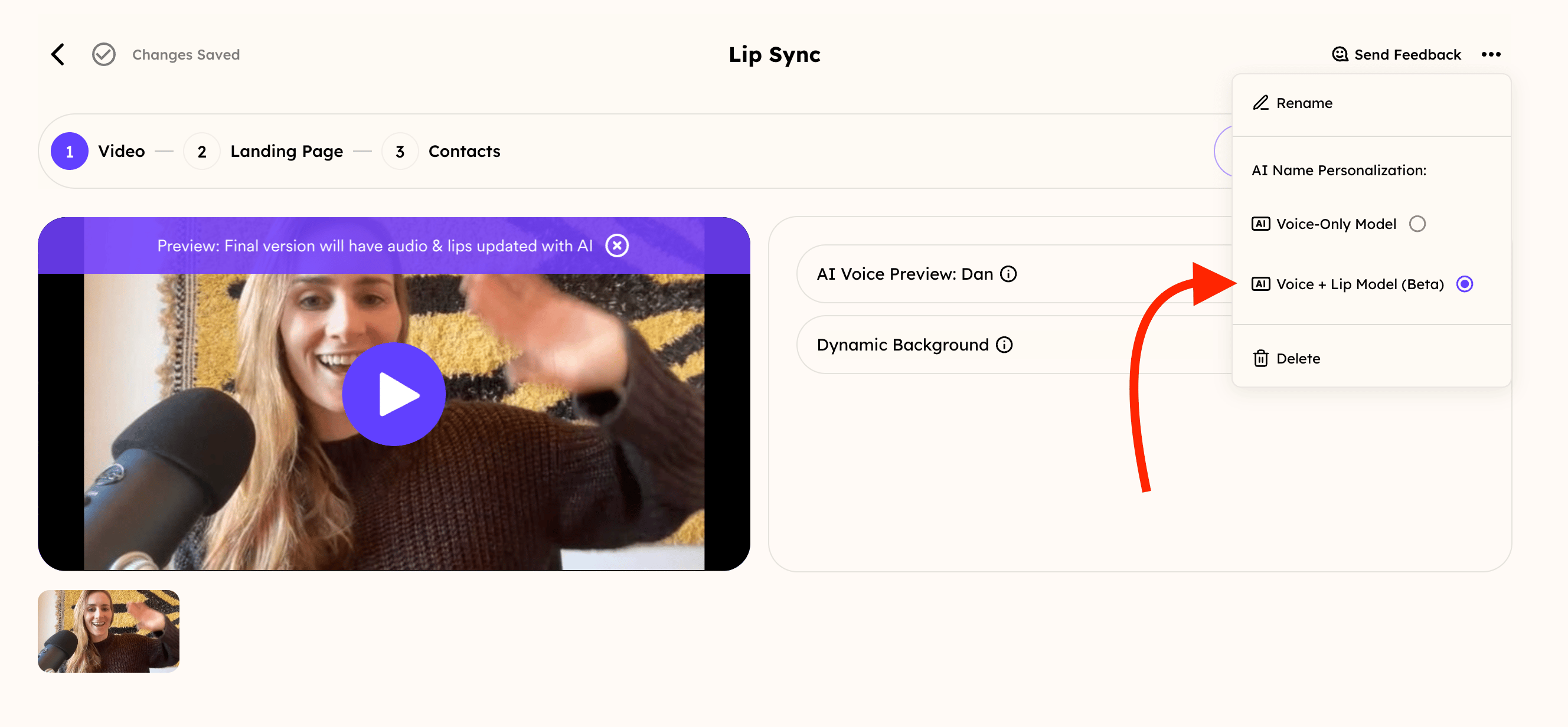
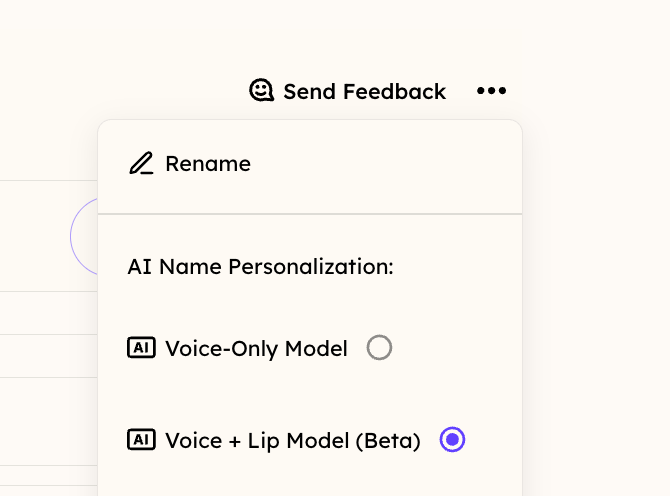
- Now, you can go ahead and create videos from this campaign, and you will be using the latest model!
Pre-Recording Preparations
- Trim Silent or Unnecessary Initial Seconds: Before submitting your video for processing, ensure the first 10 seconds are meaningful and relevant, as Sendspark’s AI prioritizes this section for lip sync calibration.
- Start With a Closed Mouth: Begin recording with your mouth in a neutral, closed position before speaking. This provides the AI with a clear starting point for synchronizing movements.
- After your greeting or introductory statement, briefly pause and close your mouth again before continuing with the main content of your message. This helps set the rhythm for smoother lip sync throughout the recording.
Frequently asked questions
How do I turn on the latest lip sync model?
How do I turn on the latest lip sync model?
When creating a dynamic video campaign, click the Settings gear in the top right corner and select “Voice + Lip Model (Beta).” Videos created from that campaign will then use the latest model.
Why do the first 10 seconds of my recording matter so much?
Why do the first 10 seconds of my recording matter so much?
Sendspark’s AI prioritizes the first 10 seconds for lip sync calibration, so make sure that section is meaningful and relevant. Trim any silent or unnecessary opening seconds before submitting your video for processing.
How do I get the best lip sync results?
How do I get the best lip sync results?
Start recording with your mouth in a neutral, closed position, and pause and close your mouth again after your greeting before continuing. Keep your face well-lit and your lips in focus, and follow standard voice cloning best practices — speak normally, avoid background noise, and leave a brief pause after saying “watermelon.”
Is the lip sync always perfect?
Is the lip sync always perfect?
Not always. Minor imperfections in lip movements or sync can appear depending on the video content, though most viewers find them subtle and unnoticeable unless closely scrutinized. The Sendspark team is continually working to enhance the technology.