

Key takeaways
- Combine two videos in the video editor using the Add Video option before you create your dynamic video campaign.
- Only the first video counts toward your dynamic video minute allocation, so you can extend length without using extra minutes.
- Your original videos stay unaltered. Combining is a temporary arrangement you can adjust or undo at any time, including removing the breakpoints so the combined video plays as one seamless clip.
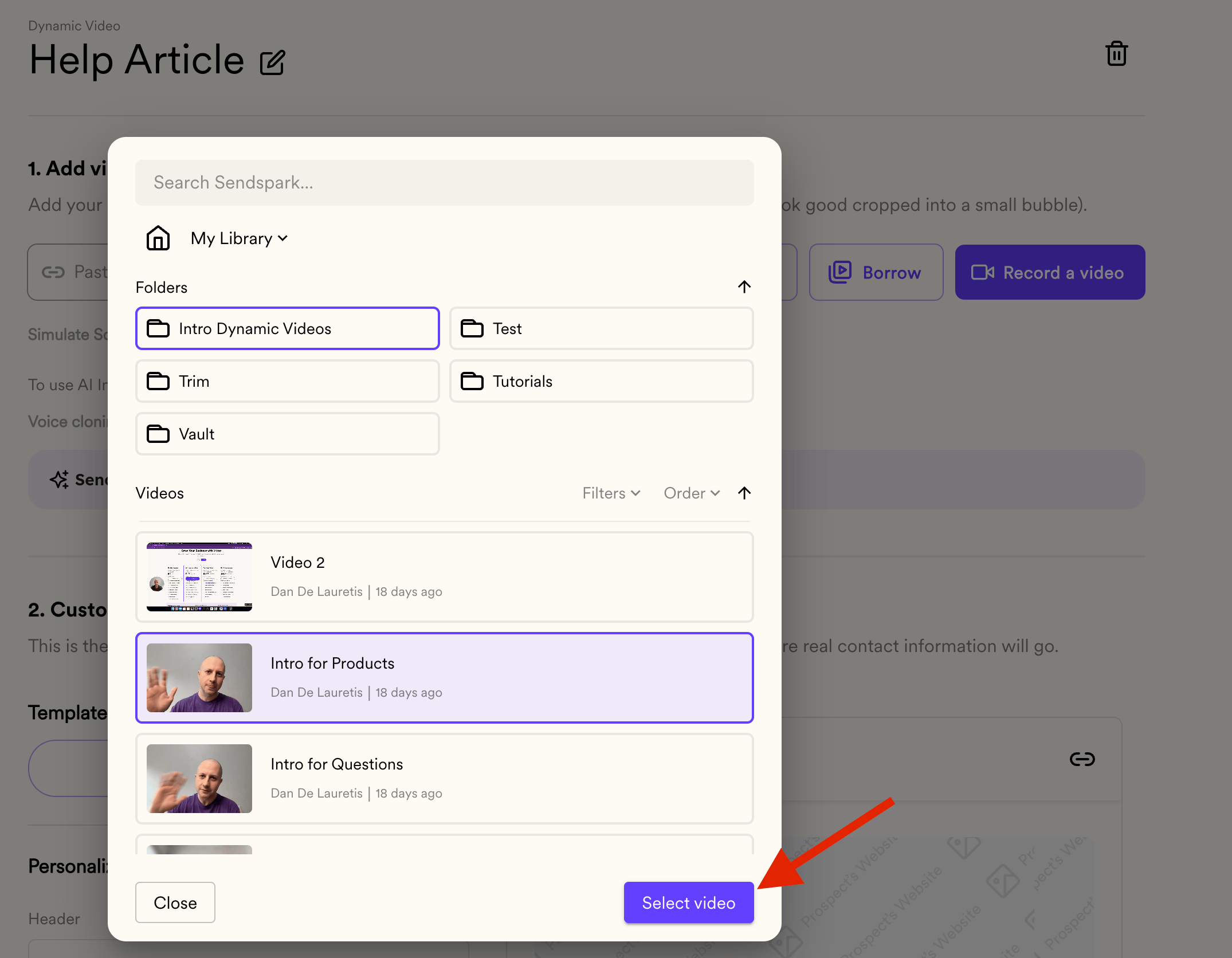
- To use the combined video in a campaign, create a dynamic video campaign, click the drop-down arrow next to Record, choose Browse, and select the combined video.
Did you know that you can combine two different videos in Sendspark? This feature allows you to integrate multiple video clips seamlessly, offering several advantages such as creating longer videos with more information while conserving your dynamic video minutes.
Important! In order to use a combined video, you have to stich them BEFORE creating the Dynamic Video Campaign
Steps to follow:
- Accessing Your Videos:
- Start by logging into your Sendspark account and navigate to your video library.
- Adding a Second Video:
- Select a video that you want to combine with another: Click on VIDEO #1 to access the edit section.
- Combining Videos:
- In the edit section, locate the “Add Video” option. Choose the second video that you wish to integrate into the first one. This second video can serve as a complement or continuation of the initial video.

- Review and Modify:
- Once you’ve added the second video, review the combined result. Sendspark ensures that the original videos remain unaltered; combining videos is a temporary arrangement that can be adjusted or undone at any time.
- Using Combined Videos in DV Campaigns:
- Create a new DV Campaign: https://sendspark.com/dynamic-videos

- Create a Dynamic Video campaign and then click the drop-down arrow next to RECORD and click BROWSE
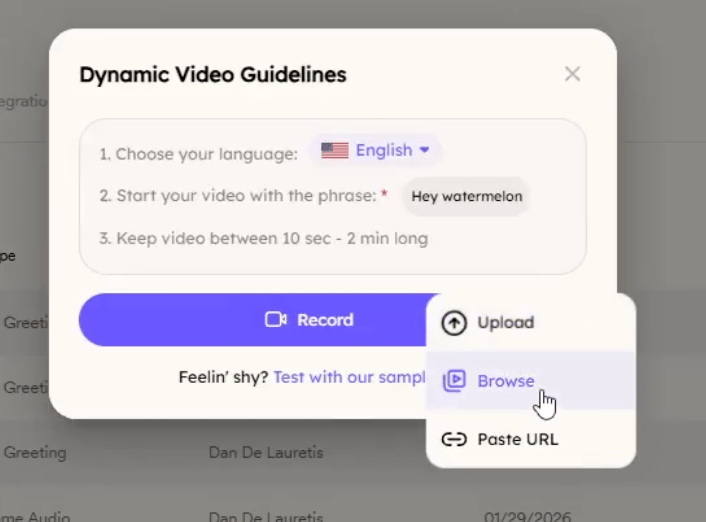
- Select the combined video and you are set!
Benefits:
- Extended Video Length: Create longer videos without exceeding your dynamic video minute allocation. When you combine videos, we only consider the first video and not the full length of the video.
- Flexibility: Easily modify or remove combined videos as per your campaign needs.
- Efficiency: Streamline your video creation process by integrating related content into cohesive presentations.
Frequently asked questions
Do I combine the videos before or after creating the campaign?
Do I combine the videos before or after creating the campaign?
Before. You have to stitch the two videos together first, then create the dynamic video campaign and browse to select the combined video.
How many dynamic video minutes does a combined video use?
How many dynamic video minutes does a combined video use?
Only the first video counts. When you combine videos, Sendspark only considers the first video’s length, not the full combined length, so you can create longer videos without exceeding your minute allocation.
Does combining change my original videos?
Does combining change my original videos?
No. The original videos stay unaltered. Combining is a temporary arrangement that you can adjust or undo at any time.
How do I select the combined video in a campaign?
How do I select the combined video in a campaign?
Create a dynamic video campaign, click the drop-down arrow next to Record, click Browse, and select the combined video.