

Key takeaways
- A breakpoint is the small gap Sendspark shows on the progress bar of a combined video to mark the transition from one clip to the next.
- You remove it from Workspace Settings: open your profile menu (bottom left), then find Miscellaneous Options at the bottom of the page.
- Toggle off Show Breakpoints for Combined Videos to get a seamless timeline.
- This is a global setting that applies only to newly created videos — videos recorded before the change are not affected.

Steps to Remove Breakpoints
- Open Workspace Settings
- Click on your profile menu in the bottom left-hand corner of your Sendspark dashboard.
- From the dropdown, select Workspace Settings.
- Scroll Down to Miscellaneous Options
- At the bottom of the Workspace Settings page, you’ll find a section labeled Miscellaneous Options.
- Turn Off Breakpoints
- Find the option labeled Show Breakpoints for Combined Videos.
- Toggle it off to remove breakpoints from the timeline.
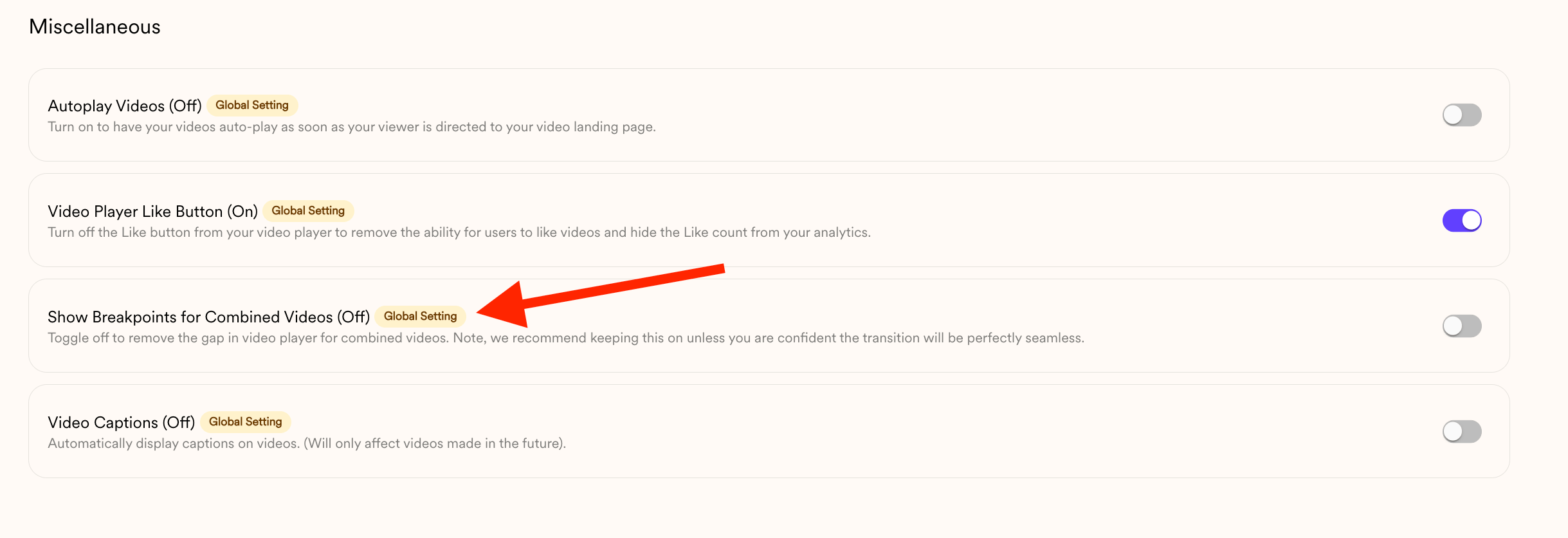
That’s It! 🎉
Once this setting is turned off, any new combined videos you create will play seamlessly without showing breakpoints in the progress bar.Frequently asked questions
What is a breakpoint in a combined video?
What is a breakpoint in a combined video?
It’s the small gap Sendspark shows on the video player’s progress bar to indicate the transition between one video and the next in a combined video.
Where do I turn off breakpoints?
Where do I turn off breakpoints?
Open your profile menu in the bottom left-hand corner of your Sendspark dashboard, select Workspace Settings, scroll to the Miscellaneous Options section, and toggle off “Show Breakpoints for Combined Videos.”
Will turning this off affect my existing videos?
Will turning this off affect my existing videos?
No. This is a global setting that only applies to newly created videos. Any videos you recorded before the change are not affected.
What changes after I turn breakpoints off?
What changes after I turn breakpoints off?
Any new combined videos you create will play seamlessly, without the gap showing on the progress bar between segments.