

Key takeaways
- The warning appears because your Mac’s security level is set to a high standard, and Apple shows it when an app was not downloaded from the App Store.
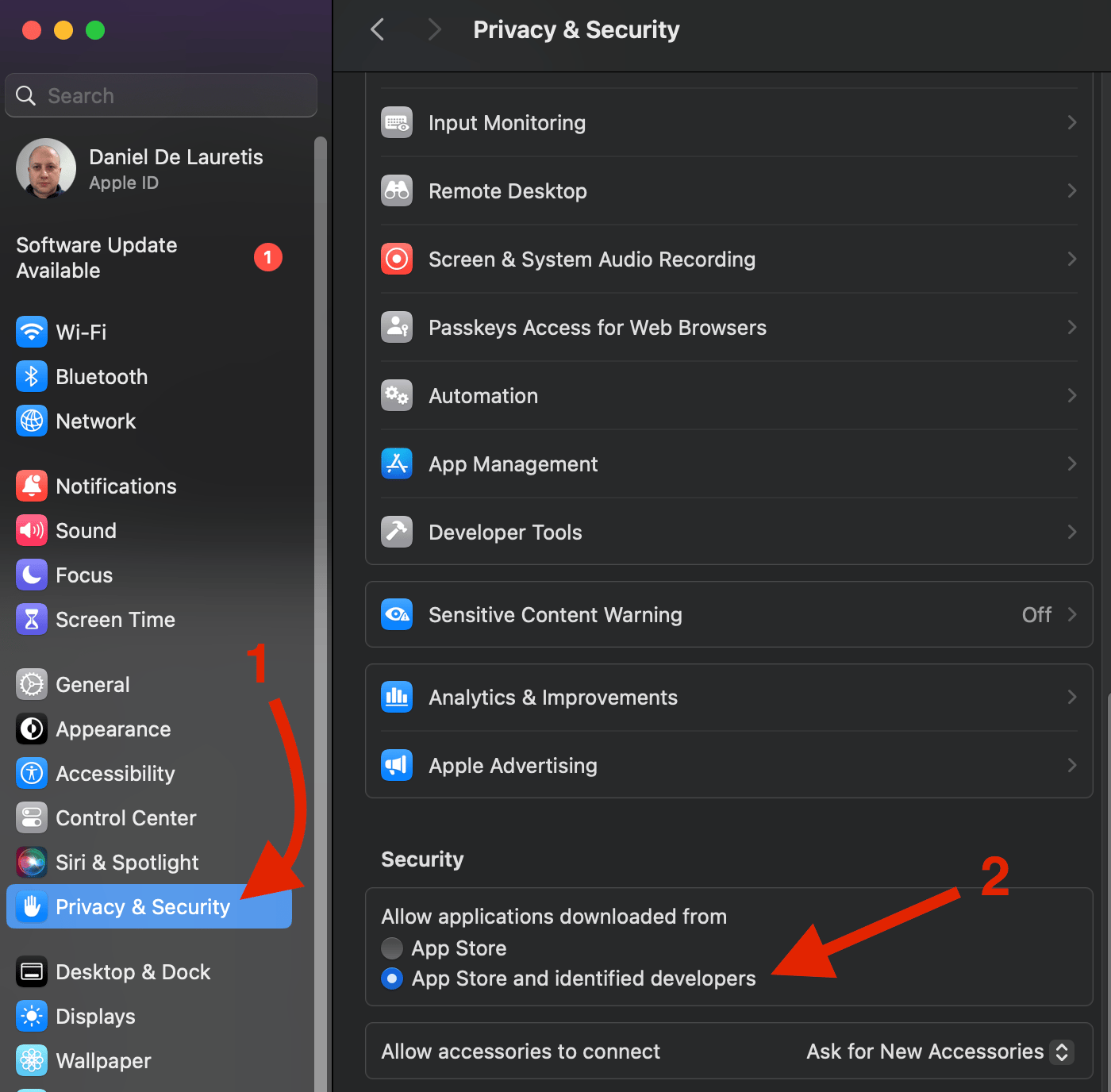
- To fix it, open Privacy & Security settings, scroll to the Security section, and switch to App Store and identified developers.
- After changing the setting, try opening the Sendspark desktop app again.
Frequently asked questions
Why is my Mac blocking the Sendspark app?
Why is my Mac blocking the Sendspark app?
Your Mac’s security level is likely set to a high standard. Apple usually shows this message when an app was not downloaded from the App Store.
How do I allow the Sendspark app to open?
How do I allow the Sendspark app to open?
Go to your settings, search for Privacy & Security, then scroll down on the right until you find the Security section. Switch it to App Store and identified developers and try opening the app again.
Is the Sendspark desktop app safe to open?
Is the Sendspark desktop app safe to open?
Yes. This is Sendspark’s own desktop app. The warning simply appears because the app was not installed from the Mac App Store, not because anything is wrong with it.