

Key takeaways
- WhatsApp is opened right away by most recipients and reaches over 2 billion people, making it a fast, personal channel for short video walkthroughs.
- Sharing is three steps: create the video in Sendspark, copy the Video Link, and paste it into a WhatsApp chat.
- If you’re in the recipient’s contacts, the link shows a moving thumbnail preview; if not, the preview won’t show but the link still works.
- Sendspark notifies you by email when someone watches and shows play rate, view time, and click-throughs in your dashboard.
Why Share Videos in WhatsApp?
WhatsApp is used by over 2 billion people worldwide, and messages on the platform are usually opened right away. If you’re trying to send something short and personal—like a video walkthrough or intro—it’s a fast and effective way to get your message seen. Instead of sending a cold email or a bulky attachment, you can send a video that plays smoothly, feels personal, and tracks who’s watching.How to Share a Sendspark Video in WhatsApp
1. Create Your Video in Sendspark
Start in Sendspark by recording a video or using one you already made. You can:- Record yourself on camera
- Record your screen for walkthroughs or demos
- Use AI to make a batch of personalized videos using dynamic fields like name or company
2. Copy the Video Link
Each row has a chain-link icon whose tooltip reads Copy Video Link. Click it to copy the link. The link is lightweight and mobile-friendly, so it loads fast and works well in WhatsApp chats.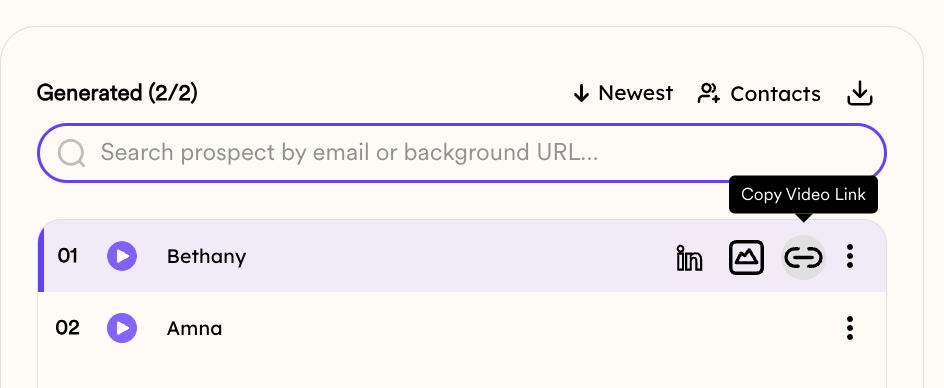
3. Paste the Link in a WhatsApp Message
Go to WhatsApp and paste the link directly into your message. Here’s what happens:- If you’re in the recipient’s contacts: They’ll see a preview with a moving thumbnail (like a short GIF), which makes it more eye-catching
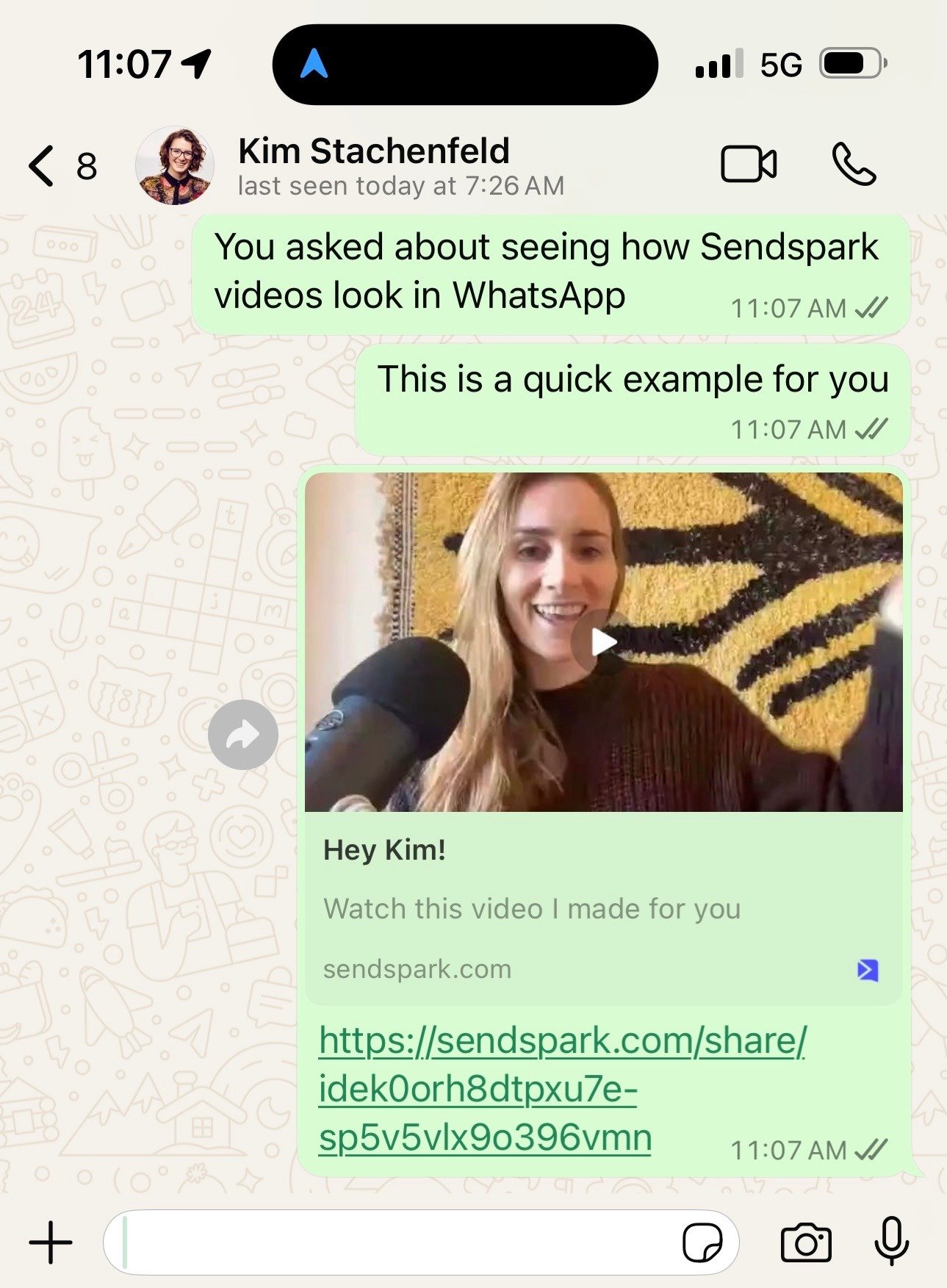
- If you’re not in their contacts: The preview won’t show, but the link still works
4. Track Views & Analytics
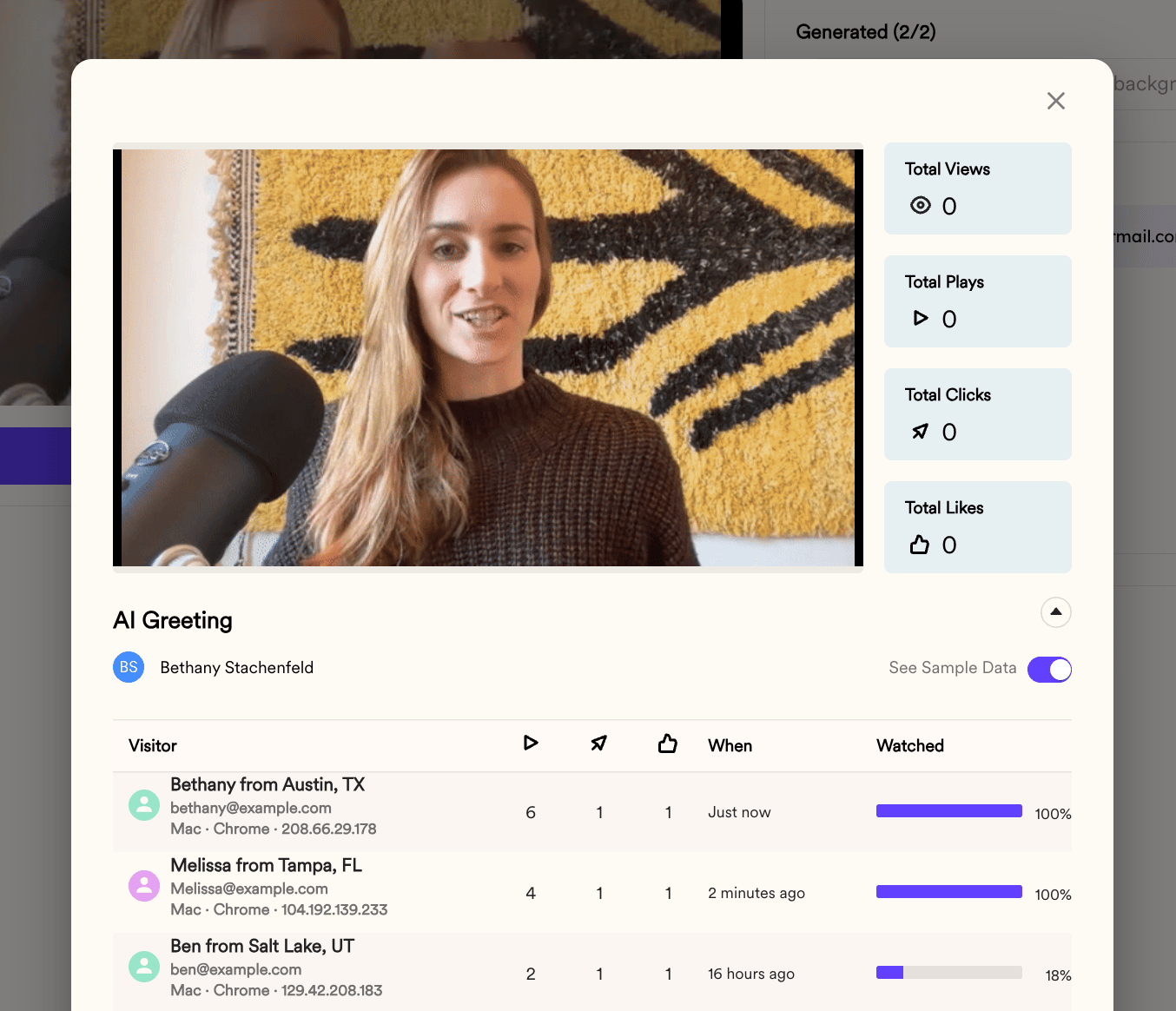
When someone clicks and watches the video:- Sendspark notifies you by email
- You can check the view data in your dashboard, including play rate, view time, and click-throughs
Advantages and Limitations of Sharing Videos on WhatsApp
Pros:
- Very high open rates (WhatsApp messages are usually read right away)
- Feels more personal than email
- No need to compress or upload a large file
- Mobile-friendly by default
Cons:
- If your number isn’t saved, the preview won’t show
- Not ideal for sending to large lists
- WhatsApp has limited formatting for longer or more detailed messages
When to Use WhatsApp for Video
- Start the video with movement or a wave to help the preview stand out
- Keep videos under a minute to hold attention
- Use a clear call to action, either in the message or inside the video itself
- Combine your Sendspark link with a short text or voice message for context
Tips to Maximize Video Engagement on WhatsApp
- Start the video with movement or a wave to increase thumbnail click-through rates
- Keep videos under 60 seconds to hold attention
- Add a strong call to action directly in the video or the message text
- Consider pairing your video with a follow-up text or voice message to reinforce the message
Final Thoughts
Sending videos through WhatsApp is a simple way to make your outreach feel more personal without adding extra tools or steps. With Sendspark, you can record, share, and track your videos in minutes. It’s a quick win for anyone in sales, support, or customer success who wants to connect in a more direct way.Frequently asked questions
How do I send a Sendspark video on WhatsApp?
How do I send a Sendspark video on WhatsApp?
Create or choose your video in Sendspark, click the Video Link button to copy the link, then paste it directly into a WhatsApp message. The link is lightweight and mobile-friendly, so it loads fast in WhatsApp chats.
Why doesn't my video preview show in WhatsApp?
Why doesn't my video preview show in WhatsApp?
The moving thumbnail preview only appears if your number is saved in the recipient’s contacts. If you’re not in their contacts, the preview won’t show, but the link still works.
Can I track who watches my WhatsApp video?
Can I track who watches my WhatsApp video?
Yes. When someone clicks and watches, Sendspark notifies you by email, and you can check view data in your dashboard, including play rate, view time, and click-throughs.
Is WhatsApp good for sending to large lists?
Is WhatsApp good for sending to large lists?
Not really. WhatsApp has very high open rates and feels personal, but it isn’t ideal for sending to large lists and has limited formatting for longer messages.
How can I make my WhatsApp video stand out?
How can I make my WhatsApp video stand out?
Start the video with movement or a wave so the thumbnail catches attention, keep it under 60 seconds, add a clear call to action, and pair the link with a short text or voice message for context.