

Key takeaways
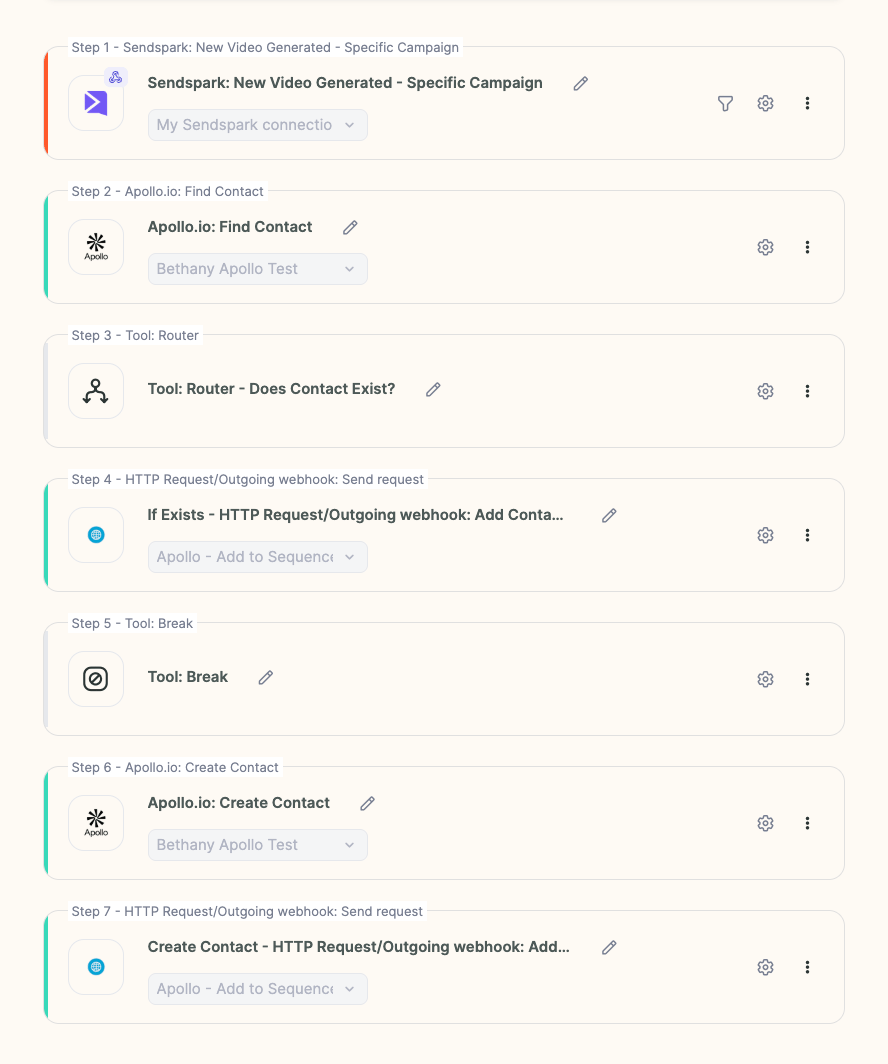
- Add a Router step to check whether the lead already exists in Apollo.
- If the lead is missing, add a Apollo.io: Create Contact step, then re-run the HTTP request using the newly created lead’s ID (not the ID from Apollo.io: Find Contact).
- Put a break between the two paths — existing lead vs. new lead — so each is handled correctly.
- The result: no matter what, every contact ends up enrolled in your Apollo video sequence.
- Add a Router step to check if the lead exists in Apollo.
- If the lead is missing, create a new step: Apollo.io: Create Contact.
- After creating the lead, run the same HTTP request step again, but reference the newly created lead’s ID instead of the one from “Find Lead.”
- Add a break between the two possible paths (existing lead vs. new lead).
Frequently asked questions
Do I usually need this step?
Do I usually need this step?
For the most part, no. Your contacts should already exist in Apollo because Apollo has a large database. Add this logic only if you believe some contacts might be missing.
How does the workflow handle new versus existing leads?
How does the workflow handle new versus existing leads?
A Router step checks whether the lead exists. Existing leads continue on one path, while missing leads get a Apollo.io: Create Contact step and then re-run the HTTP request with the new lead’s ID. A break between the paths keeps the two cases separate.
Why re-run the HTTP request after creating the lead?
Why re-run the HTTP request after creating the lead?
The newly created lead has a different ID than the one returned by “Find Lead.” You run the same request again referencing the new lead’s ID so that contact gets enrolled.
What is the HTTP request enrolling contacts into?
What is the HTTP request enrolling contacts into?
It calls Apollo’s API to add the contact to your Apollo sequence. See Auto-Send Personalized Video Emails in Apollo for the full enrollment automation this fits into.