

Key takeaways
- Global Styles apply your logo and brand styles to Sendspark video messages and requests for a polished, professional look.
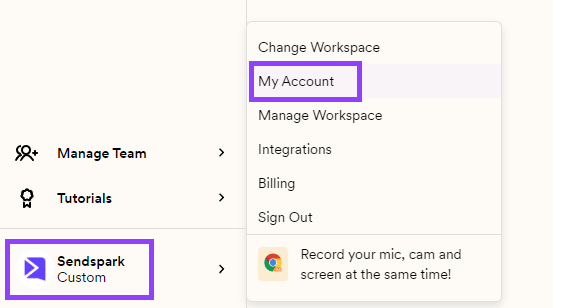
- Access them from your workspace settings, or via the dashboard by clicking the bottom-left logo, then My Account.
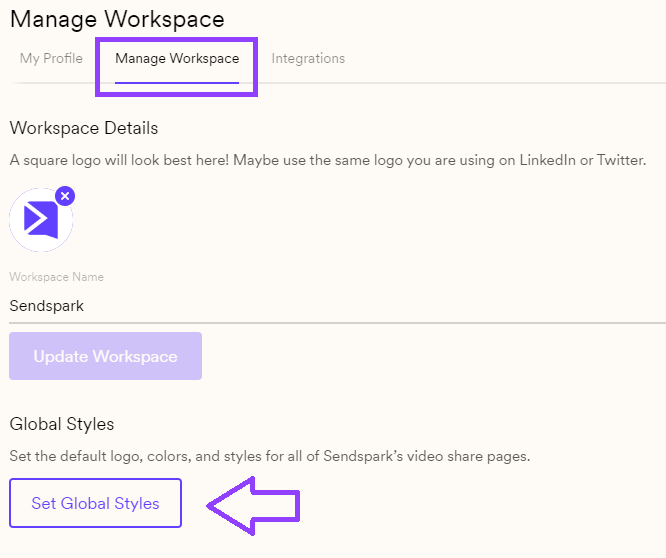
- Click Manage Workspace, then Set Global Styles to open the editor.
- Edit fields in the left sidebar and preview changes on the right; clicking a field highlights the element you’re editing. Save to apply.
- Click here to access your: workspace settings. Or navigate through your dashboard by clicking on the bottom left-hand side logo, then click My Account:
- Click Manage Workspace and then on Set Global Styles
- Use the side bar on the left to add your own logo and brand styles. You can preview how your video pages will look on the right.
- Save changes, and you’re all set!

Frequently asked questions
How do I get to Set Global Styles?
How do I get to Set Global Styles?
Open your workspace settings directly, or from the dashboard click the logo in the bottom left, choose My Account, click Manage Workspace, and then Set Global Styles.
What can I customize with Global Styles?
What can I customize with Global Styles?
You can add your own logo and brand styles to your video pages. These apply across your Sendspark video messages and requests.
Can I preview my changes before saving?
Can I preview my changes before saving?
Yes. Use the sidebar on the left to make changes and preview how your video pages will look on the right. When you click a field on the left, the element you’re editing is highlighted on the right.
Where do the styles I set apply?
Where do the styles I set apply?
They apply to your video messages and requests, giving viewers a consistent, branded experience.