

Key takeaways
- Webhooks are currently available for dynamic video campaigns only, not every video in your library.
- Create one from Settings → Webhooks → New Webhook by supplying a Name and URL in the Create Webhook dialog.
- After creating a webhook, click its name to choose events: Video Created, Video CTA Clicked, Video Liked, Video Played, Video Viewed, Video Watched to the End, Video Ready to Download, and Video Failed to Generate.
- By default a webhook is associated with all dynamic video campaigns in the workspace; use Connect Campaign to limit it to specific campaigns.
How to Use Webhooks in Sendspark
Navigate to the Webhooks section within the Settings panel in your Sendspark account.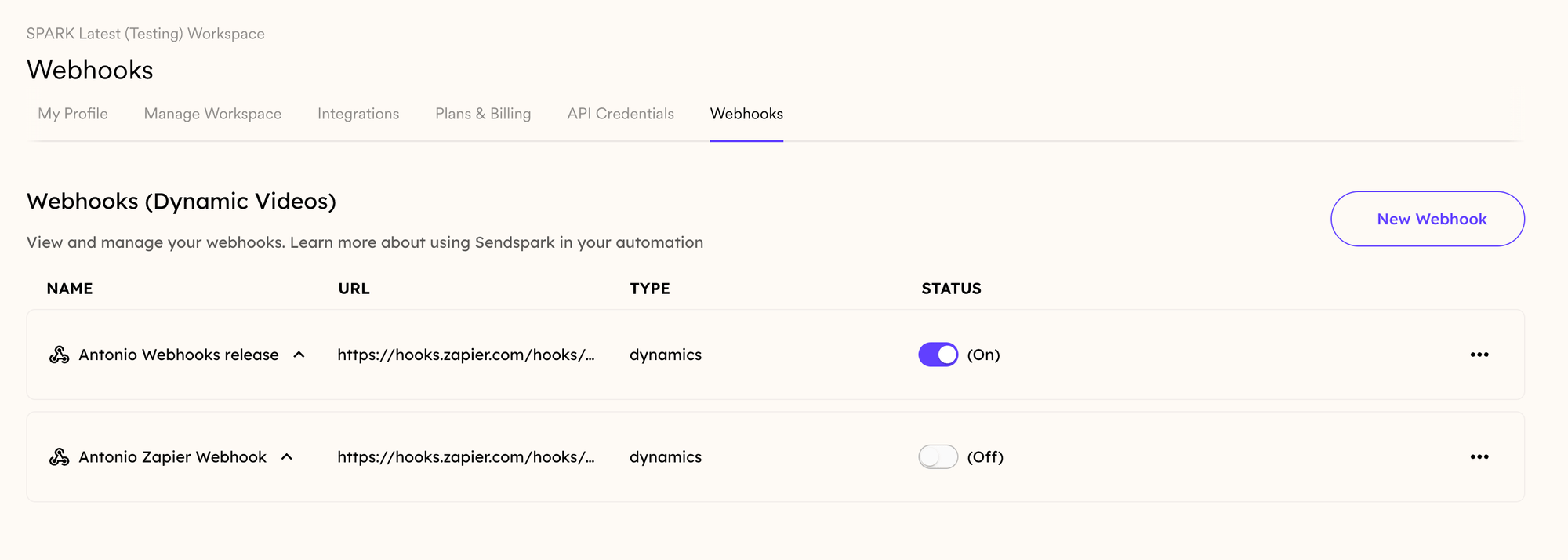
Create a New Webhook:
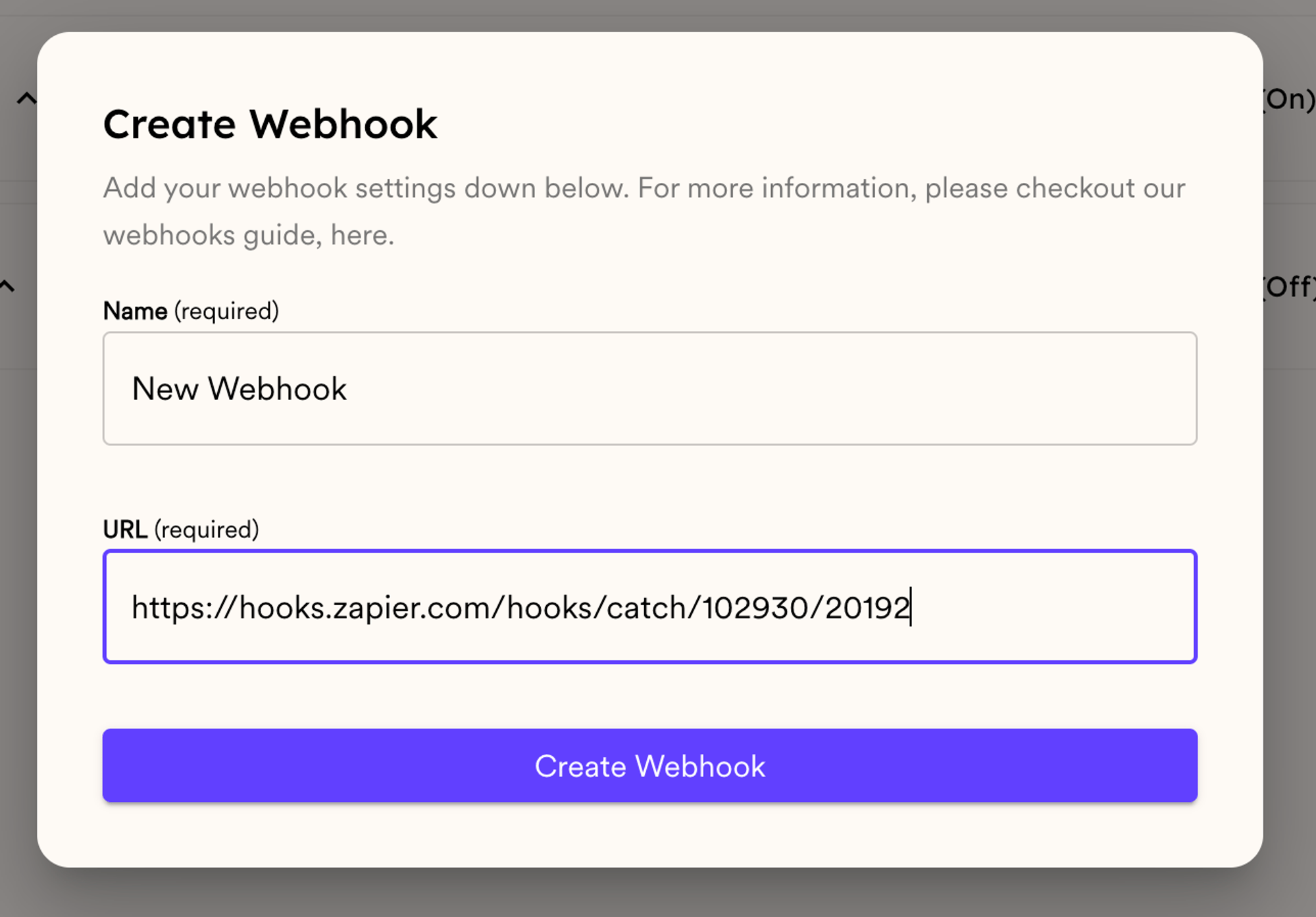
- Click the New Webhook button in the top-right corner. The dialog that opens is titled Create Webhook.
- Fill in all the necessary information, such as the Name and URL
Configure Webhook Events:
- After creating your webhook, click on its name to access the events.

- Here, you will see all of the available webhook events:
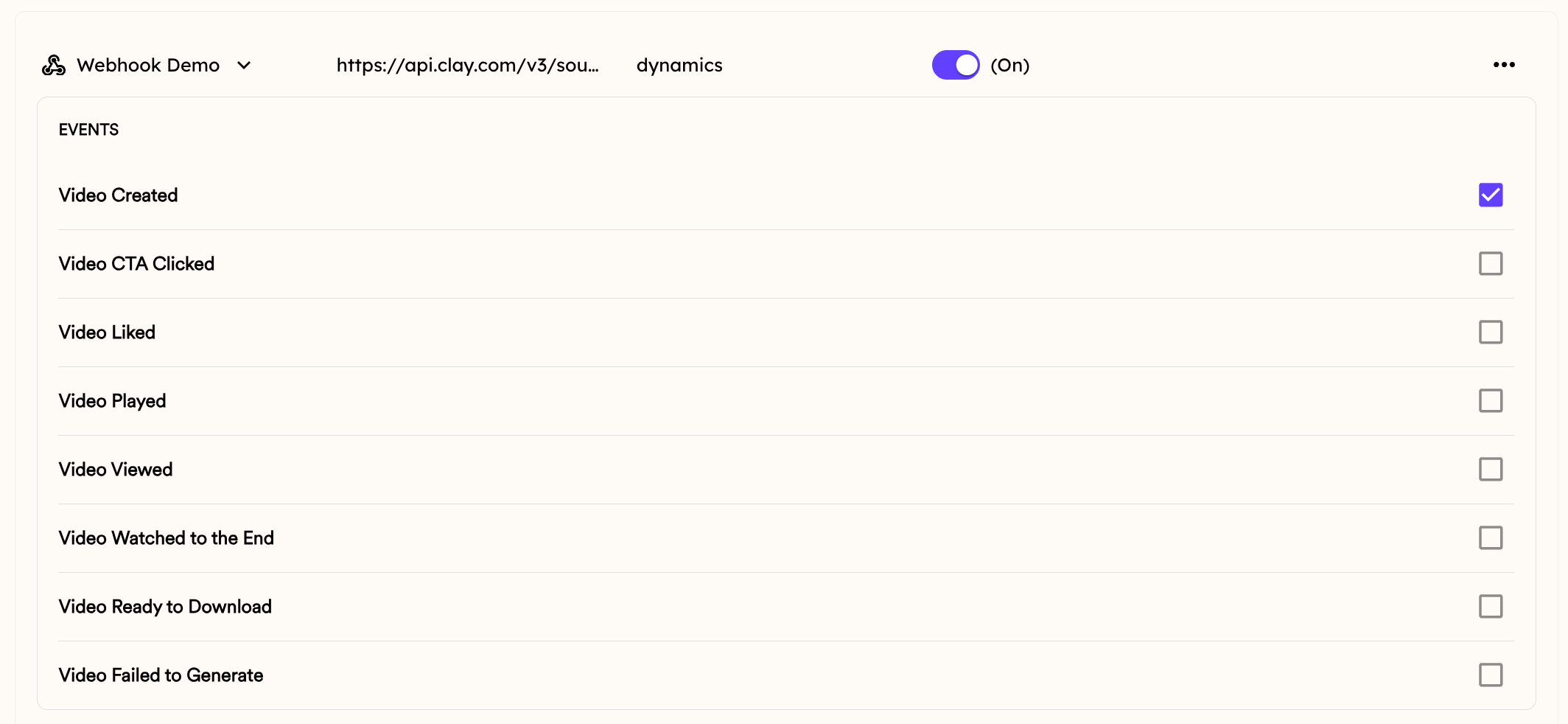
- You can select the ones that you want to use for this webhook URL. This is what each of the webhooks do:
- Video Created:
- This event is triggered when a new video is successfully created in the dynamic campaign that you associated in your Webhook.
- Video CTA Clicked:
- When a viewer interacts with a Call-to-Action (CTA) button in the share page, this event is triggered.
- Video Liked:
- This event occurs when a viewer indicates their positive sentiment towards a video by clicking the “Like”button associated with the video content.
- Video Played:
- When a viewer initiates playback of a video, either by clicking the play button or auto-play functionality, this event is triggered.
- Video Viewed:
- This event is triggered when a viewer opens or accesses a video, regardless of whether they interact with the playback controls or watch the video in its entirety.
- Video Watched to the End:
- This event fires when a viewer reaches the end of the video.
- Video Ready to Download
- This fires when the video .mp4 is ready to download, which can take a few minutes longer than the “Video Created” event. You can use this webhook to get the .mp4 of the video to download or upload to another site.
- Video Failed to Generate
- This will fire when your dynamic video generates with an error. You can use this event to keep an eye on errors.
- Video Created:
Associate Webhooks with Dynamic Video Campaigns
By default, when you create a new webhook, it will be associated with all dynamic video campaigns in your workspace. If you’d like it to only be associated with some dynamic videos campaigns, than you can click “Connect Campaign,” and associate it only with specific campaigns.
Sendspark Webhook FAQs
- What are webhooks, and how do they work in Sendspark?
- Webhooks are automated messages sent from Sendspark to another application when a specific event occurs. In Sendspark, you can configure webhooks to trigger events based on user interactions or system actions within your dynamic video campaigns.
- Are webhooks available for all types of videos in Sendspark?
- Currently, webhooks are only available for dynamic videos in Sendspark. Dynamic videos allow for personalized content generation based on user data, making them ideal for triggering events and automating workflows through webhooks.
- Where can I find more information or support for setting up and configuring webhooks in Sendspark?
- For more detailed instructions or assistance with webhook setup and configuration, you can reach out to our support team for personalized support and guidance.
Frequently asked questions
Are webhooks available for all videos in Sendspark?
Are webhooks available for all videos in Sendspark?
No. Webhooks are currently available for dynamic video campaigns only, not for every video in your Sendspark library.
How do I create a webhook?
How do I create a webhook?
Go to the Webhooks section in your Settings panel, click New Webhook in the top-right corner, and fill in the Name and URL in the Create Webhook dialog. Then click the webhook’s name to select which events it should fire on.
Which events can trigger a webhook?
Which events can trigger a webhook?
You can select from Video Created, Video CTA Clicked, Video Liked, Video Played, Video Viewed, Video Watched to the End, Video Ready to Download, and Video Failed to Generate. Video Ready to Download can fire a few minutes after Video Created, once the .mp4 is ready.
Does a webhook apply to all my campaigns?
Does a webhook apply to all my campaigns?
By default a new webhook is associated with all dynamic video campaigns in your workspace. To limit it, click Connect Campaign and associate it with specific campaigns only.
What data is sent with a webhook?
What data is sent with a webhook?
See properties that are sent with webhooks for the full list of fields included in each event.