

Key takeaways
- Save your video to your computer first (click the download button in the preview modal) so you don’t lose it while troubleshooting.
- Slow uploads are most often caused by a slow internet upload speed — check it at Fast.com before trying anything else.
- Restarting Chrome clears an overloaded browser; restarting your computer clears the whole system if that doesn’t help.
- If it still uploads slowly, remove and re-add the Sendspark Chrome extension.
First: Save your video!
Before you follow any of the steps below, you might want to save your video to your computer so you don’t lose it. If you’re using the Sendspark Chrome Extension, you can save your video by clicking the “download” button on the left of the preview modal.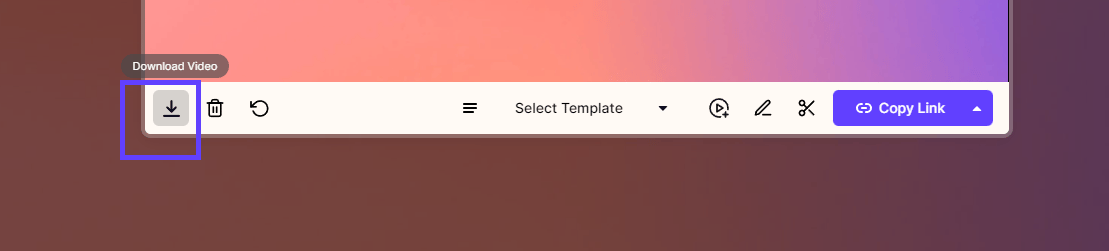
Improve Video Upload Speed
After you record a video using Sendspark, it should upload to Sendspark in just a few seconds. If it feels like your video is taking a long time to upload, you might want to try the following steps:- Check your internet upload speed. Use Fast to check your internet speed. If your internet speed is slow, then it’s normal for your video to upload slowly. There’s nothing you can do except sit back and wait patiently.
- **Restart Chrome.**Sometimes Chrome gets a little overloaded — especially if you have a lot of tabs opened, and haven’t restarted your browser recently. Quit Chrome and open it again to freshen up the system.
- **Restart your computer.**If restarting Chrome doesn’t help, try rebooting your entire system.
- Remove and re-add the Sendspark Chrome Extension. If you’re still having trouble, try removing and re-adding the Sendspark Chrome extension.

Frequently asked questions
Why is my Sendspark video uploading so slowly?
Why is my Sendspark video uploading so slowly?
A Sendspark video normally uploads in just a few seconds. The most common cause of a slow upload is a slow internet upload speed, so check it at Fast.com first. If your connection is fine, restart Chrome, then restart your computer, then remove and re-add the Sendspark Chrome extension.
How do I save my video before troubleshooting?
How do I save my video before troubleshooting?
If you’re using the Sendspark Chrome extension, click the download button on the left of the preview modal to save the video to your computer. You can then upload it to Sendspark later to share via email or other channels.
My video upload is stuck or frozen — what should I do?
My video upload is stuck or frozen — what should I do?
Save the video to your computer first so you don’t lose it, then work through the steps in order: check your upload speed at Fast.com, quit and reopen Chrome, restart your computer, and finally remove and re-add the Sendspark Chrome extension.
How long should a Sendspark video take to upload?
How long should a Sendspark video take to upload?
After you record a video with Sendspark, it should upload in just a few seconds. If it’s taking noticeably longer, your internet upload speed is the most likely culprit — check it at Fast.com.