

Key takeaways
- The Workspace ID is a unique alphanumeric identifier for the workspace you’re working in.
- Support may request it for specific procedures, and it’s also used with API credentials and agency workspace activation.
- Find it in three clicks: Workspace Settings → Manage Workspace tab → click the hidden Workspace ID to copy.
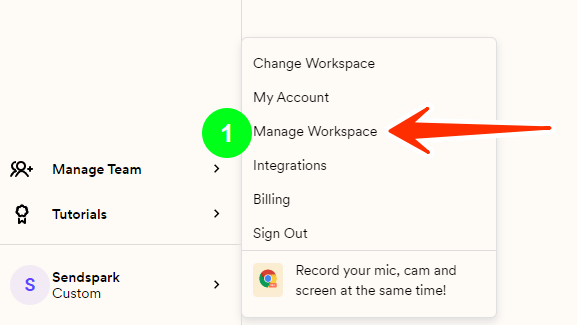
- Click on your company and click Manage Workspace: https://sendspark.com/settings/workspace
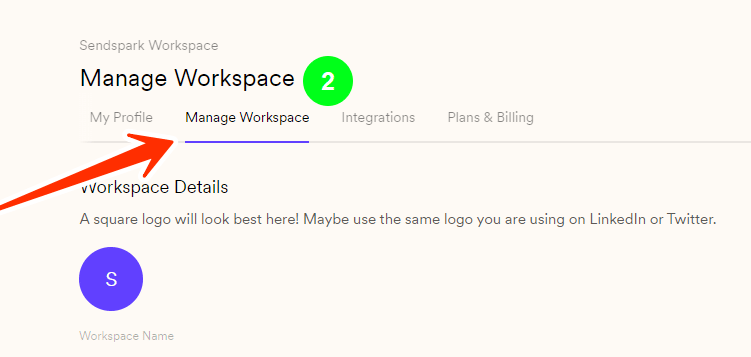
- Click on the Manage Workspace tab on the top
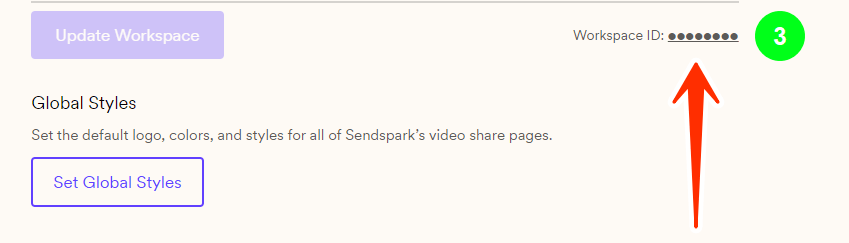
- Find and click on the hidden Workspace ID on the right-hand side, to copy it
Frequently asked questions
Where do I find my Workspace ID?
Where do I find my Workspace ID?
Open Workspace Settings, click the Manage Workspace tab at the top, then click the hidden Workspace ID on the right-hand side to copy it.
What is the Workspace ID used for?
What is the Workspace ID used for?
It’s an alphanumeric ID that identifies the specific workspace you’re working in. The support team can require it for certain procedures, and it’s also used alongside your API credentials.
Can I have more than one Workspace ID?
Can I have more than one Workspace ID?
Yes. Each workspace you create has its own unique Workspace ID. If you manage multiple brands or clients, see How to create and use multiple workspaces.