

Key takeaways
- Sendspark connects with over 60 email and CRM platforms, including HubSpot, Salesforce, Mailchimp, Outreach, Expandi, and Clay.
- The Chrome extension lets you record and insert videos directly into Gmail, or copy animated/static thumbnails to paste into any other email platform.
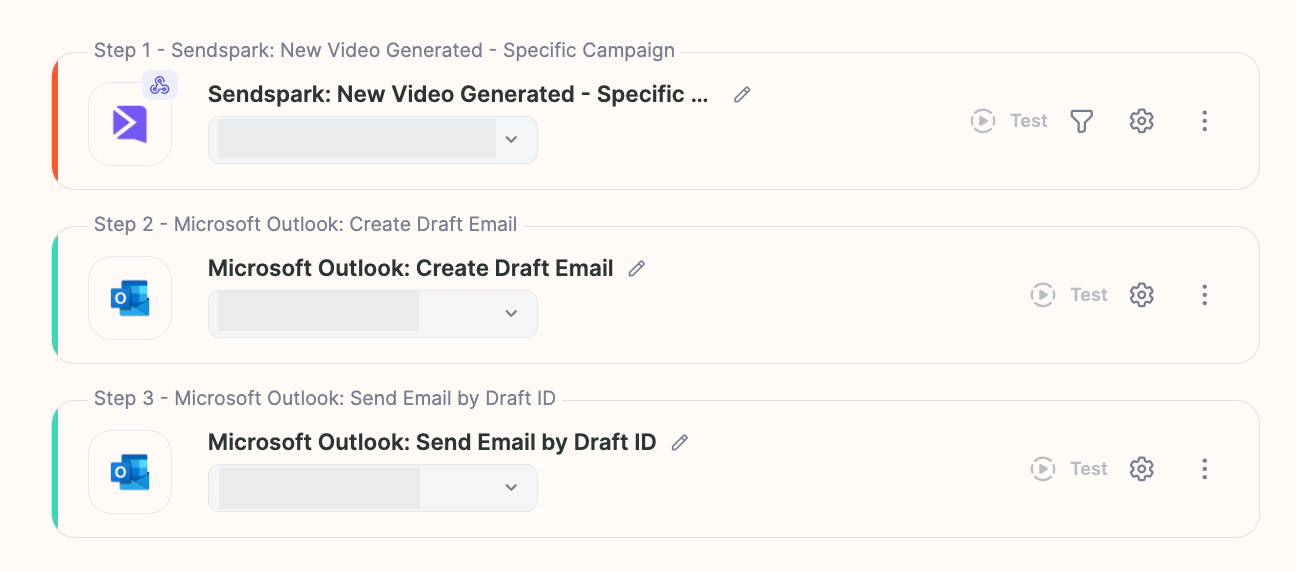
- Agentic Workflows can automate sending (for example, “when a video is generated, send it through Gmail or Outlook”) without a separate email automation platform. This feature is available on specific plans.
- Whether you send manually, through an integration, or via automation, Sendspark hosts the video and you deliver it wherever your audience already is.
While Sendspark focuses on video generation, you can deliver your videos through Gmail, Outlook, CRMs, and automation platforms connected to your account.
✅ Ways to Send Sendspark Videos via Email
🧩 1. Using Sendspark Integrations
Sendspark connects with over 60 email and CRM platforms, including HubSpot, Salesforce, Mailchimp, Outreach, Expandi, Clay, and many more. You can check the complete list of integrations: 👉 View all available integrations⚙️ 2. Automate sending with Agentic Workflows in bulk without an email automation platform
Sendspark includes its own automation system, similar to Zapier.You can create automations such as:
- “When a video is generated → send it automatically through Gmail or Outlook.”
💌 3. Send Videos with any email platform
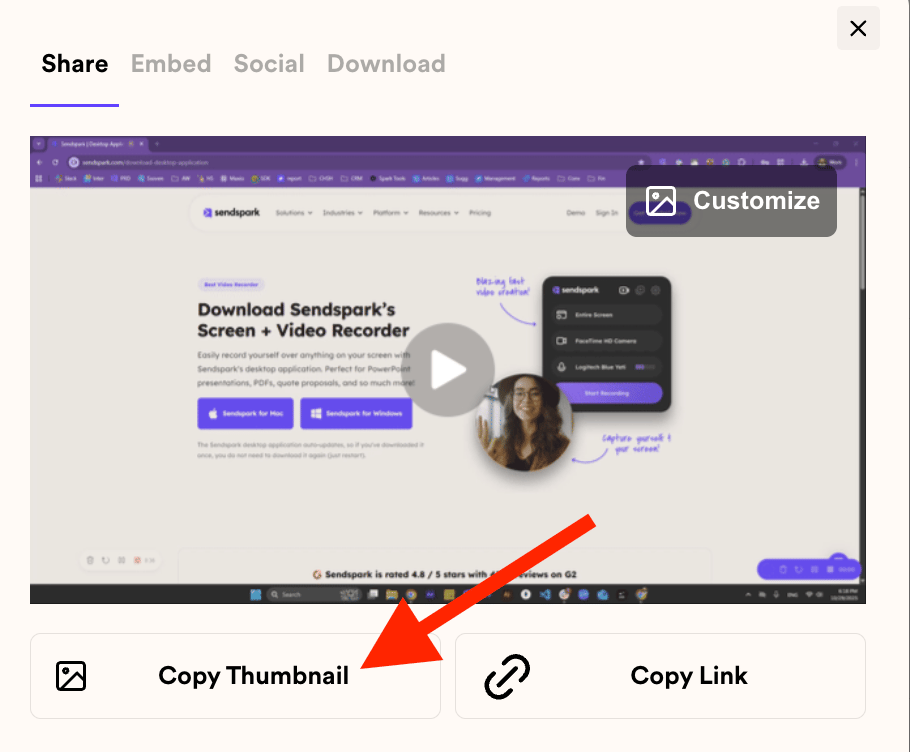
The simplest way to share your videos is with our Chrome extension, which lets you:- Record and insert videos directly into Gmail.
- Copy animated or static thumbnails and paste them into any other email platform.
💡 In Summary
Sendspark lets you generate personalized videos and then send them through 60+ supported platforms — including Gmail, Outlook, and popular CRMs. Whether you send them manually, through integrations, or via automations, you can always deliver your Sendspark videos exactly where your audience is.Frequently asked questions
Does Sendspark send the email itself, or just create the video?
Does Sendspark send the email itself, or just create the video?
Sendspark creates, personalizes, and hosts your video. You deliver it by email through a connected integration, the Chrome extension, or an Agentic Workflow that sends via Gmail or Outlook.
How many email and CRM platforms does Sendspark integrate with?
How many email and CRM platforms does Sendspark integrate with?
Over 60, including HubSpot, Salesforce, Mailchimp, Outreach, Expandi, and Clay. You can view all available integrations.
Can I send a video without any integration or automation platform?
Can I send a video without any integration or automation platform?
Yes. The Chrome extension lets you record and insert videos directly into Gmail, or copy an animated or static thumbnail and paste it into any other email platform.
Can Sendspark send videos automatically?
Can Sendspark send videos automatically?
Yes, using Agentic Workflows. For example, you can set up “when a video is generated, send it automatically through Gmail or Outlook.” Automations are available on specific plans, so make sure your account includes access.