

Key takeaways
- The Table replacement tool adds a fallback value when a field (for example, First Name) is empty.
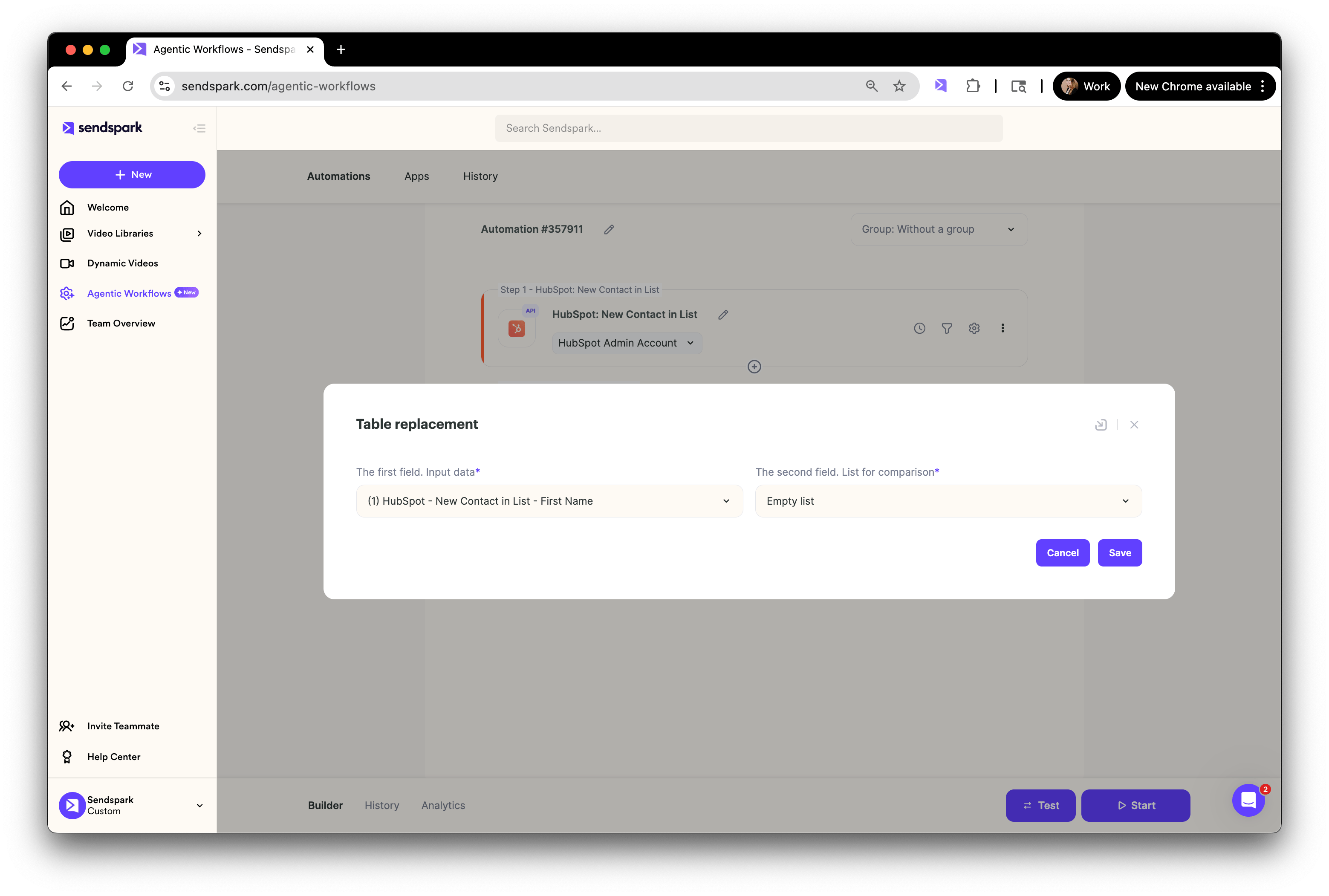
- Set The first field. Input data to the field you want to check and the The second field. List for comparison to Empty list to detect blanks.
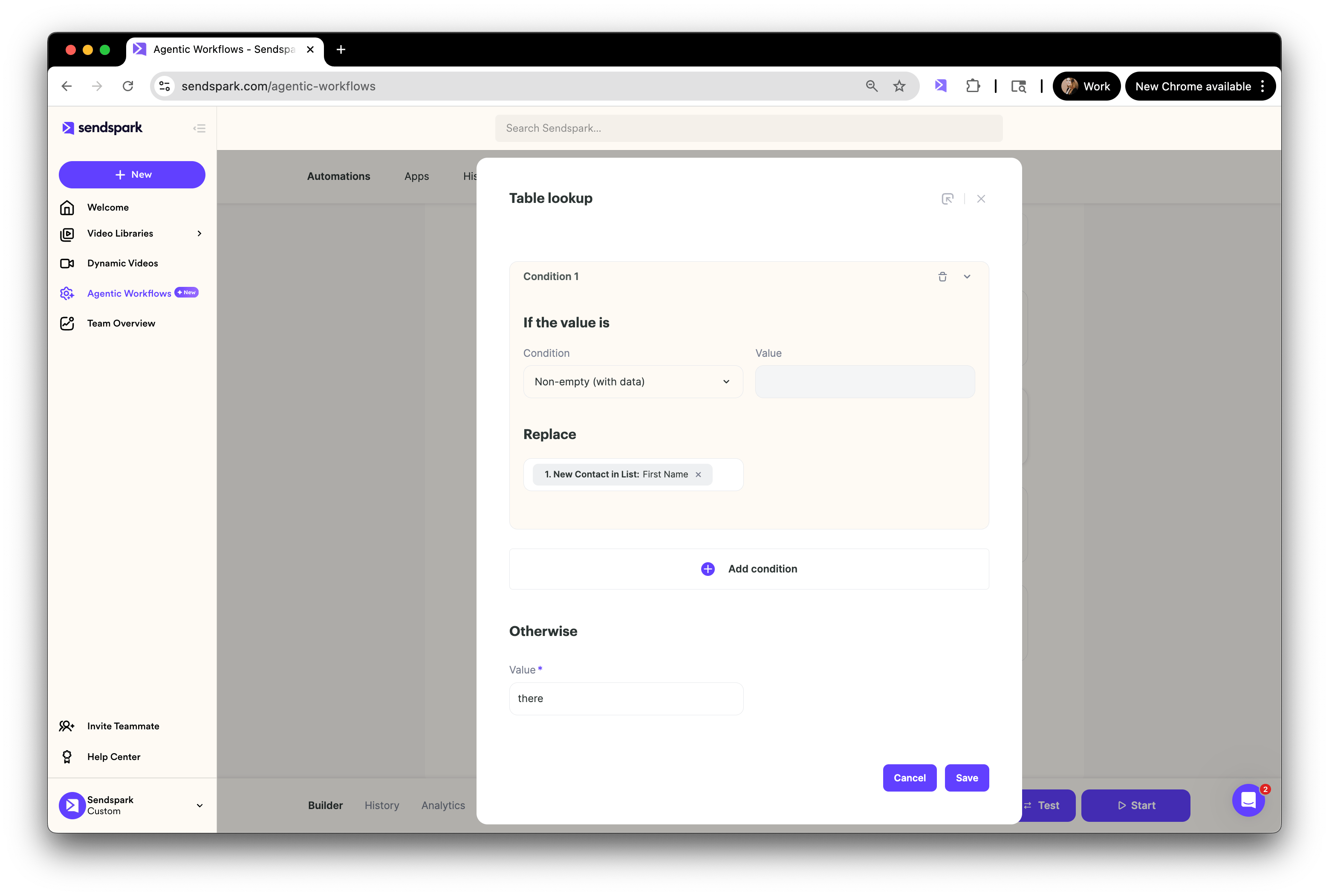
- If the value is non-empty, use the original field data; otherwise, use your fallback word (for example, “there”).
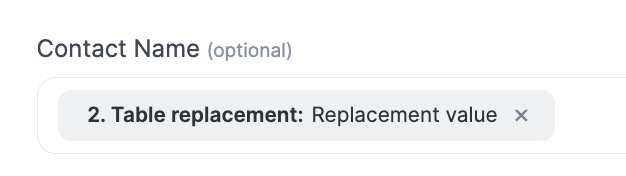
- Reference the
Table replacement: Replacement valuefield wherever you want the fallback to appear, such as a dynamic video’s Contact Name field.
Step 1: Add the Table replacement Tool
Inside your Agentic Workflow:- Add a tool for Table replacement.
- For the The first field. Input data, select the field you want to check (e.g. “First Name”).
- For the The second field. List for comparison, select Empty list.
Step 2: Configure the Logic
Next, tell the workflow what to do if the field is empty.- Add a condition: If the value is non-empty, replace it with the original field data.
- Otherwise, specify a fallback word (for example, “there”).
“Hi there” instead of “Hi watermelon.” Example:
Step 3: Use the Replacement Field in Your Workflow
Finally, make sure you’re using the updated field everywhere you want the fallback to appear. For example, in the Contact Name field of a dynamic video, select:Table replacement: Replacement value
This way, Sendspark will automatically use the contact’s real data if available, or your fallback value if not.
Example:
Best Practices for Fallbacks
- Keep it natural: Use fallback values like “there,” “friend,” or “your team” that sound human in context.
- Match the tone: If your brand is casual, “there” works. If it’s more formal, try “valued contact.”
- Test before launching: Always run a test automation to make sure your fallback logic displays correctly.
- Use sparingly: Fallbacks are a safety net, not a replacement for clean CRM data. Keep your contact lists as complete as possible.
Summary
By adding a fallback with the Table replacement tool, you ensure your automations always look polished, even if some data fields are missing. This small step can make your personalized videos and outreach feel much more natural and professional.Frequently asked questions
What does the Table replacement tool do?
What does the Table replacement tool do?
It lets you detect when a field is empty and substitute a fallback value, so missing data (like a blank first name) doesn’t make your video or email look awkward.
How do I detect an empty field?
How do I detect an empty field?
Add the Table replacement tool, set The first field. Input data to the field you want to check (e.g. “First Name”), and set the The second field. List for comparison to Empty list. That configuration lets the workflow tell when the field is empty.
What should I use as a fallback value?
What should I use as a fallback value?
Use something natural that fits your brand tone — “there,” “friend,” or “your team” for casual, or “valued contact” for formal. So “Hi there” reads well instead of an awkward placeholder.
Where do I use the fallback after setting it up?
Where do I use the fallback after setting it up?
Use the updated field everywhere you want the fallback to appear. For example, in a dynamic video’s Contact Name field, select
Table replacement: Replacement value. Sendspark then uses real data when available and the fallback when not.Should I rely on fallbacks instead of cleaning my CRM data?
Should I rely on fallbacks instead of cleaning my CRM data?
No. Fallbacks are a safety net, not a substitute for clean data. Keep your contact lists as complete as possible and test your automation before launching to confirm the fallback logic displays correctly.