

https://api-gw.sendspark.com/v1.
Key takeaways
- You need two credentials: an API Key (scoped to your workspace) and an API Secret (scoped to your user profile). Pass both as
x-api-keyandx-api-secretheaders on every request. - The core flow is: create a dynamic video campaign, then add one prospect (
/prospect) or many (/prospects/bulk) to it. Sendspark generates a video per prospect. - Adding prospects requires
processAndAuthorizeCharge: true, which acknowledges charges for videos generated above your plan limit. - Rate limits are 30 requests per minute for all endpoints, except
/prospects/bulk, which is limited to 1 request per minute. - If you’d rather ask questions than write requests, connect Sendspark to an AI assistant over MCP and query your campaigns, prospects, and analytics in plain language.
- Once a video exists, you can also get its transcript via the API as JSON or as a WebVTT or SubRip subtitle file.
API endpoints at a glance
Sendspark lets you automatically generate AI-personalized videos via our API. This is helpful when you want to create dynamic videos based on specific actions such as…
- Filling out a form
- Being added to a list
- Being enrolled in email sequence
- Being added to LinkedIn automation campaign
- Taking action in your product
- And more!
Sendspark API Basics
Where to view Your API Credentials
You can access your information in the API Credentials tab in your Sendspark settings.What are API Keys and Secrets?
- An API Key is specific to your Sendspark workspace. It lets you access your workspace from other applications, so you can take actions via automation.
- An API Secretis specific to your Sendspark user profile. Every member of your workspace can generate their own API Secrets. These will let each of you take actions as “you” via automation.
How to Generate an API Key
- Go to your API Credentials Tab
- Select “Create New Key”
- You’ll see your API Key appear

How to Generate an API Secret
- Click on the Key Icon next to your API Key
- Click “Generate New Secret Key”
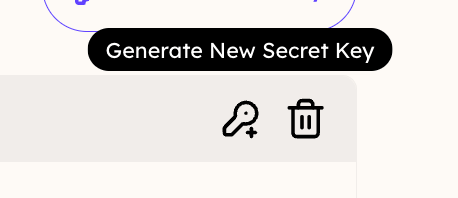
- Your API Secret Key will appear for you to copy and use.
- Note that you will never able to view this key again. If you need to use an API Secret in the future, you will have to remember this one, or generate a new API Secret Key.
Sendspark API Rate Limits
All API endpoints are limited to 30 requests per minute rate limit, except “../prospects/bulk`, which is limited to 1 request per minute.Endpoint reference
The credentials, headers, and campaign → prospect flow above apply to every endpoint. For the full request and response schema of each endpoint — with an interactive Try it console — see the API reference tab.Frequently asked questions
How do I authenticate with the Sendspark API?
How do I authenticate with the Sendspark API?
Every request includes two headers:
x-api-key (your workspace API Key) and x-api-secret (your user API Secret), plus Accept: application/json. Generate both in the API Credentials tab of your Sendspark settings. Note that an API Secret is shown only once, so store it securely when you generate it.What's the difference between an API Key and an API Secret?
What's the difference between an API Key and an API Secret?
An API Key is specific to your Sendspark workspace and lets other applications act on that workspace. An API Secret is specific to your individual user profile, so each member of a workspace can generate their own and take actions as themselves via automation.
How do I create a personalized video for a contact via the API?
How do I create a personalized video for a contact via the API?
First create a dynamic video campaign with
POST /dynamics. Then add the contact with POST /dynamics/{dynamicId}/prospect (or /prospects/bulk for many at once), including fields like contactName, contactEmail, company, jobTitle, and backgroundUrl. Sendspark generates a personalized video for each prospect you add.What are the API rate limits?
What are the API rate limits?
All endpoints are limited to 30 requests per minute, except
/prospects/bulk, which is limited to 1 request per minute.How do I get a Sendspark partner account?
How do I get a Sendspark partner account?
If you’re building an integration with Sendspark in your product for your customers to use, you’re likely eligible for a free partner account. Reach out to Sendspark support via the chatbot on our website and tell us about the integration you’re building.
What are some good examples of Sendspark integrations?
What are some good examples of Sendspark integrations?
You can see where the Sendspark API has been implemented successfully in existing integrations on Clay, Expandi, Zapier, and HubSpot Workflows.