> ## Documentation Index
> Fetch the complete documentation index at: https://help.sendspark.com/llms.txt
> Use this file to discover all available pages before exploring further.
# ZoomInfo - Create Personalized Video Emails
> Learn how to record and insert personalized videos directly into ZoomInfo emails using Sendspark's Chrome extension integration.
Sendspark's ZoomInfo integration runs through the Sendspark Chrome extension, letting you record and insert videos directly into ZoomInfo emails. Install the extension, draft your email (optionally with ZoomInfo's AI Copilot), then click the Sendspark icon in the compose window to record a new video, request one, add your last recording, or pull one from your library.
## Key takeaways
* The integration works through the Sendspark Chrome extension, which you install to access it inside ZoomInfo.
* Clicking the Sendspark icon in the compose window gives four options: Record New Video, Request Video, Add Last Recording, and Video Library.
* It pairs with ZoomInfo Copilot to create AI-personalized video emails at scale.
* You need active Sendspark and ZoomInfo accounts; the integration is available on every plan and is best for BDRs, SDRs, and sales reps.
Sendspark has an instant integration with ZoomInfo that allows you to record and insert videos directly into ZoomInfo emails.
This can be used with ZoomInfo Copilot to create AI-personalized video emails at scale.
## How The Sendspark + ZoomInfo Copilot Works:
1. Install the [Sendspark chrome extension](https://chrome). This is how you access the the Sendspark + ZoomInfo integration.
2. Navigate to ZoomInfo and draft your email. If you don't know what to say, try using ZoomInfo's AI Copilot feature to draft the email for you. 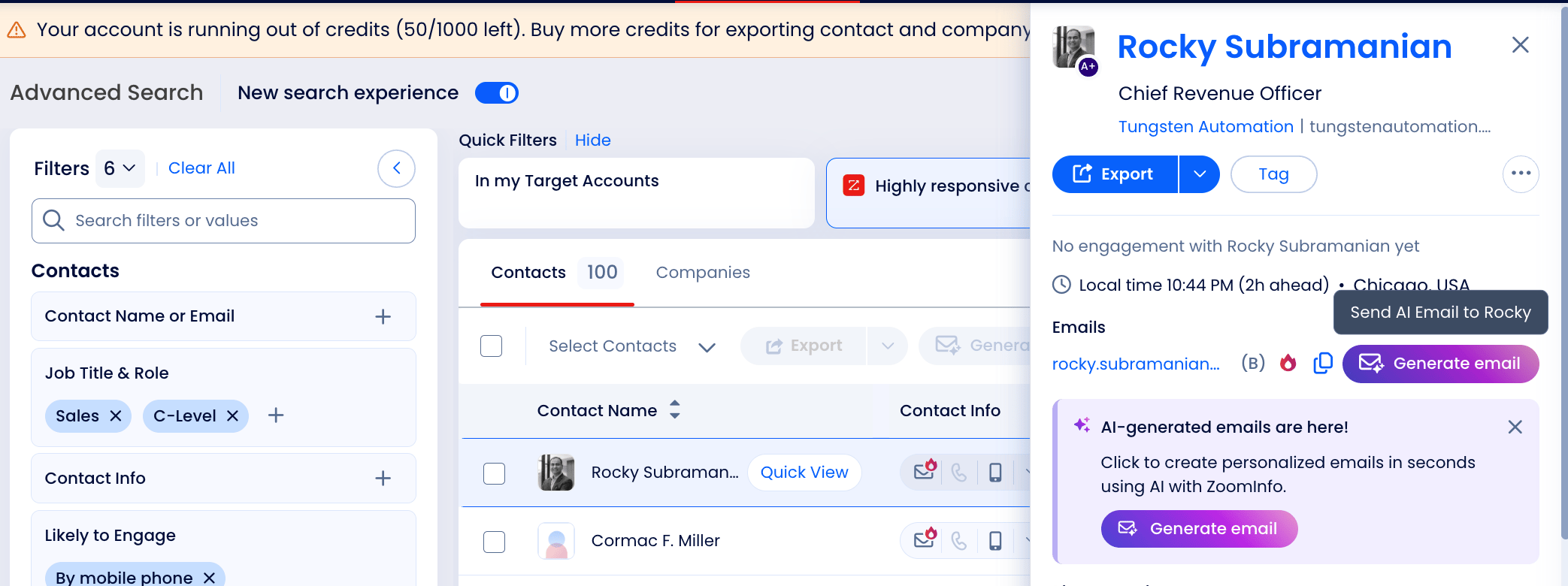 3. Select the Sendspark icon from the email compose window.
 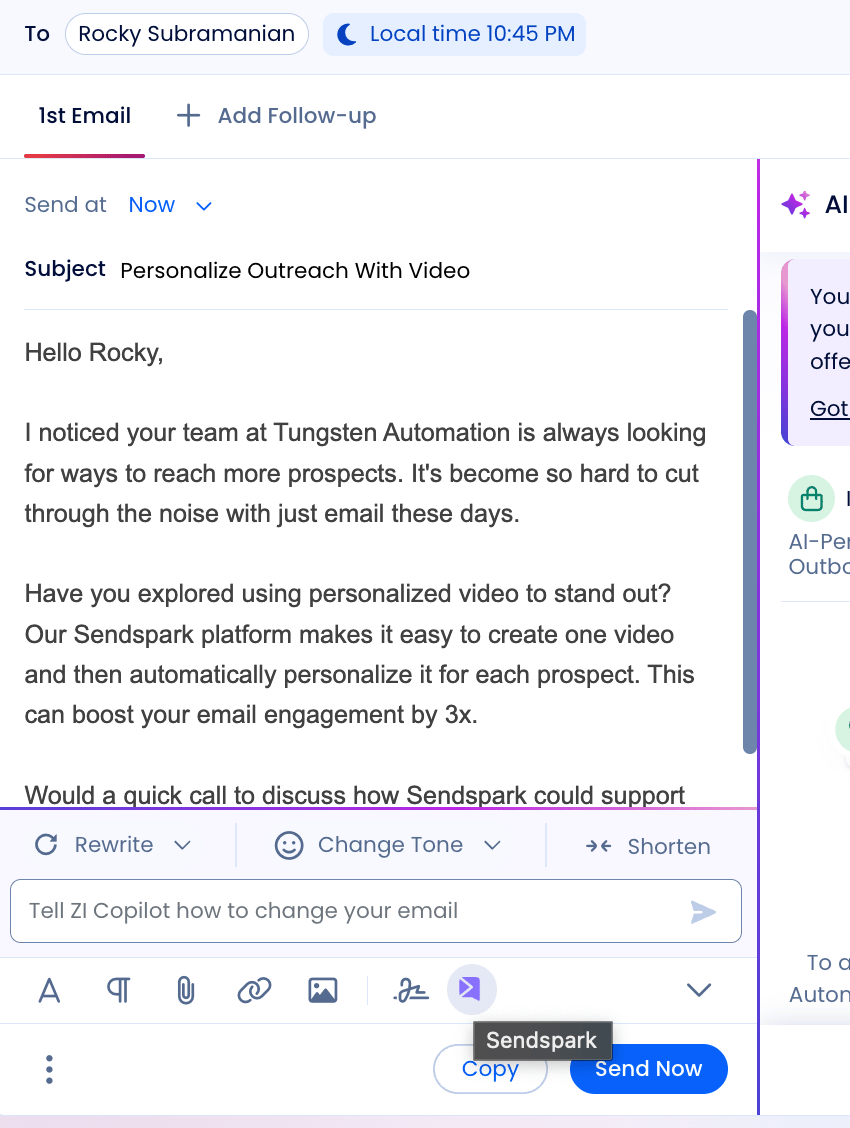 4. Now you'll see 4 options...
 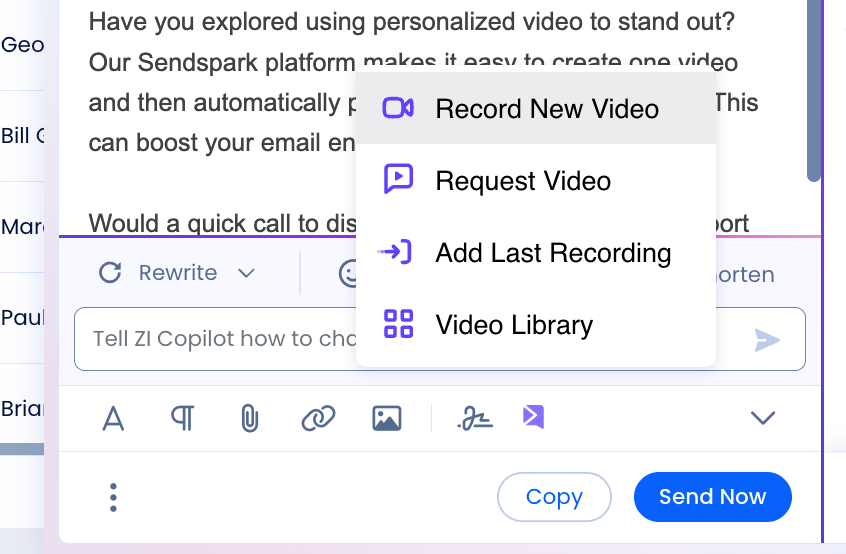 5. This is what each of them does:
6. **Record New Video** — Lets you record a personalized video of yourself, your screen, or yourself talking over your screen in a floating bubble. After recording, you can preview the video and insert it right into your email.
7. **Request Video** — Lets you send a "video request link," which is a quick way to get a video from someone else.
8. **Add Last Recording** — Lets you quickly add the last recording you made on Sendspark into your email
9. **Video Library**— Lets you see your entire Sendspark video library and select the video you'd like to use.
## Frequently asked questions
You must have active Sendspark and ZoomInfo accounts. Access to the integration comes through the Sendspark Chrome extension, which you install to add the Sendspark icon to your ZoomInfo email compose window.
The Sendspark + ZoomInfo integration is available on every plan.
Record New Video (record yourself, your screen, or both in a floating bubble), Request Video (send a link to collect a video from someone else), Add Last Recording (insert your most recent Sendspark recording), and Video Library (pick any video from your Sendspark library).
Yes. You can use it alongside ZoomInfo Copilot to draft the email, then insert a personalized video, creating AI-personalized video emails at scale.
It's best for BDRs, SDRs, and sales reps who want to send AI-personalized video emails. It's aimed at automating the tedious work of personalizing emails rather than sending massive bulk campaigns.
*Updated July 2026.*
5. This is what each of them does:
6. **Record New Video** — Lets you record a personalized video of yourself, your screen, or yourself talking over your screen in a floating bubble. After recording, you can preview the video and insert it right into your email.
7. **Request Video** — Lets you send a "video request link," which is a quick way to get a video from someone else.
8. **Add Last Recording** — Lets you quickly add the last recording you made on Sendspark into your email
9. **Video Library**— Lets you see your entire Sendspark video library and select the video you'd like to use.
## Frequently asked questions
You must have active Sendspark and ZoomInfo accounts. Access to the integration comes through the Sendspark Chrome extension, which you install to add the Sendspark icon to your ZoomInfo email compose window.
The Sendspark + ZoomInfo integration is available on every plan.
Record New Video (record yourself, your screen, or both in a floating bubble), Request Video (send a link to collect a video from someone else), Add Last Recording (insert your most recent Sendspark recording), and Video Library (pick any video from your Sendspark library).
Yes. You can use it alongside ZoomInfo Copilot to draft the email, then insert a personalized video, creating AI-personalized video emails at scale.
It's best for BDRs, SDRs, and sales reps who want to send AI-personalized video emails. It's aimed at automating the tedious work of personalizing emails rather than sending massive bulk campaigns.
*Updated July 2026.*