> ## Documentation Index
> Fetch the complete documentation index at: https://help.sendspark.com/llms.txt
> Use this file to discover all available pages before exploring further.
# Why is there no audio on my video?
> Troubleshoot missing audio in your videos by fixing microphone settings, checking input selection, and enabling mic permissions.
If your video recorded with no audio, the most common causes are having the wrong microphone selected or leaving the mic toggled "off" from a previous recording. Open your recording settings and pick the correct microphone from the dropdown, and make sure the mic toggle is on before you record.
## Key takeaways
* The two most common causes are the **wrong mic selected** and the **mic left toggled off** from a previous session.
* In the Web App or Chrome Extension, open settings and choose the correct microphone from the dropdown menu.
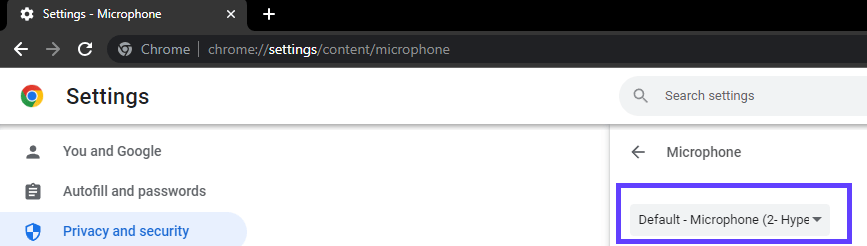
* For a permanent fix, set your default microphone in Chrome at **chrome://settings/content/microphone**.
* If no microphone is detected at all, see [Camera or Microphone not detected / No Inputs](/camera-or-microphone-not-detected-no-inputs).
## Possible Reasons Why Your Mic Was Not Recorded
## 1. You had the wrong mic selected
To fix this:
* When recording from the **Web App or Chrome Extension**, change your microphone by clicking on settings and deploying the second drop-down menu to display all your available options. 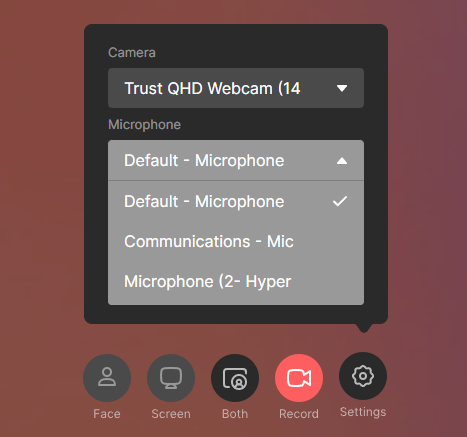 * For a more permanent fix, change your default microphone settings in your **Chrome Preferences.** You can also copy the following path and paste it into your Chrome's address bar and hit Enter: ***chrome://settings/content/microphone***
 ## 2. You accidentally left your microphone "off" from your last video
To fix this:
* When recording from the Chrome Extension, it's possible to toggle your microphone to "off." Make sure to turn it back on when you're ready to record with sound again!
## 2. You accidentally left your microphone "off" from your last video
To fix this:
* When recording from the Chrome Extension, it's possible to toggle your microphone to "off." Make sure to turn it back on when you're ready to record with sound again! 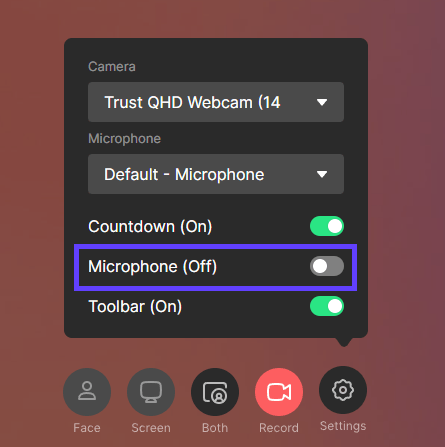 Related article: "**Camera or Microphone not detected / No Inputs"** [fix camera or microphone issues](/camera-or-microphone-not-detected-no-inputs)
## Frequently asked questions
When recording from the Web App or Chrome Extension, click settings and open the second drop-down menu to see all available microphones, then select the right one.
Change your default microphone in your Chrome Preferences. You can paste **chrome://settings/content/microphone** into your Chrome address bar and hit Enter to get there directly.
In the Chrome Extension you can toggle your microphone off, and it can stay off from your last video. Make sure the mic toggle is turned back on before you record with sound again.
That's a different issue — an app like OBS or Zoom may be controlling your peripherals, or the mic may be connected through a hub. See [Camera or Microphone not detected / No Inputs](/camera-or-microphone-not-detected-no-inputs) for the full fix.
*Updated July 2026.*
Related article: "**Camera or Microphone not detected / No Inputs"** [fix camera or microphone issues](/camera-or-microphone-not-detected-no-inputs)
## Frequently asked questions
When recording from the Web App or Chrome Extension, click settings and open the second drop-down menu to see all available microphones, then select the right one.
Change your default microphone in your Chrome Preferences. You can paste **chrome://settings/content/microphone** into your Chrome address bar and hit Enter to get there directly.
In the Chrome Extension you can toggle your microphone off, and it can stay off from your last video. Make sure the mic toggle is turned back on before you record with sound again.
That's a different issue — an app like OBS or Zoom may be controlling your peripherals, or the mic may be connected through a hub. See [Camera or Microphone not detected / No Inputs](/camera-or-microphone-not-detected-no-inputs) for the full fix.
*Updated July 2026.*