> ## Documentation Index
> Fetch the complete documentation index at: https://help.sendspark.com/llms.txt
> Use this file to discover all available pages before exploring further.
# What to do when video processing is taking too long
> Troubleshoot video processing delays and failed uploads with step-by-step fixes to recover your content and prevent future issues.
If a video is still showing "processing" long after you recorded it, the processing was most likely unsuccessful and the video cannot be recovered, so you'll need to re-record. To avoid this, never close the recording modal or tab until you see "Your video is done processing" and the **Copy Link** button appears. On an unstable connection, download the video for a later re-upload.
## Key takeaways
* A video that still says "processing" a long time after recording means the process failed. It cannot be recovered or retrieved, so you'll have to re-do the video.
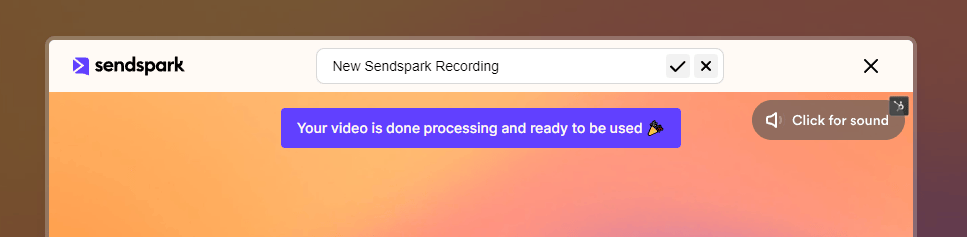
* While recording, do not close the modal or the tab. You should see your icon whirling, then a "Your video is done processing" message.
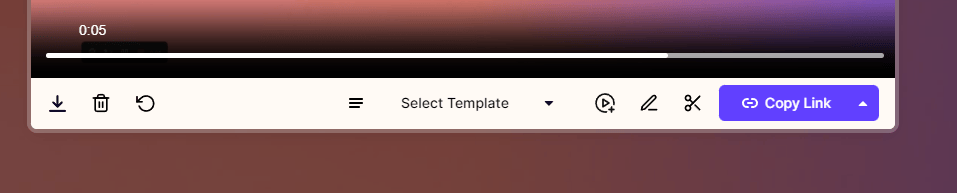
* Once done, use the **Copy Link** button at the bottom, and paste the link into a new tab to confirm it opens.
* If your internet connection feels unstable, download the video (bottom-left icon) so you can re-upload it later.
If you're experiencing any of the following issues:
* The video is taking more than usual to process.
* The video never finished uploading.
* The video is still processing after 24 hours.
If it's been a long time since you recorded the video and the message "processing" still comes up, it means the process was unsuccessful. Unfortunately, the video cannot be recovered or retrieved and you will have to re-do the video.
📌 When you record a video, It's important not to close the modal or the tab you've used to record the video. When you finish recording, you should see your icon whirling:
 📌 Once done, the modal will show you this (Your video is done processing...)
 📌 At the bottom, you will find the "Copy Link" button
 📌 As a suggestion, copy the link and paste it into a new tab to open it to test it.
**Also, if you feel your internet connection is not stable, you can always download the video (bottom left corner icon) for a later re-upload attempt**
You won't have any problems this way.
## How do I know if my video processed successfully?
After you stop recording, the modal shows a whirling icon while it processes, then displays "Your video is done processing" and a **Copy Link** button at the bottom. Copy that link and open it in a new tab to confirm the video plays. If the modal is still stuck on "processing" long after recording, the process failed.
## Frequently asked questions
Unfortunately no. If it's been a long time since you recorded and the message still says "processing," the process was unsuccessful. The video cannot be recovered or retrieved, so you'll have to re-record it.
The most common cause is closing the recording modal or tab before processing completed. Keep the modal and tab open until you see "Your video is done processing" and the Copy Link button. An unstable internet connection can also interrupt processing.
Don't close the recording modal or tab until processing finishes, and confirm the video by copying its link into a new tab. If your connection isn't stable, download the video using the bottom-left icon so you have a copy to re-upload later.
Processing typically finishes shortly after you stop recording, when the whirling icon is replaced by the "done processing" confirmation. A video still processing after 24 hours indicates the process failed rather than being merely slow.
*Updated July 2026.*
📌 As a suggestion, copy the link and paste it into a new tab to open it to test it.
**Also, if you feel your internet connection is not stable, you can always download the video (bottom left corner icon) for a later re-upload attempt**
You won't have any problems this way.
## How do I know if my video processed successfully?
After you stop recording, the modal shows a whirling icon while it processes, then displays "Your video is done processing" and a **Copy Link** button at the bottom. Copy that link and open it in a new tab to confirm the video plays. If the modal is still stuck on "processing" long after recording, the process failed.
## Frequently asked questions
Unfortunately no. If it's been a long time since you recorded and the message still says "processing," the process was unsuccessful. The video cannot be recovered or retrieved, so you'll have to re-record it.
The most common cause is closing the recording modal or tab before processing completed. Keep the modal and tab open until you see "Your video is done processing" and the Copy Link button. An unstable internet connection can also interrupt processing.
Don't close the recording modal or tab until processing finishes, and confirm the video by copying its link into a new tab. If your connection isn't stable, download the video using the bottom-left icon so you have a copy to re-upload later.
Processing typically finishes shortly after you stop recording, when the whirling icon is replaced by the "done processing" confirmation. A video still processing after 24 hours indicates the process failed rather than being merely slow.
*Updated July 2026.*