> ## Documentation Index
> Fetch the complete documentation index at: https://help.sendspark.com/llms.txt
> Use this file to discover all available pages before exploring further.
# Voice Cloning with Multiple Languages
> Generate accurate multilingual pronunciation with Sendspark voice cloning. Use the WATERMELON keyword to switch languages mid-recording per name.
You can use Sendspark voice cloning in almost any language — just speak that language and keep saying the English placeholder word "Watermelon" where a name should go. Watermelon is the keyword that tells the system to swap in each contact's name. To fix names that come out Americanized, import the phonetic spelling as the First Name.
Learn how to produce different pronunciations throughout many languages in our AI Voice Cloning feature.
## Key takeaways
* The word **WATERMELON** is the keyword that tells the system to switch to the contact names you added.
* It only works **once**, within the first \~10 seconds of the video, and should follow a greeting (e.g. "Hola Watermelon," "Hallo Watermelon").
* You can clone your voice in any language by speaking it — just keep the placeholder word "Watermelon" in English.
* If names come out Americanized, import the phonetic pronunciation and use it as the "First Name" field; ChatGPT can generate these at scale.
## Let's Set Ground Rules for Voice Cloning:
* The word **WATERMELON** serves as a keyword for the system to recognize and switch over to the names you added.
* It only works **ONCE** during the initial seconds of your video. If you say "Watermelon" after the first 10 seconds of the video, we'll assume you are talking about the fruit 🍉
* It should be accompanied by a **greeting**: "Hey Watermelon," "Hallo Watermelon," "Hola Watermelon," etc.
***
## Can I Clone My Voice in Languages Other Than English?
You should be able to use voice cloning with any language, simply by speaking that language. You will just need to keep using the placeholder word "Watermelon" in English.
For example, these should all work:
`Spanish: "Hola Watermelon, aquí hay un vídeo para ti..."`
`German: "Hola Watermelon, Hier ist ein Video für Sie..."French: "Bonjour Watermelon, voici une vidéo pour vous..."`
***
## How Do I Specify the Dialect?
We've had some customers report that Sendspark "Americanizes" their accents when saying customer names. For example, even though you're speaking German, Sendspark might still use the American pronunciation of certain names.
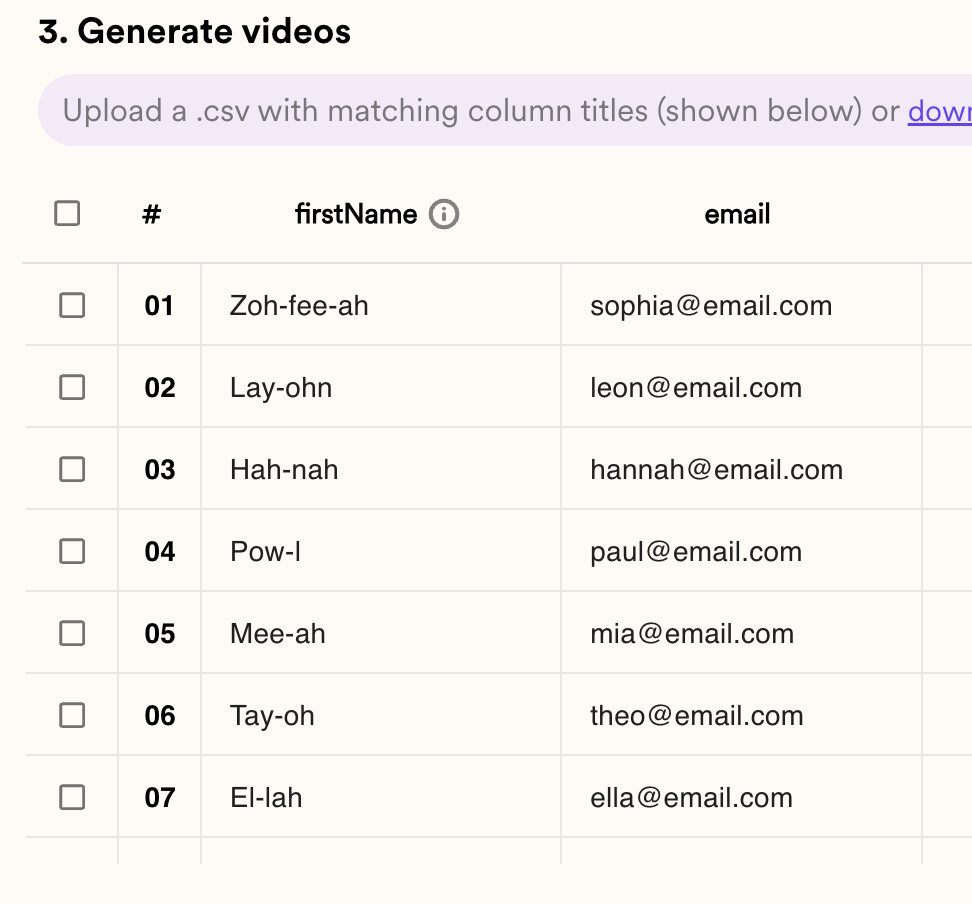
One workaround that you can use right now is, when you import your contacts, specify the phonetic pronunciation of the names.
If you have a large list, you can ask ChatGPT to do this for you at scale.
**`Prompt:`**` Please provide the phonetic pronunciations for these names written out, as if you were a native [Language] speaking from [Region]. Please format the response in a list, without the original names, bullet points or any formatting: [List of Names].`
**For example:**
```text theme={null}
Please provide the phonetic pronunciations for these names written out, as if you were a native German speaking from Berlin. Please format the response in a list, without the original names, bullet points or any formatting: SophiaLeonHannahPaulMiaTheoEllaLucaMilaFinnLinaLiamLiaEmilLeniLouisClaraHenryLeaBen
```
ChatGPT will then provide the phonetic pronunciation for you, and you can use that as the "First Name" field in Sendspark to ensure that your voice cloning comes out the way you'd like:
 ***
## Frequently asked questions
Yes. You can use voice cloning with any language simply by speaking that language. You just need to keep using the placeholder word "Watermelon" in English — for example, "Hola Watermelon, aquí hay un vídeo para ti..." in Spanish.
"Watermelon" is the keyword the system recognizes as the cue to switch over to the contact names you added. It should be paired with a greeting, such as "Hey Watermelon" or "Bonjour Watermelon."
The keyword only works once, during the initial seconds of your video. If you say "Watermelon" after the first 10 seconds, the system assumes you're referring to the fruit rather than a name placeholder.
When you import your contacts, specify the phonetic pronunciation of each name and use it as the "First Name" field. For a large list, you can ask ChatGPT to generate the phonetic pronunciations for a native speaker from a specific region.
*Updated July 2026.*
***
## Frequently asked questions
Yes. You can use voice cloning with any language simply by speaking that language. You just need to keep using the placeholder word "Watermelon" in English — for example, "Hola Watermelon, aquí hay un vídeo para ti..." in Spanish.
"Watermelon" is the keyword the system recognizes as the cue to switch over to the contact names you added. It should be paired with a greeting, such as "Hey Watermelon" or "Bonjour Watermelon."
The keyword only works once, during the initial seconds of your video. If you say "Watermelon" after the first 10 seconds, the system assumes you're referring to the fruit rather than a name placeholder.
When you import your contacts, specify the phonetic pronunciation of each name and use it as the "First Name" field. For a large list, you can ask ChatGPT to generate the phonetic pronunciations for a native speaker from a specific region.
*Updated July 2026.*