> ## Documentation Index
> Fetch the complete documentation index at: https://help.sendspark.com/llms.txt
> Use this file to discover all available pages before exploring further.
# Use a Call-to-Action (Calendar Link)
> Learn how to add calendar links as call-to-action buttons in your videos to boost meeting bookings and viewer engagement.
To add a calendar link as a call-to-action on your video, toggle on the Call-to-Action field, write your button text (such as "Schedule a Meeting"), then paste your calendar link from Calendly, HubSpot, Undock, or a similar tool into the URL field. You can confirm it looks right in the preview area on the right. Video CTAs require the Starter Plan or higher.
## Key takeaways
* Video CTAs (Call-To-Action) require the Starter Plan or a higher plan.
* Toggle on the Call-to-Action field, then set your button text and paste your calendar link.
* Calendar links from tools like Calendly, HubSpot, and Undock are supported in the URL field.
* Use the preview area on the right of your page to confirm the button looks right.
**Note**: you must be on the [Starter Plan](https://www.sendspark.com/pricing) or a higher plan to use video CTAs (Call-To-Action)
***
Follow these steps to add your calendar link to your video:
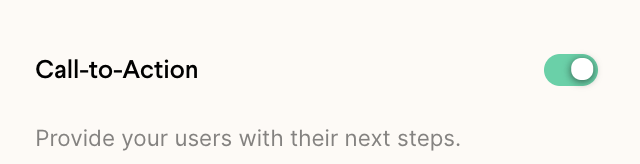
* **Toggle** on the Call-to-Action field
 * Write your desired **button text**(ex: Schedule a Meeting)
* Add your calendar link (from Calendly, Hubspot, Undock, etc.) in the **URL field**
* Write your desired **button text**(ex: Schedule a Meeting)
* Add your calendar link (from Calendly, Hubspot, Undock, etc.) in the **URL field**
 You'll be able to check that everything looks good in the preview area on the right of your page 👍
## Frequently asked questions
Video CTAs (Call-To-Action) require the Starter Plan or a higher plan.
Toggle on the Call-to-Action field, write your button text (for example, "Schedule a Meeting"), then add your calendar link in the URL field.
You can use a calendar link from Calendly, HubSpot, Undock, and similar tools in the URL field.
Use the preview area on the right of your page to confirm the button text and link look right.
*Updated July 2026.*
You'll be able to check that everything looks good in the preview area on the right of your page 👍
## Frequently asked questions
Video CTAs (Call-To-Action) require the Starter Plan or a higher plan.
Toggle on the Call-to-Action field, write your button text (for example, "Schedule a Meeting"), then add your calendar link in the URL field.
You can use a calendar link from Calendly, HubSpot, Undock, and similar tools in the URL field.
Use the preview area on the right of your page to confirm the button text and link look right.
*Updated July 2026.*