> ## Documentation Index
> Fetch the complete documentation index at: https://help.sendspark.com/llms.txt
> Use this file to discover all available pages before exploring further.
# Thunderbird — Send Video Emails
> Learn how to send video emails in Thunderbird using Sendspark's linked GIF feature for clickable video previews in recipients' inboxes.
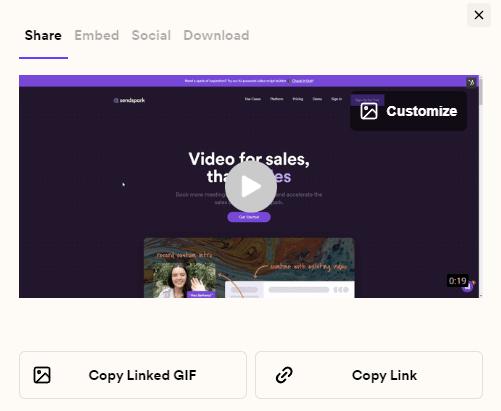
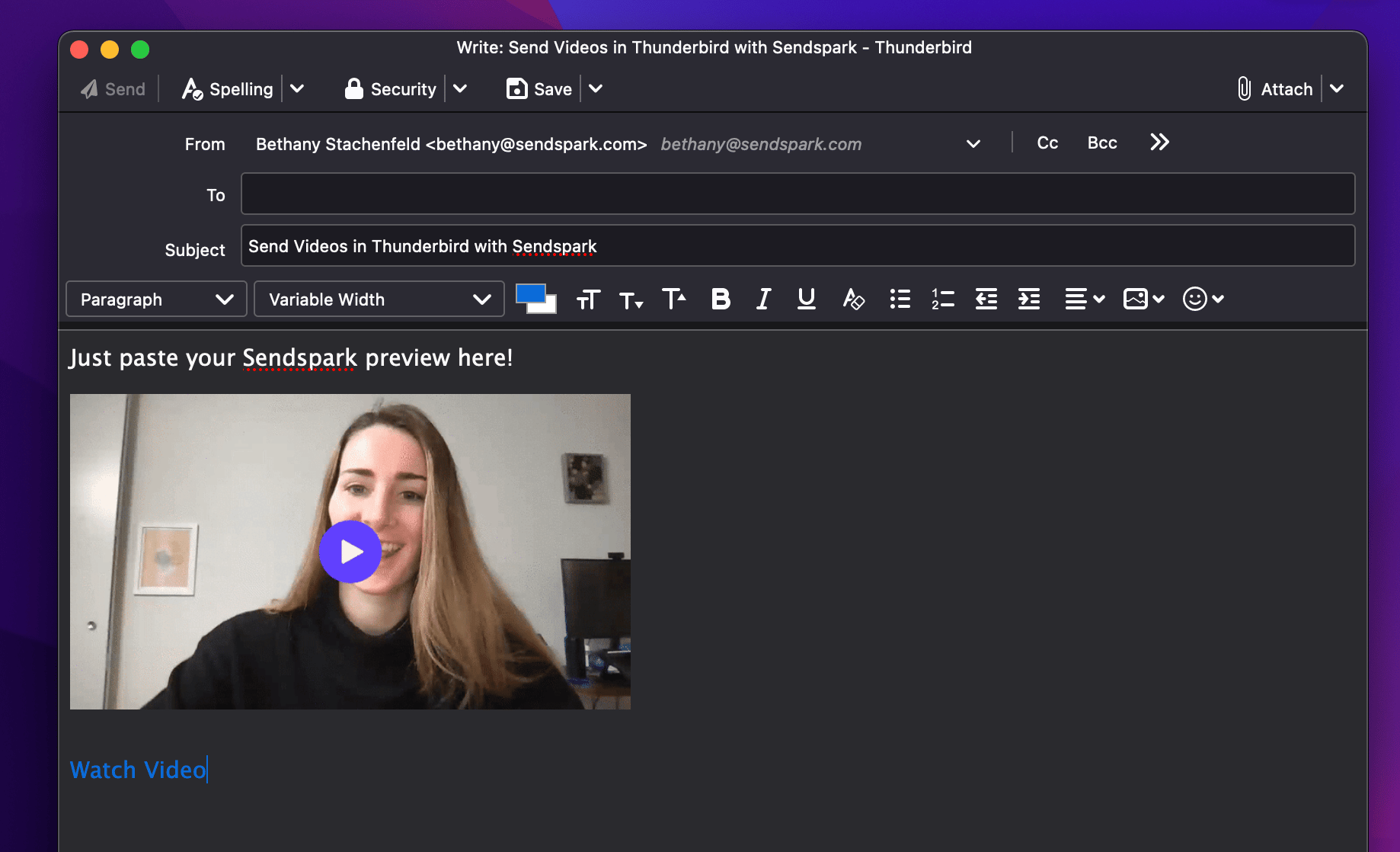
To send a video email in Thunderbird, record your video in Sendspark, click Share Video, then under Share click Copy Linked GIF and paste it into your Thunderbird email draft. Recipients see a clickable preview in their inbox and can click it to watch the full video in their browser.
## Key takeaways
* Send videos in Thunderbird with Copy Linked GIF: record in Sendspark, click Share Video, click Copy Linked GIF, and paste into your Thunderbird draft.
* Recipients see a preview in their inbox and can click to watch the full video in their browser.
* Thunderbird can't embed videos that play in-email because that requires editing the email's HTML; email marketing platforms like Mailchimp, HubSpot, and ActiveCampaign support that instead.
* Installing the Sendspark Chrome Extension is suggested for a better recording experience.
## How to Send Videos in Thunderbird
1. Record your video in Sendspark. (We suggest installing our [Chrome Extension](https://chrome.google.com/webstore/detail/sendspark-video-and-scree/blimjkpadkhcpmkeboeknjcmiaogbkph?hl=en-US) for a better recording experience).
2. Click **Share Video**  3. Under **Share**, click **Copy Linked GIF**
  4. Paste in your email draft in Thunderbird
  ## Commonly Asked Questions about Sending Videos in Thunderbird
## How do videos sent through Thunderbird render for recipients?
Your recipients will see a preview in their inbox, and they will be able to click to watch the full video in their browser.
## Can I embed videos in Thunderbird so they play in-email?
No. To embed videos so they play in-email, you need to be able to edit the HTML of your email. Many email marketing platforms (like [Mailchimp](/mailchimp-send-video-emails), [Hubspot](/hubspot-static-videos-marketing-hub), and [ActiveCampaign](/activecampaign-send-personalized-videos-at-scale)) let you do this.
Check out our resources for [embedding videos in email using an email marketing platform](/general-overview-how-to-share-sendspark-videos) if you'd like to do this!
## More questions about sending videos in Thunderbird?
Let us know and we're happy to help!
## Frequently asked questions
Record your video in Sendspark, click Share Video, under Share click Copy Linked GIF, then paste it into your email draft in Thunderbird.
Your recipients see a preview in their inbox, and they can click to watch the full video in their browser.
No. Embedding videos so they play in-email requires being able to edit the HTML of your email. Many email marketing platforms — like Mailchimp, HubSpot, and ActiveCampaign — let you do this instead.
*Updated July 2026.*
## Commonly Asked Questions about Sending Videos in Thunderbird
## How do videos sent through Thunderbird render for recipients?
Your recipients will see a preview in their inbox, and they will be able to click to watch the full video in their browser.
## Can I embed videos in Thunderbird so they play in-email?
No. To embed videos so they play in-email, you need to be able to edit the HTML of your email. Many email marketing platforms (like [Mailchimp](/mailchimp-send-video-emails), [Hubspot](/hubspot-static-videos-marketing-hub), and [ActiveCampaign](/activecampaign-send-personalized-videos-at-scale)) let you do this.
Check out our resources for [embedding videos in email using an email marketing platform](/general-overview-how-to-share-sendspark-videos) if you'd like to do this!
## More questions about sending videos in Thunderbird?
Let us know and we're happy to help!
## Frequently asked questions
Record your video in Sendspark, click Share Video, under Share click Copy Linked GIF, then paste it into your email draft in Thunderbird.
Your recipients see a preview in their inbox, and they can click to watch the full video in their browser.
No. Embedding videos so they play in-email requires being able to edit the HTML of your email. Many email marketing platforms — like Mailchimp, HubSpot, and ActiveCampaign — let you do this instead.
*Updated July 2026.*