> ## Documentation Index
> Fetch the complete documentation index at: https://help.sendspark.com/llms.txt
> Use this file to discover all available pages before exploring further.
# Supported Email Automation Platforms
> Full list of email automation platforms supported by Sendspark, including HubSpot, Outreach, Salesloft, Mailchimp, and more. Find your integration today.
Sendspark integrates with a wide range of email automation platforms. View the current list at [sendspark.com/integrations](https://www.sendspark.com/integrations), or from Settings → Integrations if you're already a member. To display Sendspark video thumbnails correctly, use a platform that supports HTML editing so you can paste the snippet code that powers AI voice cloning, text variables, and dynamic backgrounds.
## Key takeaways
* View supported platforms at [sendspark.com/integrations](https://www.sendspark.com/integrations), or at Settings → Integrations if you're already a member.
* If your platform isn't listed, submit a suggestion using the request form.
* Use a platform that supports **HTML editing** so the snippet code renders AI voice cloning, text variables, and the correct dynamic background.
* To embed a thumbnail: create your video or campaign, copy the snippet code, and paste it into the HTML section of your email.
**Sendspark integrates seamlessly with a variety of email automation platforms.**\
\
To review the supported email automation platform, head to the following link: [https://www.sendspark.com/integrations](https://www.sendspark.com/integrations)
If you are already a Sendspark member, you can head to: [https://sendspark.com/settings/integrations](https://sendspark.com/settings/integrations)
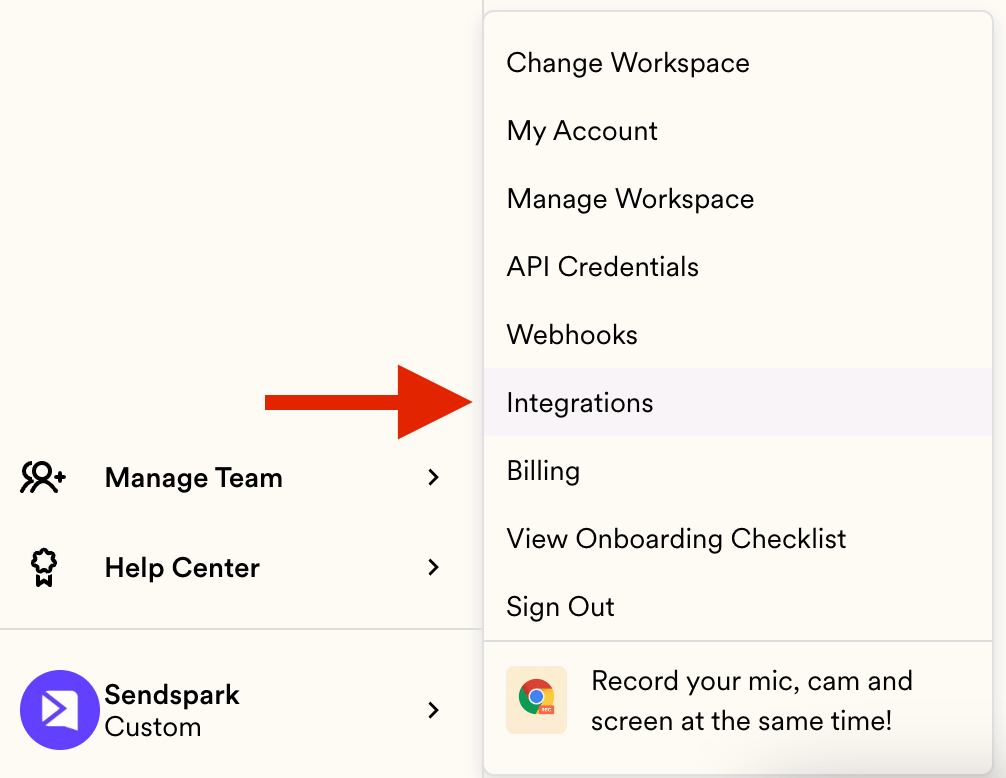 If yours is not supported, you can submit your suggestion [using this form](https://docs.google.com/forms/d/e/1FAIpQLSerf7BF0uD1jM9DjF_GSAefGNJtwzG1gRFCV8yoGDQMb-DACQ/viewform?hsCtaTracking=87ed9c2b-b05f-4cf9-9789-0319fe75988d%7C993d2c23-8a2b-44ed-8e7f-6573cadea53c)
## Using Sendspark Video Thumbnails in supported Email Automation Platforms
Sendspark allows you to create Dynamic Videos and Personalized (non-dynamic) videos, enhancing your email marketing campaigns with engaging content.
To ensure your video thumbnails display correctly in emails, it's crucial to use email automation platforms that support HTML editing, that way you can use our snippet code in your platform to use our AI Voice cloning, Text Variables, and correct Dynamic Background.
**How to Embed Sendspark Video Thumbnails in Emails**
1. **Create Your Video or Campaign:** Start by creating a dynamic video or a regular video campaign in Sendspark.
2. **Copy the Snippet Code:** Once your video is ready, copy the provided snippet code.
3. **Paste the Snippet Code:** In your email automation platform, navigate to the HTML editing section of your email. Paste the snippet code into the body of the email.
If yours is not supported, you can submit your suggestion [using this form](https://docs.google.com/forms/d/e/1FAIpQLSerf7BF0uD1jM9DjF_GSAefGNJtwzG1gRFCV8yoGDQMb-DACQ/viewform?hsCtaTracking=87ed9c2b-b05f-4cf9-9789-0319fe75988d%7C993d2c23-8a2b-44ed-8e7f-6573cadea53c)
## Using Sendspark Video Thumbnails in supported Email Automation Platforms
Sendspark allows you to create Dynamic Videos and Personalized (non-dynamic) videos, enhancing your email marketing campaigns with engaging content.
To ensure your video thumbnails display correctly in emails, it's crucial to use email automation platforms that support HTML editing, that way you can use our snippet code in your platform to use our AI Voice cloning, Text Variables, and correct Dynamic Background.
**How to Embed Sendspark Video Thumbnails in Emails**
1. **Create Your Video or Campaign:** Start by creating a dynamic video or a regular video campaign in Sendspark.
2. **Copy the Snippet Code:** Once your video is ready, copy the provided snippet code.
3. **Paste the Snippet Code:** In your email automation platform, navigate to the HTML editing section of your email. Paste the snippet code into the body of the email. 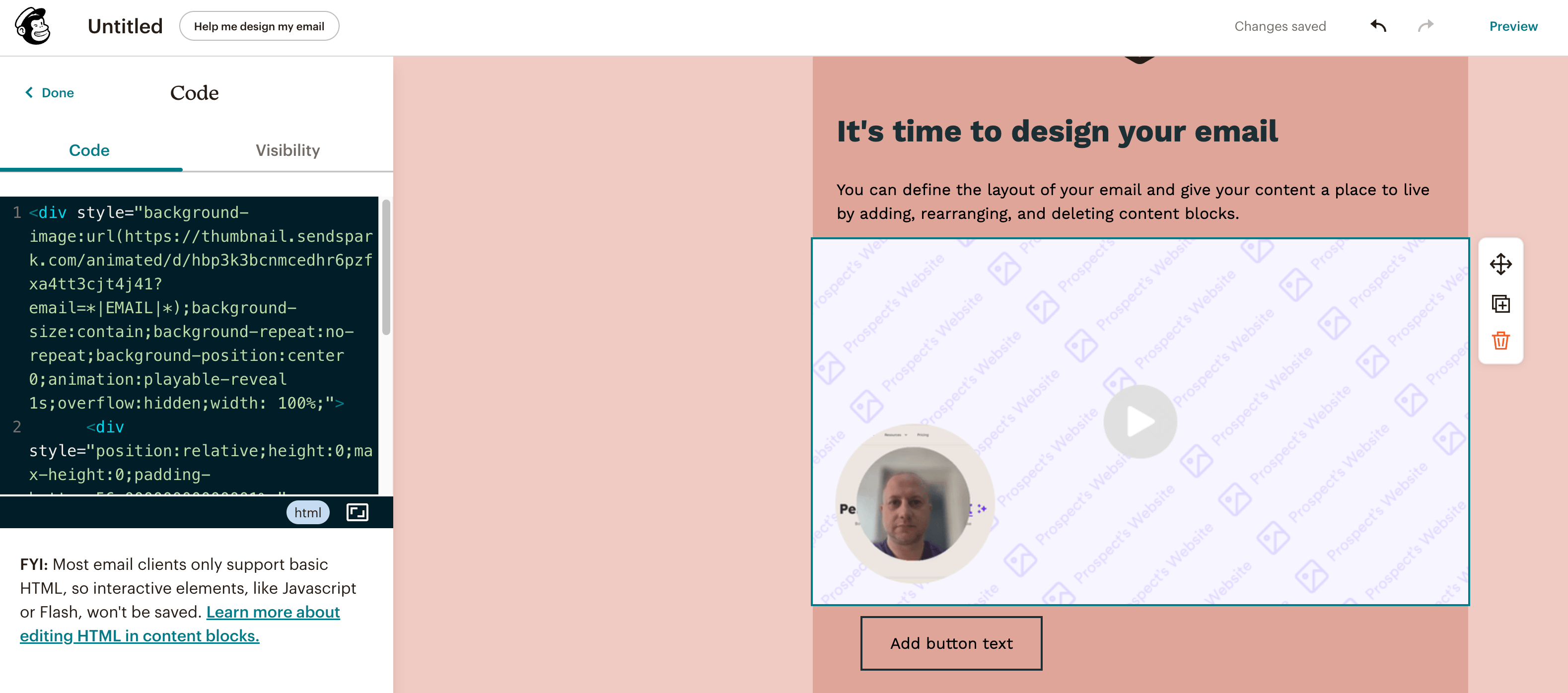 Here's a complete Help Article to understand how to create a Dynamic Video Campaign for the first time: [create a dynamic video campaign](/how-to-create-a-dynamic-video-campaign)
This process ensures the thumbnail of your video is correctly embedded in your email. When recipients click on the thumbnail, they are directed to your video, allowing you to collect valuable analytics.
**Advantages of Using Supported Email Automation Platforms**
1. **Seamless Integration:** Easily add Sendspark video thumbnails into your emails with just a snippet code.
2. **Enhanced Engagement:** Increase click-through rates and engagement with video thumbnails.
3. **Detailed Analytics:** Track viewer interactions and gain insights into video performance.
4. **Efficient Campaigns:** Automate your email campaigns while incorporating dynamic video content.
5. **Personalization:** Personalize video content for your audience, boosting relevance and impact.
By using these supported email automation platforms, you can maximize the effectiveness of your Sendspark videos and gain comprehensive analytics to refine your marketing strategies.
***
## Frequently asked questions
View the full list at [sendspark.com/integrations](https://www.sendspark.com/integrations). If you're already a member, you can also check [Settings → Integrations](https://sendspark.com/settings/integrations).
You can submit a suggestion using the request form linked on this page, and the team will review it.
HTML editing lets you paste Sendspark's snippet code into your email. That snippet is what powers AI voice cloning, text variables, and the correct dynamic background, so the video thumbnail displays properly.
Create your video or campaign, copy the provided snippet code, then paste it into the HTML editing section of your email. When recipients click the thumbnail, they're directed to your video and you collect viewer analytics.
*Updated July 2026.*
Here's a complete Help Article to understand how to create a Dynamic Video Campaign for the first time: [create a dynamic video campaign](/how-to-create-a-dynamic-video-campaign)
This process ensures the thumbnail of your video is correctly embedded in your email. When recipients click on the thumbnail, they are directed to your video, allowing you to collect valuable analytics.
**Advantages of Using Supported Email Automation Platforms**
1. **Seamless Integration:** Easily add Sendspark video thumbnails into your emails with just a snippet code.
2. **Enhanced Engagement:** Increase click-through rates and engagement with video thumbnails.
3. **Detailed Analytics:** Track viewer interactions and gain insights into video performance.
4. **Efficient Campaigns:** Automate your email campaigns while incorporating dynamic video content.
5. **Personalization:** Personalize video content for your audience, boosting relevance and impact.
By using these supported email automation platforms, you can maximize the effectiveness of your Sendspark videos and gain comprehensive analytics to refine your marketing strategies.
***
## Frequently asked questions
View the full list at [sendspark.com/integrations](https://www.sendspark.com/integrations). If you're already a member, you can also check [Settings → Integrations](https://sendspark.com/settings/integrations).
You can submit a suggestion using the request form linked on this page, and the team will review it.
HTML editing lets you paste Sendspark's snippet code into your email. That snippet is what powers AI voice cloning, text variables, and the correct dynamic background, so the video thumbnail displays properly.
Create your video or campaign, copy the provided snippet code, then paste it into the HTML editing section of your email. When recipients click the thumbnail, they're directed to your video and you collect viewer analytics.
*Updated July 2026.*