> ## Documentation Index
> Fetch the complete documentation index at: https://help.sendspark.com/llms.txt
> Use this file to discover all available pages before exploring further.
# Simulate Scrolling a Webpage in Dynamic Video
> Learn how to simulate scrolling webpages in dynamic videos to create personalized content for each contact automatically.
Simulate Scrolling makes a dynamic video look like you're scrolling through each contact's own webpage. Create a dynamic video campaign, add a video of yourself that will appear over the website, then toggle on **"Simulate Scrolling."** When you add contacts and generate videos, each one shows you scrolling through that contact's site.
## Key takeaways
* Simulate Scrolling overlays your video of yourself on top of each contact's own webpage as it appears to scroll.
* Set it up in three steps: create a dynamic video campaign, add your video, then toggle on **"Simulate Scrolling."**
* Each contact's webpage is handled automatically when you import contacts and generate videos.
* The result is a unique video per contact — for example, one scrolling sendspark.com and another scrolling hubspot.com.
Want to generate dynamic videos that makes it look like you're scrolling through each of your contacts' webpages?
Follow the steps below!
## How to Add Website Scroll to Dynamic Videos
1. Create a [dynamic video campaign](https://sendspark.com/dynamic-videos)
2. Add the video that you would like to use of yourself (that will appear over the website for each of your contacts)
3. Toggle on **"Simulate Scrolling"**
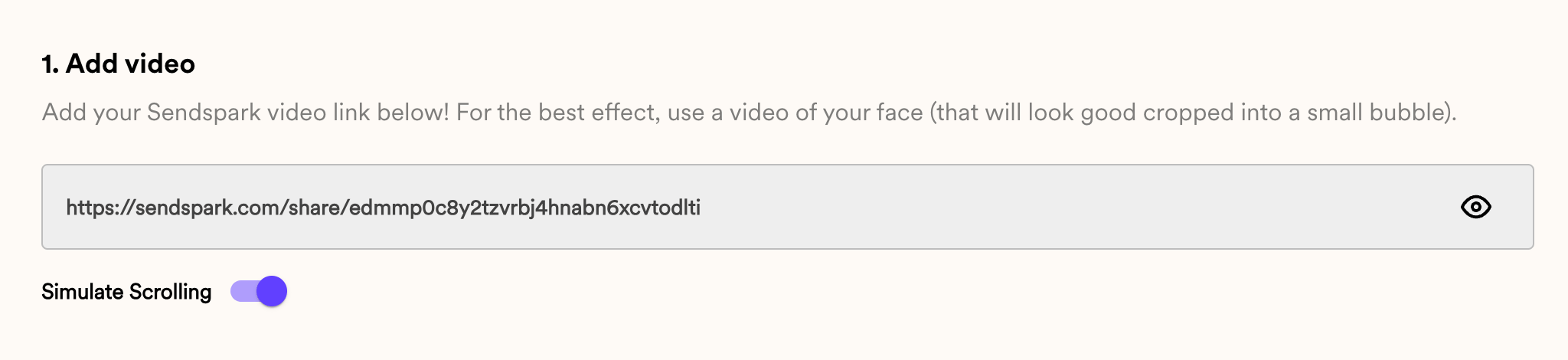 Now, when you add contacts and generate videos, it will look like you're scrolling through each of their webpages.
For example, you could import these contacts:
Now, when you add contacts and generate videos, it will look like you're scrolling through each of their webpages.
For example, you could import these contacts:
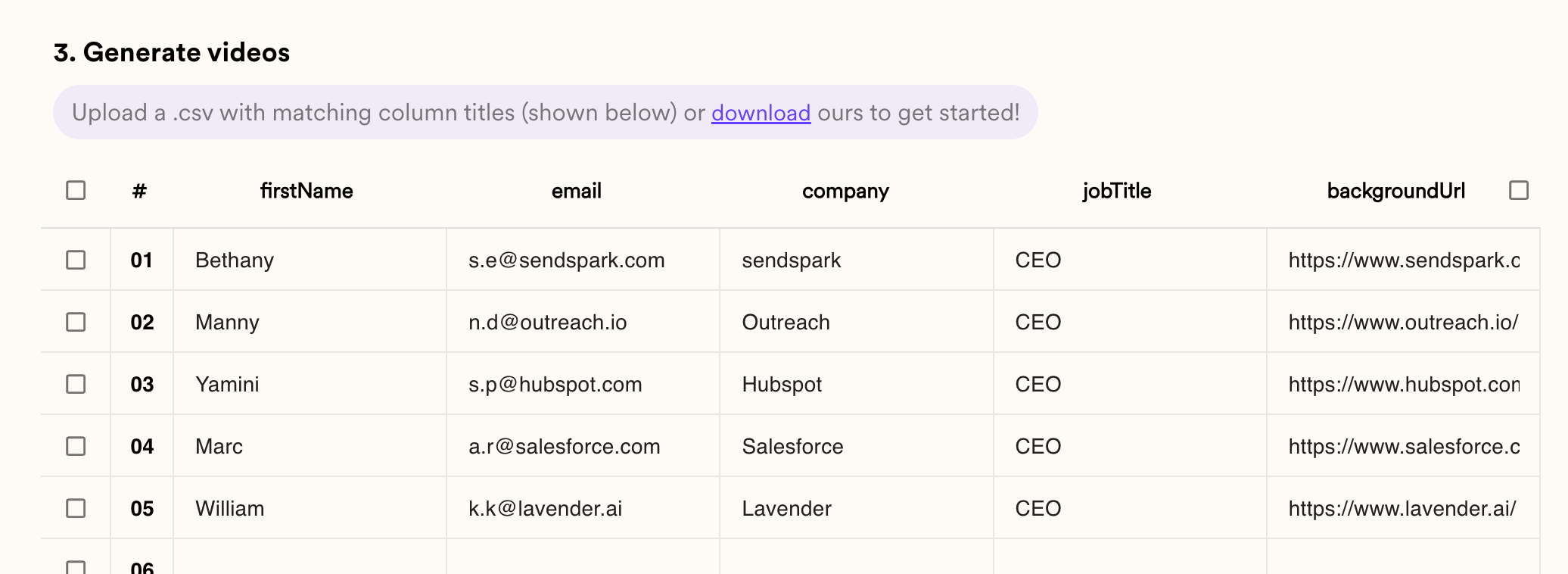 And generate these videos:
* [Bethany (sendspark.com)](https://sendspark.com/share/d/scg7eckejsmcpks48rqt9s4074rh5sl0/cy5lQHNlbmRzcGFyay5jb20%3D)
* [Manny (outreach.io)](https://sendspark.com/share/d/scg7eckejsmcpks48rqt9s4074rh5sl0/bi5kQG91dHJlYWNoLmlv)
* [Yamini (hubspot.com)](https://sendspark.com/share/d/scg7eckejsmcpks48rqt9s4074rh5sl0/cy5wQGh1YnNwb3QuY29t)
* [Mac (salesforce.com)](https://sendspark.com/share/d/scg7eckejsmcpks48rqt9s4074rh5sl0/YS5yQHNhbGVzZm9yY2UuY29t)
* [William (lavender.ai)](https://sendspark.com/share/d/scg7eckejsmcpks48rqt9s4074rh5sl0/ay5rQGxhdmVuZGVyLmFp)
## Frequently asked questions
Create a dynamic video campaign, add the video of yourself that will appear over the website, then toggle on **"Simulate Scrolling."** When you add contacts and generate videos, each one will look like you're scrolling through that contact's webpage.
Add a video of yourself. In each generated video, your recording appears over the contact's webpage while it scrolls.
Each contact's own webpage. Once you import your contacts and generate videos, Sendspark produces a separate video per contact showing you scrolling through their site.
Yes. The examples above show the same recording over different contacts' sites — Bethany (sendspark.com), Manny (outreach.io), Yamini (hubspot.com), Mac (salesforce.com), and William (lavender.ai).
*Updated July 2026.*
And generate these videos:
* [Bethany (sendspark.com)](https://sendspark.com/share/d/scg7eckejsmcpks48rqt9s4074rh5sl0/cy5lQHNlbmRzcGFyay5jb20%3D)
* [Manny (outreach.io)](https://sendspark.com/share/d/scg7eckejsmcpks48rqt9s4074rh5sl0/bi5kQG91dHJlYWNoLmlv)
* [Yamini (hubspot.com)](https://sendspark.com/share/d/scg7eckejsmcpks48rqt9s4074rh5sl0/cy5wQGh1YnNwb3QuY29t)
* [Mac (salesforce.com)](https://sendspark.com/share/d/scg7eckejsmcpks48rqt9s4074rh5sl0/YS5yQHNhbGVzZm9yY2UuY29t)
* [William (lavender.ai)](https://sendspark.com/share/d/scg7eckejsmcpks48rqt9s4074rh5sl0/ay5rQGxhdmVuZGVyLmFp)
## Frequently asked questions
Create a dynamic video campaign, add the video of yourself that will appear over the website, then toggle on **"Simulate Scrolling."** When you add contacts and generate videos, each one will look like you're scrolling through that contact's webpage.
Add a video of yourself. In each generated video, your recording appears over the contact's webpage while it scrolls.
Each contact's own webpage. Once you import your contacts and generate videos, Sendspark produces a separate video per contact showing you scrolling through their site.
Yes. The examples above show the same recording over different contacts' sites — Bethany (sendspark.com), Manny (outreach.io), Yamini (hubspot.com), Mac (salesforce.com), and William (lavender.ai).
*Updated July 2026.*