> ## Documentation Index
> Fetch the complete documentation index at: https://help.sendspark.com/llms.txt
> Use this file to discover all available pages before exploring further.
# Send AI Videos on LinkedIn via Clay & LGM
> Send AI-personalized Sendspark videos on LinkedIn using Clay and La Growth Machine. Step-by-step guide to automating personalized video outreach at scale.
This workflow finds leads in Clay, automatically generates an AI-personalized Sendspark video for each one, and sends it inside a LinkedIn message or connection request through La Growth Machine. The Video Link column from Clay maps to La Growth Machine's Custom Attribute 1, which places each prospect's personalized video into your outreach.
## Key takeaways
* Combine Clay, Sendspark, and La Growth Machine to send AI-personalized videos on LinkedIn automatically.
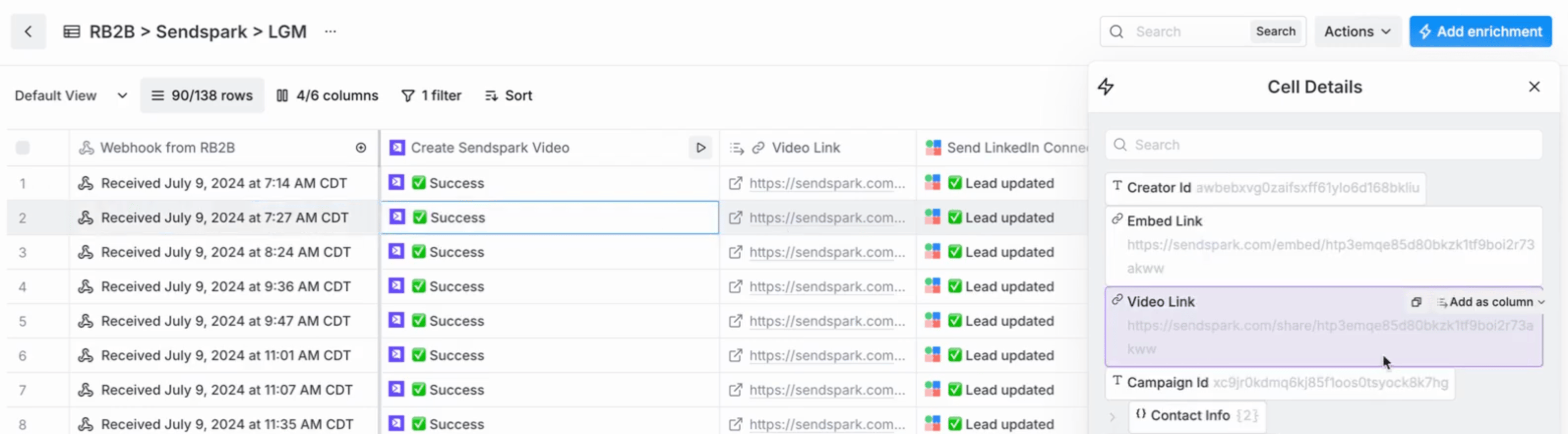
* Generate videos with the Sendspark + Clay integration; a successful row shows "✅ Success" and a Video Link.
* Map the Clay "Video Link" field to La Growth Machine's "Custom Attribute 1."
* Use Custom Attribute 1 in your La Growth Machine message or connection request so each prospect receives their own video.
This guide will walk through how you can...
1. Find leads in Clay
2. Automatically Generate an AI-personalized video with Sendspark
3. Send in a LinkedIn message or Connection Request via LaGrowthMachine
## How to Send AI-Personalized Videos in LinkedIn Automation
1. First, you'll want to identify your leads in Clay. In this tutorial, we're using the webhook from RB2B to add people who visit our website to a Clay Table. You can use **any leads in Clay**for this automation though!
2. Then, you'll use the [Sendspark + Clay integration](/clay-integration-create-ai-videos) to **generate AI-personalized videos**. If you don't know how to make AI-personalized videos in Sendspark, start with this guide on [how to make dynamic videos](/dynamic-videos-make-videos-with-ai-introductions).
3. Once your first video generates in Clay, you'll see the status updated to **"✅ Success."** Click on this, and make a new column from the value **"Video Link"**
4. You'll use the "Video Link" in your LinkedIn message or Connection Request to send a personalized video to your prospect in the next step.
5. Use the Clay Enrichment for LaGrowthMachine to add **this prospect to an audience in LaGrowthMachine**. Make sure to map in the field **"Video Link" to the LaGrowthMachine "Custom Attribute 1" **
6. In your LaGrowthMachine workflow, \*\*use "Custom Attribute 1"\*\*where you want to send the Sendspark personalized video.
7. To finalize the automation, make sure that when leads get added to the audience you're using in Clay, they will get **automatically enrolled in your LaGrowthMachine workflow.**
That's it! Let us know if you have questions!
***
## Frequently asked questions
No. The tutorial uses the RB2B webhook to add website visitors to a Clay table, but you can use any leads in Clay for this automation.
Use the Sendspark + Clay integration. Once the first video generates, the status updates to "✅ Success" — click it and make a new column from the "Video Link" value.
Use the Clay enrichment for La Growth Machine to add the prospect to a La Growth Machine audience, mapping the "Video Link" field to "Custom Attribute 1." Then reference Custom Attribute 1 in your workflow wherever you want the video to appear.
Make sure that when leads are added to the audience you're using in Clay, they get automatically enrolled in your La Growth Machine workflow.
*Updated July 2026.*
 4. You'll use the "Video Link" in your LinkedIn message or Connection Request to send a personalized video to your prospect in the next step.
5. Use the Clay Enrichment for LaGrowthMachine to add **this prospect to an audience in LaGrowthMachine**. Make sure to map in the field **"Video Link" to the LaGrowthMachine "Custom Attribute 1" **
4. You'll use the "Video Link" in your LinkedIn message or Connection Request to send a personalized video to your prospect in the next step.
5. Use the Clay Enrichment for LaGrowthMachine to add **this prospect to an audience in LaGrowthMachine**. Make sure to map in the field **"Video Link" to the LaGrowthMachine "Custom Attribute 1" **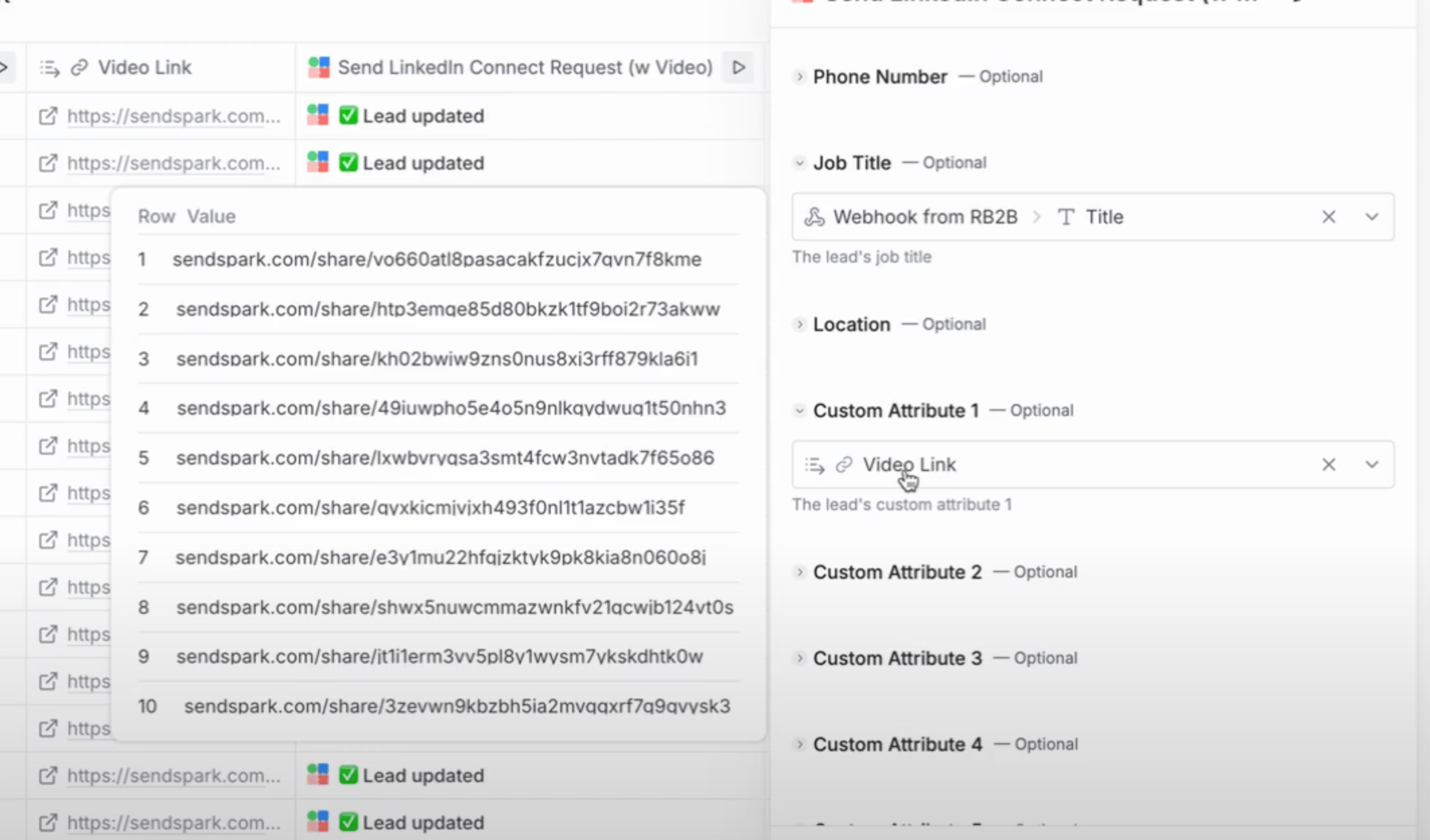 6. In your LaGrowthMachine workflow, \*\*use "Custom Attribute 1"\*\*where you want to send the Sendspark personalized video.
  7. To finalize the automation, make sure that when leads get added to the audience you're using in Clay, they will get **automatically enrolled in your LaGrowthMachine workflow.**
That's it! Let us know if you have questions!
***
## Frequently asked questions
7. To finalize the automation, make sure that when leads get added to the audience you're using in Clay, they will get **automatically enrolled in your LaGrowthMachine workflow.**
That's it! Let us know if you have questions!
***
## Frequently asked questions