> ## Documentation Index
> Fetch the complete documentation index at: https://help.sendspark.com/llms.txt
> Use this file to discover all available pages before exploring further.
# Reorder Videos
> Learn how to reorder videos in your Sendspark dashboard to display newest or oldest content first with simple sorting options.
To reorder your videos, use the **Order** control in your Sendspark dashboard and choose **Newest** or **Oldest** to set which videos appear on top. By default the newest videos are shown first, and refreshing the page returns you to that default.
## Key takeaways
* The dashboard shows your newest videos on top by default.
* Use the **Order** control and select **Newest** or **Oldest** to change which videos appear first.
* Refreshing the page resets the order back to the default (Newest first).
By default, you always see newest videos on top in your Sendspark dashboard. However, you can easily reorder videos to see the oldest videos on top.
## How to Reorder Videos
1. Under **Order**, select either **Newest** or **Oldest** to select whether you see Newest or Oldest videos on top 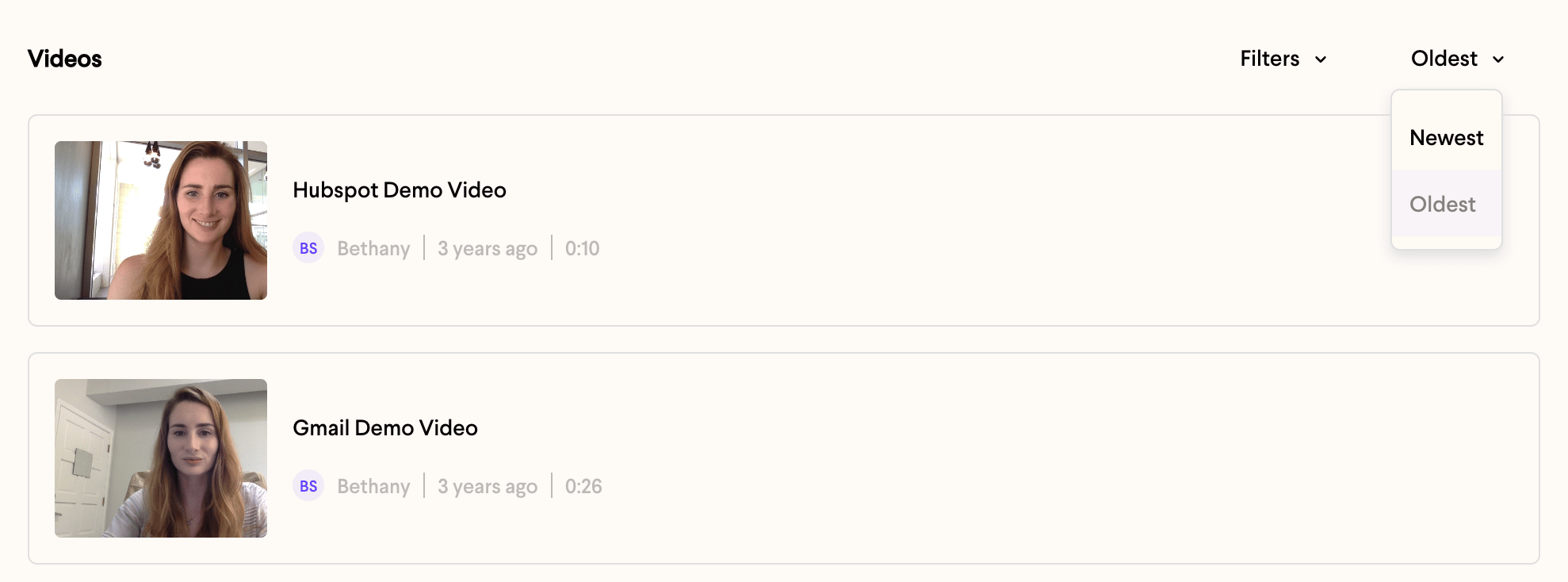 2. Refresh the page to reset to the default
## Frequently asked questions
By default your newest videos appear on top in the Sendspark dashboard.
Under the **Order** control, select **Oldest** to put your oldest videos on top.
Refresh the page. This resets the order back to the default, with newest videos on top.
*Updated July 2026.*
2. Refresh the page to reset to the default
## Frequently asked questions
By default your newest videos appear on top in the Sendspark dashboard.
Under the **Order** control, select **Oldest** to put your oldest videos on top.
Refresh the page. This resets the order back to the default, with newest videos on top.
*Updated July 2026.*