> ## Documentation Index
> Fetch the complete documentation index at: https://help.sendspark.com/llms.txt
> Use this file to discover all available pages before exploring further.
# RB2B Integration - AI Videos for Visitors
> Set up RB2B and Sendspark integration to automatically create AI personalized videos for website visitors using webhook automation
The RB2B and Sendspark integration automatically creates AI-personalized videos for the website visitors RB2B identifies. You build a Sendspark Agentic Workflow triggered by an incoming webhook, paste that webhook URL into RB2B, map the visitor data into a Create Dynamic Video step, then add a step to send the video by email or LinkedIn.
## Key takeaways
* The integration turns website visitors identified by RB2B into personalized videos automatically, on autopilot.
* It's built as a Sendspark Agentic Workflow using an **Incoming Webhook** trigger.
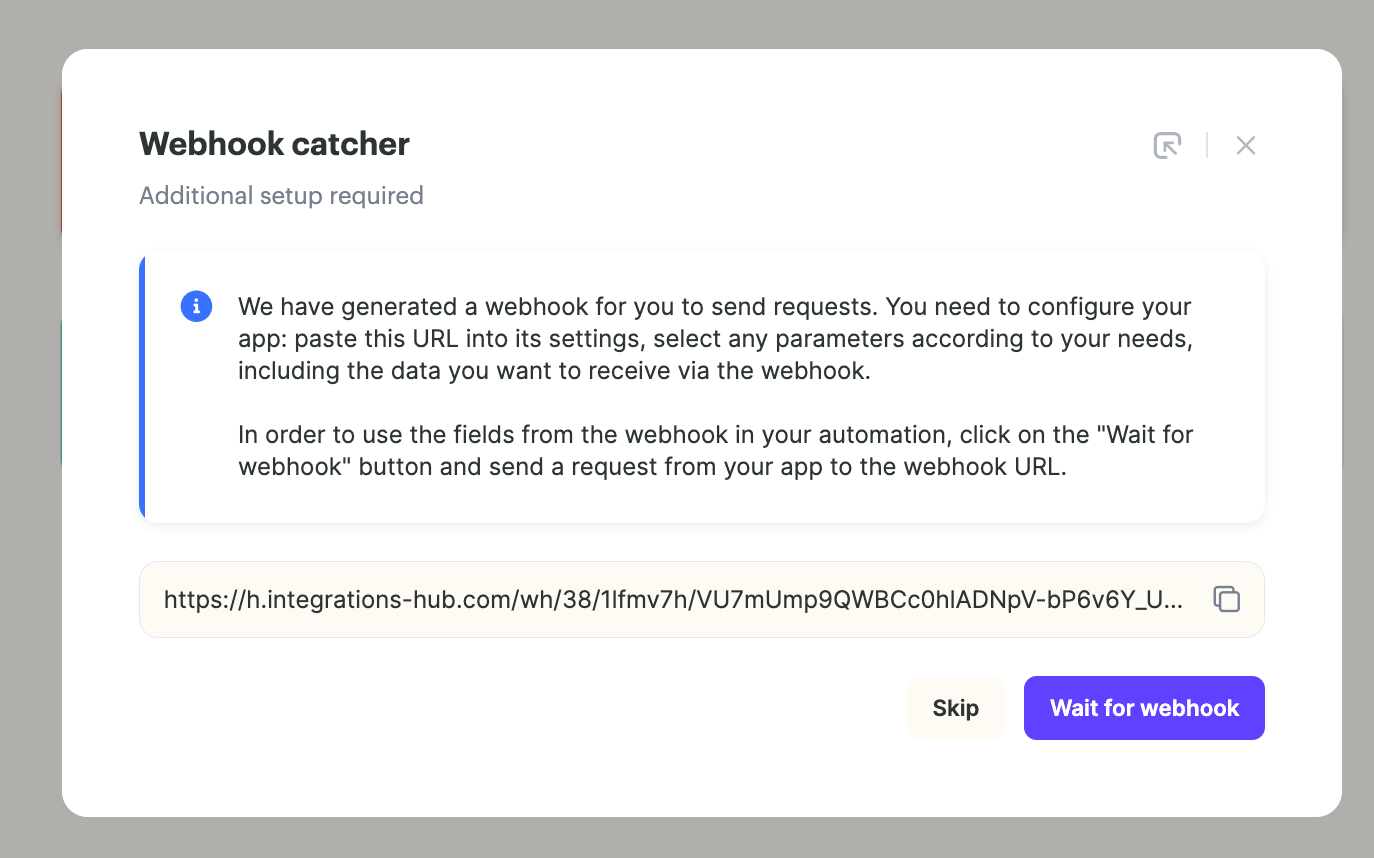
* You copy the Sendspark webhook URL into RB2B's integrations, then send a test event to confirm the connection and pull RB2B data into the workflow.
* Map the RB2B data fields into a **Sendspark: Create Dynamic Video** step, then add a final step to send the video through email, LinkedIn, or any of 50+ sending platforms.
Use the RB2B and Sendspark integration to send personalized videos to website visitors on autopilot!
## How to Use the RB2B + Sendspark Video
1. Go to Sendspark [Agentic Workflows](https://sendspark.com/agentic-workflows) and create a new workflow
2. For the trigger, select**Incoming Webhook**
3. Copy the webhook URL to your clipboard, and click **"wait for webhook"** to start testing your webhook
4. Go to [RB2B integrations](https://app.rb2b.com/integrations)
5. Select the **Sendspark**, and paste the URL from Sendspark into RB2B
6. Click **Send test event to your Sendspark account** to test the webhook connection
7. Back in Sendspark, you should see data from RB2B. You can now use that data to create an AI personalized video!
8. Add another step in your automation for **Sendspark: Create Dynamic Video**
9. Select the [dynamic video campaign](/dynamic-videos-make-videos-with-ai-introductions) from Sendspark you would like to use, and map in the data fields from RB2B. These are the data fields that you want use to personalize your Sendspark video.
10. Add another step in your automation to send the video out through email or LinkedIn. Sendspark integrates with 50+ sending platforms, so you can choose your platform, or just send with Gmail/Outlook. [Learn more here](/sendspark-automated-workflows-beginner-s-guide).
Happy scaling!
## Frequently asked questions
It lets you send personalized videos to website visitors on autopilot. When RB2B identifies a visitor, the connected Sendspark workflow automatically creates an AI-personalized video for them and sends it out.
Select **Incoming Webhook** as the trigger. Sendspark gives you a webhook URL to copy, and you click "wait for webhook" to start testing the connection.
Copy the webhook URL from Sendspark, go to RB2B integrations, select **Sendspark**, and paste the URL. Then click "Send test event to your Sendspark account" to confirm the connection — you should see the RB2B data appear back in Sendspark.
Add a **Sendspark: Create Dynamic Video** step, select the dynamic video campaign you want to use, and map in the RB2B data fields. Those mapped fields are what personalize each video.
Add another step in the automation to send the video out through email or LinkedIn. Sendspark integrates with 50+ sending platforms, so you can pick your platform or just send with Gmail/Outlook.
*Updated July 2026.*
 4. Go to [RB2B integrations](https://app.rb2b.com/integrations)
5. Select the **Sendspark**, and paste the URL from Sendspark into RB2B
4. Go to [RB2B integrations](https://app.rb2b.com/integrations)
5. Select the **Sendspark**, and paste the URL from Sendspark into RB2B 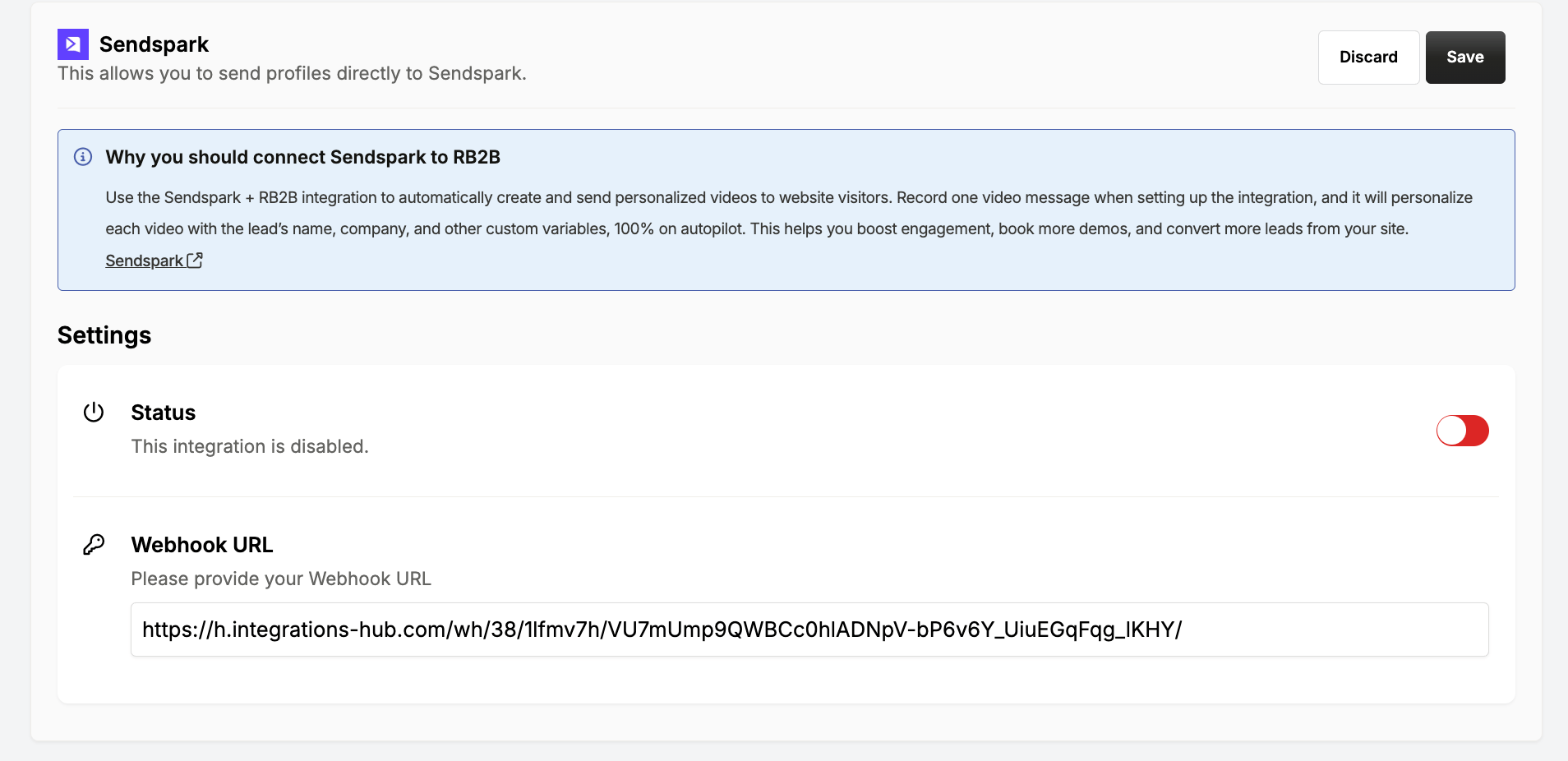 6. Click **Send test event to your Sendspark account** to test the webhook connection
 7. Back in Sendspark, you should see data from RB2B. You can now use that data to create an AI personalized video!
8. Add another step in your automation for **Sendspark: Create Dynamic Video**
9. Select the [dynamic video campaign](/dynamic-videos-make-videos-with-ai-introductions) from Sendspark you would like to use, and map in the data fields from RB2B. These are the data fields that you want use to personalize your Sendspark video.
7. Back in Sendspark, you should see data from RB2B. You can now use that data to create an AI personalized video!
8. Add another step in your automation for **Sendspark: Create Dynamic Video**
9. Select the [dynamic video campaign](/dynamic-videos-make-videos-with-ai-introductions) from Sendspark you would like to use, and map in the data fields from RB2B. These are the data fields that you want use to personalize your Sendspark video. 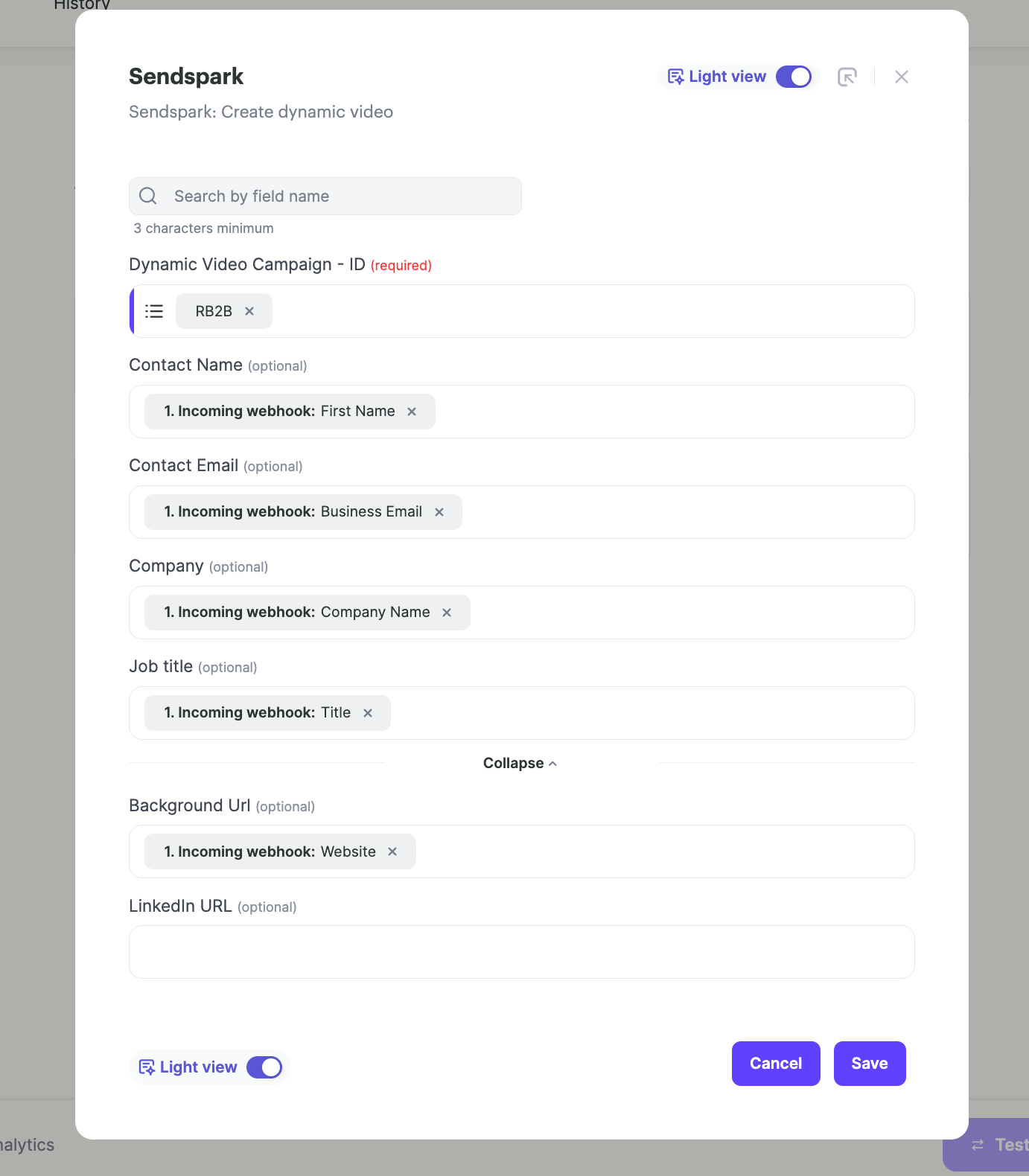 10. Add another step in your automation to send the video out through email or LinkedIn. Sendspark integrates with 50+ sending platforms, so you can choose your platform, or just send with Gmail/Outlook. [Learn more here](/sendspark-automated-workflows-beginner-s-guide).
Happy scaling!
## Frequently asked questions
10. Add another step in your automation to send the video out through email or LinkedIn. Sendspark integrates with 50+ sending platforms, so you can choose your platform, or just send with Gmail/Outlook. [Learn more here](/sendspark-automated-workflows-beginner-s-guide).
Happy scaling!
## Frequently asked questions