> ## Documentation Index
> Fetch the complete documentation index at: https://help.sendspark.com/llms.txt
> Use this file to discover all available pages before exploring further.
# Mac app blocked by Apple security check
> Learn how to fix the Sendspark.app malicious software error by adjusting your Mac's Privacy & Security settings for safe app launch.
If macOS blocks the Sendspark desktop app with a malicious-software warning, it's because your Mac's security level is set high and the app wasn't downloaded from the App Store. Open your settings, search for **Privacy & Security**, scroll to the **Security** section, and switch it to **App Store and Identified developers**, then try opening the app again.
## Key takeaways
* The warning appears because your Mac's security level is set to a high standard, and Apple shows it when an app was not downloaded from the App Store.
* To fix it, open **Privacy & Security** settings, scroll to the **Security** section, and switch to **App Store and Identified developers**.
* After changing the setting, try opening the Sendspark desktop app again.
Have you had this message when trying to open our desktop app?
No worries. It's possible your level of security has been set to a high standard. Apple usually shows this message when an App was not downloaded from the App Store
Simply go to your settings, search for "Privacy & Security" and then to the right, scroll down until you find the Security section. Be sure to switch to the "App Store and Identified developers"
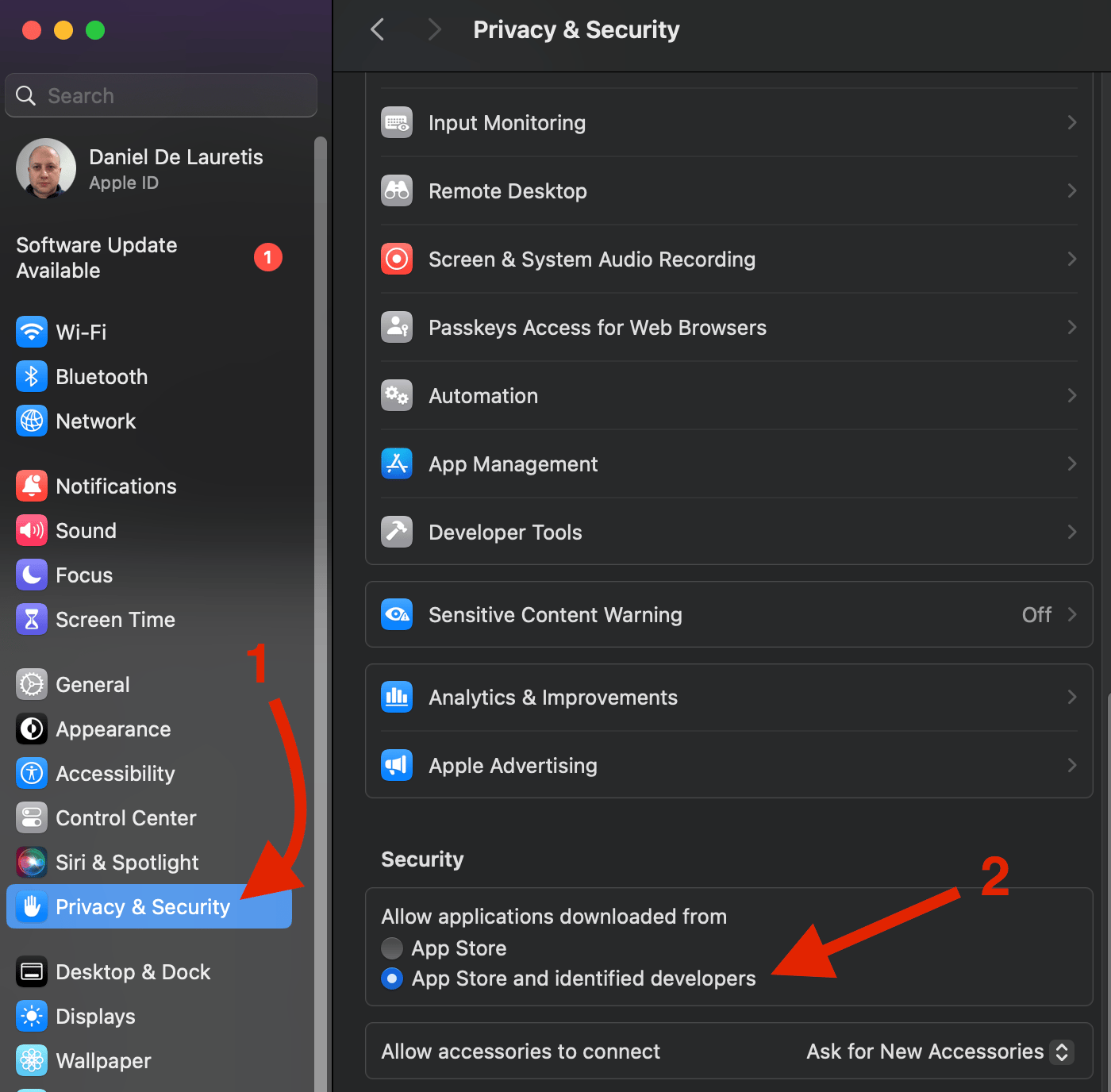 You can now try again!
Happy recordings!
## Frequently asked questions
Your Mac's security level is likely set to a high standard. Apple usually shows this message when an app was not downloaded from the App Store.
Go to your settings, search for **Privacy & Security**, then scroll down on the right until you find the **Security** section. Switch it to **App Store and Identified developers** and try opening the app again.
Yes. This is Sendspark's own desktop app. The warning simply appears because the app was not installed from the Mac App Store, not because anything is wrong with it.
*Updated July 2026.*
You can now try again!
Happy recordings!
## Frequently asked questions
Your Mac's security level is likely set to a high standard. Apple usually shows this message when an app was not downloaded from the App Store.
Go to your settings, search for **Privacy & Security**, then scroll down on the right until you find the **Security** section. Switch it to **App Store and Identified developers** and try opening the app again.
Yes. This is Sendspark's own desktop app. The warning simply appears because the app was not installed from the Mac App Store, not because anything is wrong with it.
*Updated July 2026.*