> ## Documentation Index
> Fetch the complete documentation index at: https://help.sendspark.com/llms.txt
> Use this file to discover all available pages before exploring further.
# How to Understand Video Analytics 📈
> Learn how to track video analytics in Sendspark to monitor views, plays, clicks, and viewer insights for better engagement data.
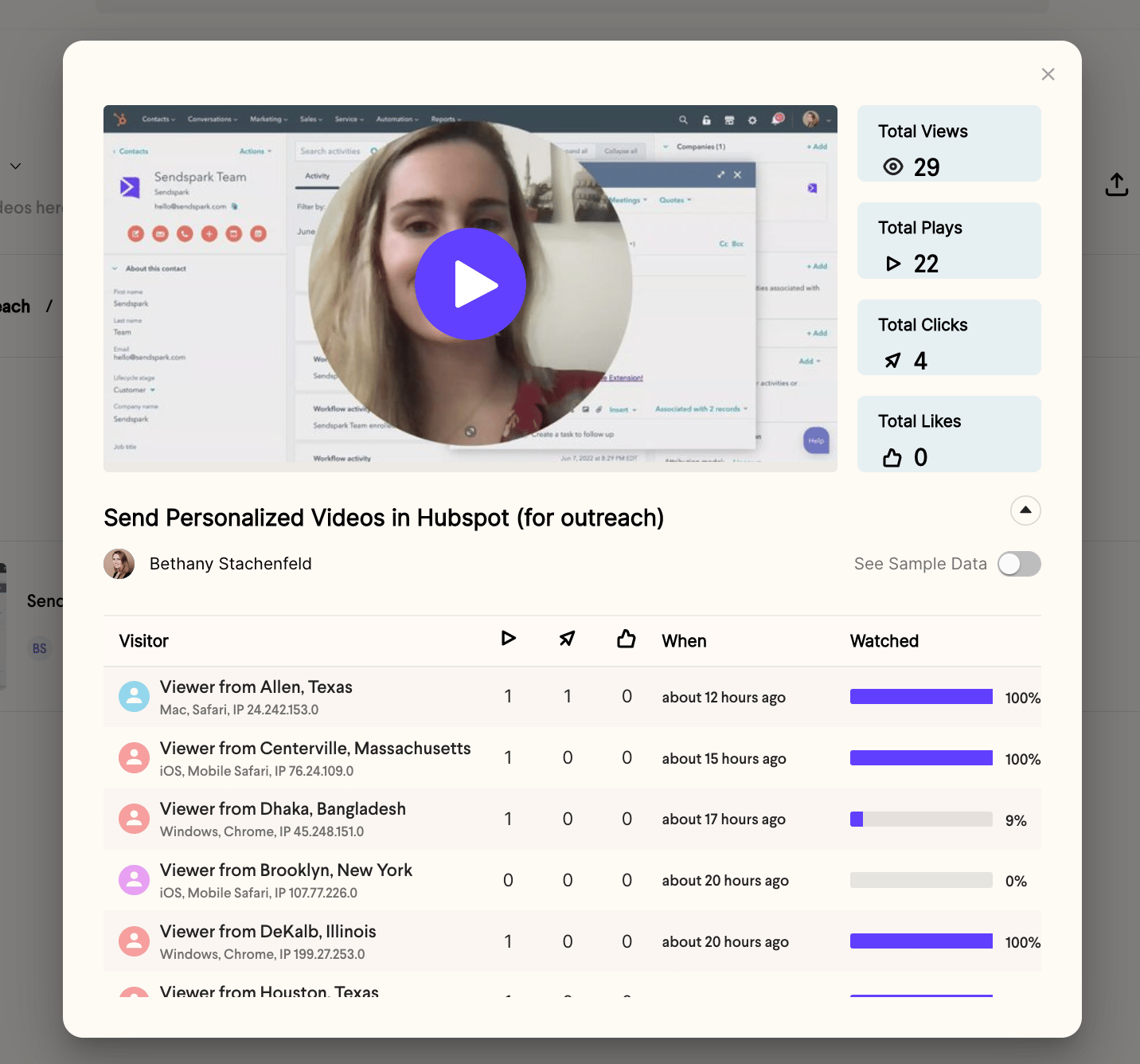
Sendspark's Analytics modal shows who is watching your videos so you can measure engagement. Open it by clicking the **Analytics** button on any video in your video dashboard. You'll see Total Engagement metrics (views, plays, clicks, and likes) plus Viewer Insights that break down each visitor's location, device, browser, and interactions.
## Key takeaways
* Open the Analytics modal from the **Analytics** button on any video in your [video dashboard](https://sendspark.com/my-videos).
* **Total Views** counts page opens, not plays. **Total Plays** counts actual video plays, **Total Clicks** counts call-to-action clicks, and **Total Likes** counts thumbs-up clicks.
* **Viewer Insights** shows each session's visitor location, device, browser, and IP, plus per-session play, click, and like counts and the time of their last interaction.
* Total Engagement data goes back to when you created your account; Viewer Insights data starts January 14, 2022.
The Sendspark Analytics modal provides insight into **who is watching your videos**. This can help you understand how your videos are adding value to your organization.
You can launch the Analytics modal by clicking the **Analytics** button on videos in your [video dashboard](https://sendspark.com/my-videos).
 ## Total Engagement Metrics
* \*\*Total Views —\*\*The number of page views your video has. This does not mean that your recipient/s played your video, just that they opened your video page.
* \*\*Total Plays —\*\*The number of times your video was played
* \*\*Total Clicks —\*\*The number of times your call-to-action button was clicked
* \*\*Total Likes —\*\*The number of times the "thumbs up" button on your video was clicked
## Total Engagement Metrics
* \*\*Total Views —\*\*The number of page views your video has. This does not mean that your recipient/s played your video, just that they opened your video page.
* \*\*Total Plays —\*\*The number of times your video was played
* \*\*Total Clicks —\*\*The number of times your call-to-action button was clicked
* \*\*Total Likes —\*\*The number of times the "thumbs up" button on your video was clicked
 ## Viewer Insights
* \*\*Visitor —\*\*Who is opening your page. We'll show their location, device, browser, and IP information to help you figure out who they are. Each line item represents a page session.
* **Play Icon —** How many times the visitor played your video in that session.
* \*\*Click Icon —\*\*How many times the visitor clicked your call-to-action button during their session.
* \*\*Like Icon —\*\*How many times the visitor liked the video during their session.
* \*\*When —\*\*The time the viewer performed their last interaction of the session (last play, thumbs up, etc.).
***
## Frequently asked questions
Sendspark does its best to scrub your own views from analytics, but if you're not logged into Sendspark your views might still appear. Check your IP address so you can identify yourself if you end up there. If you're logged in, previews aren't counted, and a banner confirms the view won't be recorded.
Total Views is the number of times your video page was opened, which does not mean the recipient played the video. Total Plays is the number of times the video was actually played.
Total Engagement data is available from the moment you created your Sendspark account. Viewer Insights data starts on January 14, 2022, when that feature was released.
You can toggle on sample data to preview what analytics would look like with engagement. It's fake data, provided only to help you understand how the feature works.
Head to your [Admin Dashboard](https://sendspark.com/admin) for higher-level insights on your top-performing videos and team members.
*Updated July 2026.*
## Viewer Insights
* \*\*Visitor —\*\*Who is opening your page. We'll show their location, device, browser, and IP information to help you figure out who they are. Each line item represents a page session.
* **Play Icon —** How many times the visitor played your video in that session.
* \*\*Click Icon —\*\*How many times the visitor clicked your call-to-action button during their session.
* \*\*Like Icon —\*\*How many times the visitor liked the video during their session.
* \*\*When —\*\*The time the viewer performed their last interaction of the session (last play, thumbs up, etc.).
***
## Frequently asked questions
Sendspark does its best to scrub your own views from analytics, but if you're not logged into Sendspark your views might still appear. Check your IP address so you can identify yourself if you end up there. If you're logged in, previews aren't counted, and a banner confirms the view won't be recorded.
Total Views is the number of times your video page was opened, which does not mean the recipient played the video. Total Plays is the number of times the video was actually played.
Total Engagement data is available from the moment you created your Sendspark account. Viewer Insights data starts on January 14, 2022, when that feature was released.
You can toggle on sample data to preview what analytics would look like with engagement. It's fake data, provided only to help you understand how the feature works.
Head to your [Admin Dashboard](https://sendspark.com/admin) for higher-level insights on your top-performing videos and team members.
*Updated July 2026.*