> ## Documentation Index
> Fetch the complete documentation index at: https://help.sendspark.com/llms.txt
> Use this file to discover all available pages before exploring further.
# How To Understand Sendspark Video Analytics
> Learn how to read Sendspark video analytics including views, plays, clicks, likes, and watch time to track viewer engagement
Sendspark video analytics show how viewers interact with your videos across four top-level metrics: Total Views (page views), Total Plays (clicks to play), Total Clicks (call-to-action clicks), and Total Likes. A per-viewer breakdown adds watch time and a heatmap so you can see exactly what each person watched.
## Key takeaways
* Total Views counts how many times viewers open your video page (a page view, not a video view), while Total Plays counts clicks to play the video.
* Total Clicks measures clicks on the call-to-action button below your video, and Total Likes counts likes on the like button.
* Watch time shows a video heatmap of which part of your video each viewer played, plus the percentage watched per session.
* Your own views are excluded from analytics as long as you play the video inside your account.
Sendspark provides video analytics to help you gauge how viewers are interacting with your videos.
***
## How do you open the video analytics modal?
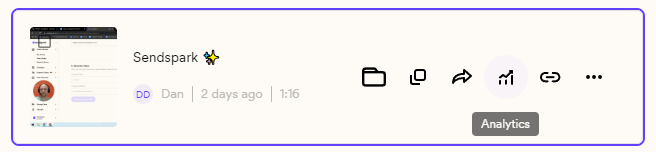
From either **My Library** or **Team Library**, click on the analytics icon on your video to launch the video analytics modal.
 ## How to Read Sendspark Video Analytics
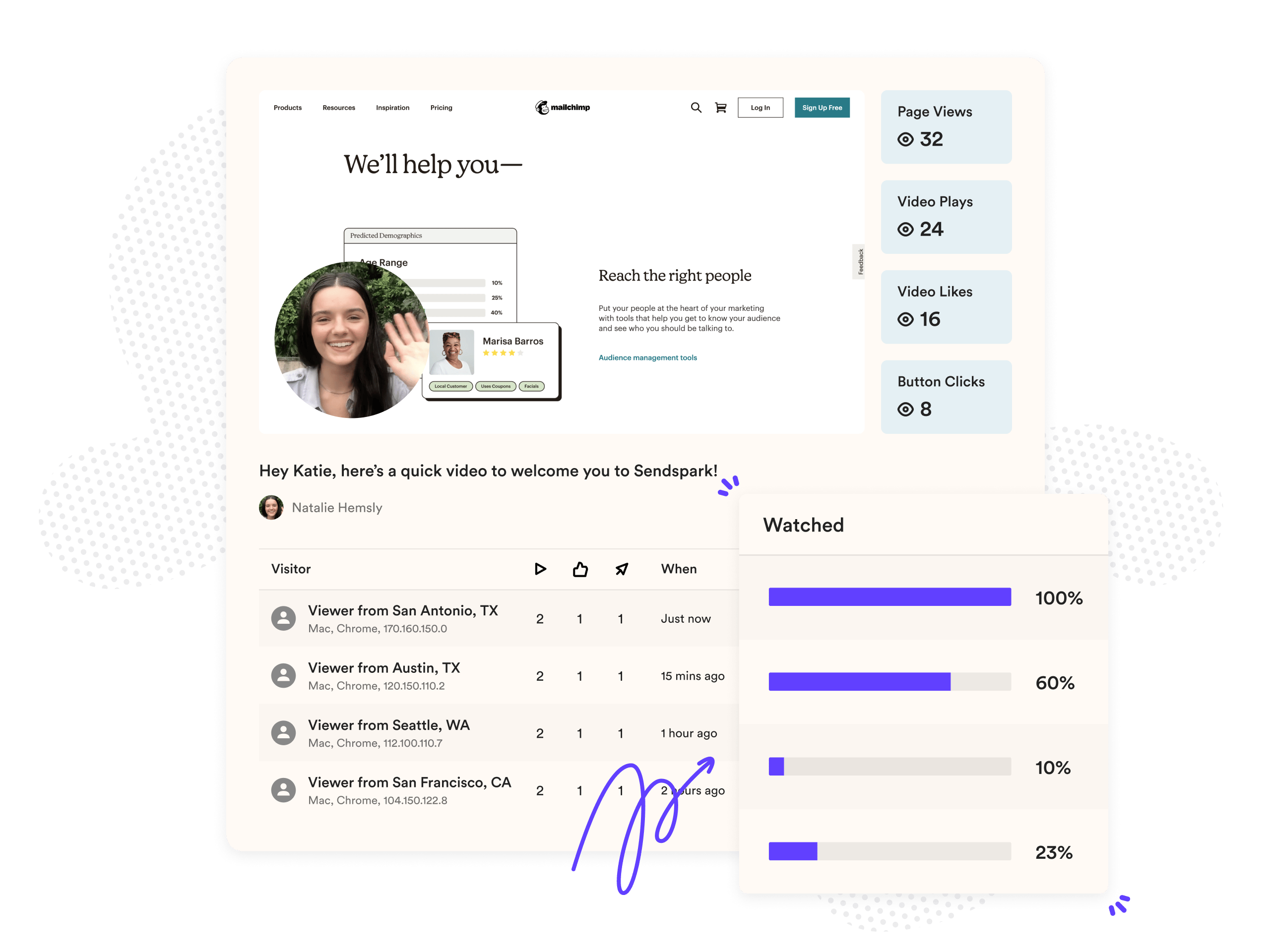
On the video analytics modal, you'll see several categories. Here's what they all mean:
## How to Read Sendspark Video Analytics
On the video analytics modal, you'll see several categories. Here's what they all mean:
 ## **Total Views:**
The number of times viewers open your video page. This is a page view, NOT a video view.
## **Total Plays:**
The number of times viewers click to play your video. Note that if someone starts and stops your video multiple times, it will count as multiple plays.
## **Total Clicks:**
The number of clicks on the **call-to-action** button below your video.
## **Total Likes:**
The number of times viewers hit the like button on the bottom right of your video. Note that one viewer can like the video multiple times.
## Viewer Insights & Watch Time
At the bottom of the video modal, you'll also see a breakdown of **views, plays, clicks, likes, and watch time**separated by individual. The views, plays, clicks, and likes correspond to the data above.
**Watch time** displays a video heatmap showing which part of your video each viewer actually played.
Next to**Watch Time**, you'll see the **percentage watched**by the viewer during that session.
## Frequently asked questions
Total Views is the number of times viewers open your video page (a page view, not a video view), while Total Plays is the number of times viewers click to play your video. Starting and stopping the video multiple times counts as multiple plays.
Total Clicks is the number of clicks on the call-to-action button below your video.
Watch time displays a video heatmap showing which part of your video each viewer actually played, and next to it you'll see the percentage watched by that viewer during the session.
No. Your visits are excluded from video analytics as long as you play the video inside your account. If you open the share link in a new tab and play it, that will count your views. Sendspark excludes creator views using mechanisms like cookies, IP addresses, and account associations.
From either My Library or Team Library, click the analytics icon on your video to launch the video analytics modal.
Yes. You can connect CRM, Instant, and Email Platform integrations from your [integrations settings](https://sendspark.com/settings/integrations), and search the [help center](/) for setup details on a specific integration.
Play your video in a way that isn't tied to your account: use incognito or private browsing mode, open the share link on a separate device like a phone, or send the link to someone else (or a secondary email). Each logs a genuine view so you can confirm interactions are tracked.
No. [Video engagement data recorded before January 19th, 2022](/analytics-update-implications-for-videos-recorded-before-jan-19-2022) (when analytics launched) isn't available in the app. If you message us, we can look up total views, plays, likes, and clicks for an individual video, but not viewer insight data.
*Updated July 2026.*
## **Total Views:**
The number of times viewers open your video page. This is a page view, NOT a video view.
## **Total Plays:**
The number of times viewers click to play your video. Note that if someone starts and stops your video multiple times, it will count as multiple plays.
## **Total Clicks:**
The number of clicks on the **call-to-action** button below your video.
## **Total Likes:**
The number of times viewers hit the like button on the bottom right of your video. Note that one viewer can like the video multiple times.
## Viewer Insights & Watch Time
At the bottom of the video modal, you'll also see a breakdown of **views, plays, clicks, likes, and watch time**separated by individual. The views, plays, clicks, and likes correspond to the data above.
**Watch time** displays a video heatmap showing which part of your video each viewer actually played.
Next to**Watch Time**, you'll see the **percentage watched**by the viewer during that session.
## Frequently asked questions
Total Views is the number of times viewers open your video page (a page view, not a video view), while Total Plays is the number of times viewers click to play your video. Starting and stopping the video multiple times counts as multiple plays.
Total Clicks is the number of clicks on the call-to-action button below your video.
Watch time displays a video heatmap showing which part of your video each viewer actually played, and next to it you'll see the percentage watched by that viewer during the session.
No. Your visits are excluded from video analytics as long as you play the video inside your account. If you open the share link in a new tab and play it, that will count your views. Sendspark excludes creator views using mechanisms like cookies, IP addresses, and account associations.
From either My Library or Team Library, click the analytics icon on your video to launch the video analytics modal.
Yes. You can connect CRM, Instant, and Email Platform integrations from your [integrations settings](https://sendspark.com/settings/integrations), and search the [help center](/) for setup details on a specific integration.
Play your video in a way that isn't tied to your account: use incognito or private browsing mode, open the share link on a separate device like a phone, or send the link to someone else (or a secondary email). Each logs a genuine view so you can confirm interactions are tracked.
No. [Video engagement data recorded before January 19th, 2022](/analytics-update-implications-for-videos-recorded-before-jan-19-2022) (when analytics launched) isn't available in the app. If you message us, we can look up total views, plays, likes, and clicks for an individual video, but not viewer insight data.
*Updated July 2026.*