> ## Documentation Index
> Fetch the complete documentation index at: https://help.sendspark.com/llms.txt
> Use this file to discover all available pages before exploring further.
# How to set up Sendspark for Hubspot CRM Integration
> Learn how to set up Sendspark for Hubspot CRM integration to track video engagement data and measure business impact in dashboards.
To connect Sendspark with HubSpot CRM, go to your Sendspark integrations tab, click Connect next to HubSpot, enter your Hub ID, and save. This sends Sendspark page visits to HubSpot so you can track contact engagement and visualize video engagement data in dashboards. The integration is available on every plan.
## Key takeaways
* The integration sends Sendspark page visits to HubSpot so you can track engagement with contacts and populate dashboards.
* It's available on every Sendspark plan and requires an active Sendspark account and an active HubSpot account.
* Connect it under Settings → Integrations, click Connect next to HubSpot, enter your Hub ID, and save.
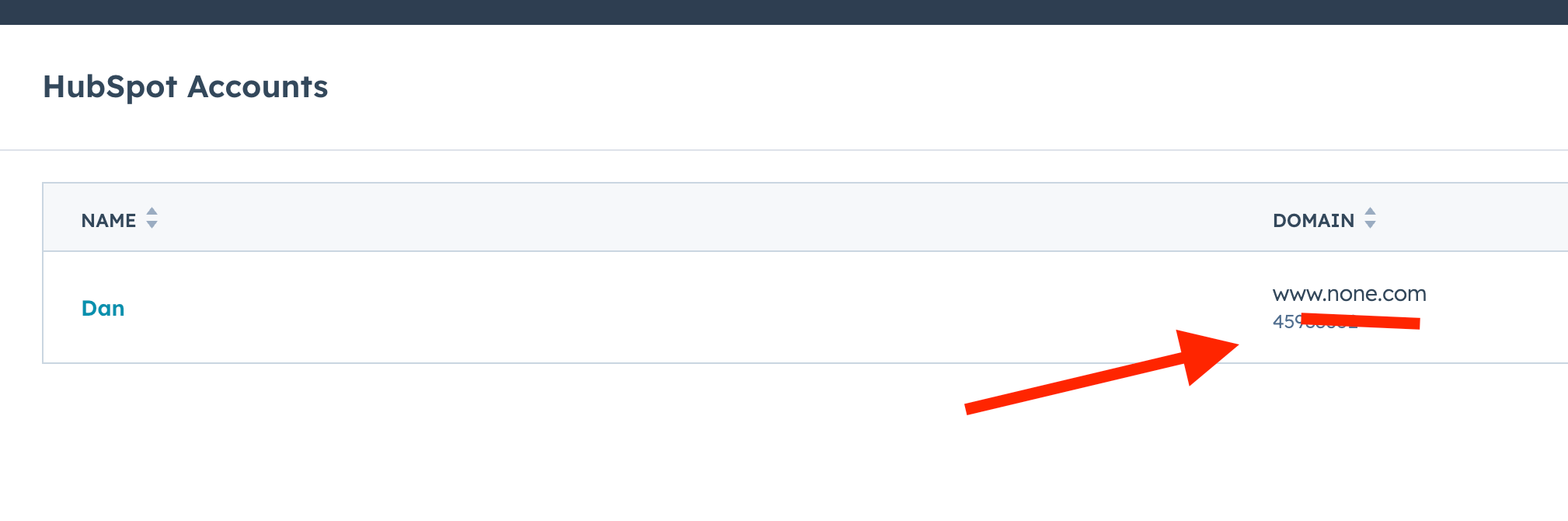
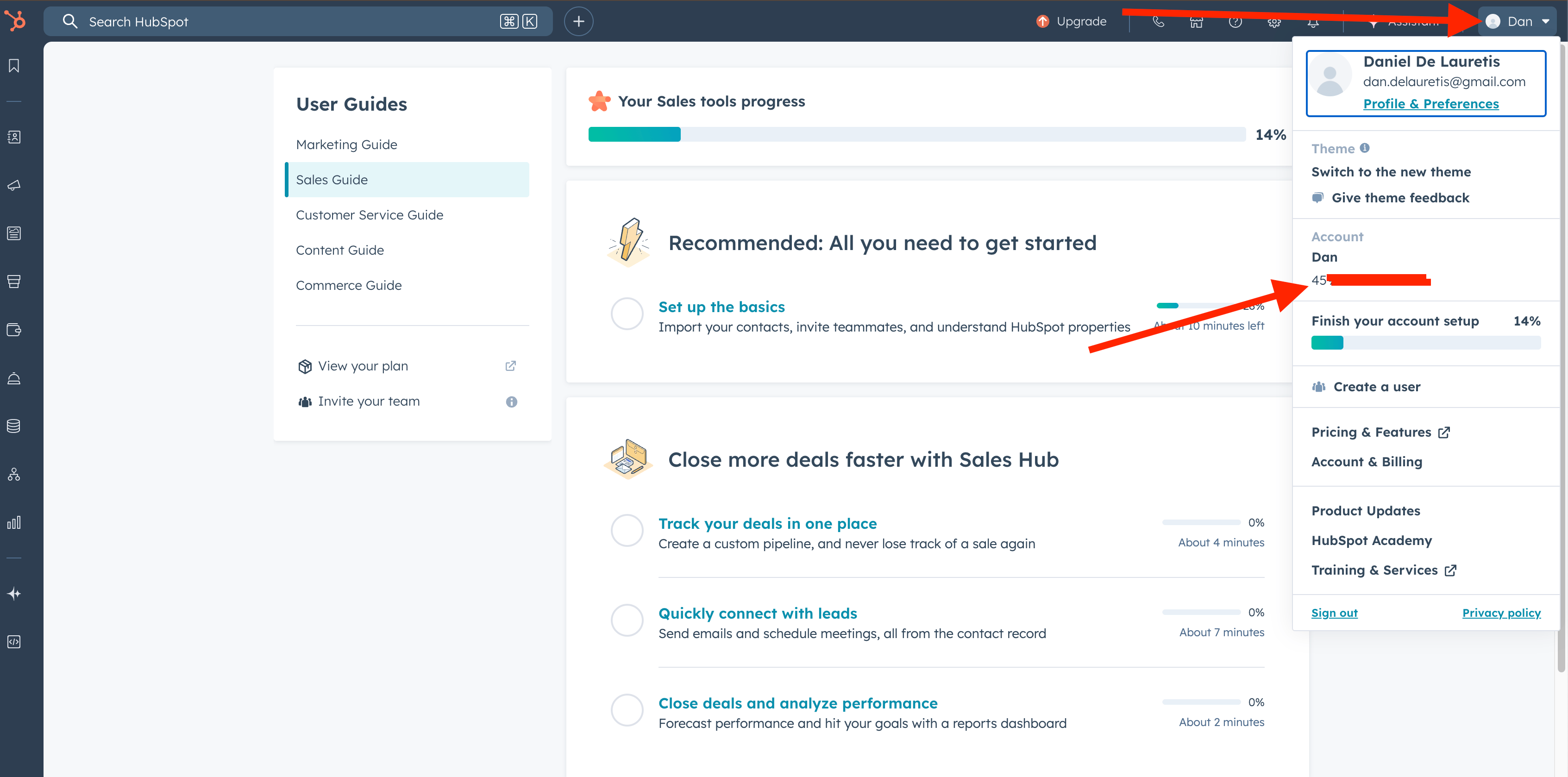
* Find your Hub ID at app.hubspot.com/myaccounts (shown below your account name) or via the top-right account menu.
The Sendspark for Hubspot integration allows you to measure the impact video is having on your business.
This integration will allow you to send Sendspark page visits to Hubspot to track engagement with contacts and visualize video engagement data in dashboards.
***
## Requirements
* An active Sendspark account *(the Sendspark for Hubspot integration is available on every plan)*
* An active Hubspot account
***
## Integrate Sendspark with Hubspot
1. Go to your [Sendspark integrations tab](https://sendspark.com/settings/integrations)
2. Next to Hubspot, click **Connect**  3. Enter your **Hub id**
  4. **Save** changes
5. You should see that Hubspot is **enabled** now 🎉
## Where to find your Hub ID
You can head to [https://app.hubspot.com/myaccounts](https://app.hubspot.com/myaccounts) and see the number right below your account name:
4. **Save** changes
5. You should see that Hubspot is **enabled** now 🎉
## Where to find your Hub ID
You can head to [https://app.hubspot.com/myaccounts](https://app.hubspot.com/myaccounts) and see the number right below your account name:
 Or simply by clicking on the top right-hand side menu:
 ## Additional resources
As a Hubspot user, you might appreciate these additional resources:
1. [How to send hyper-personalized videos in Hubspot Marketing Hub emails](/hubspot-workflows-video-marketing-email-automation)
2. [How to send hyper-personalized videos in Hubspot Sales Hub emails](/hubspot-static-videos-sales-hub)
3. [How to connect the Hubspot CRM](/how-to-set-up-sendspark-for-hubspot-crm-integration)
## Frequently asked questions
It sends Sendspark page visits to Hubspot so you can track engagement with contacts and visualize video engagement data in dashboards, helping you measure the impact video is having on your business.
The Sendspark for Hubspot integration is available on every plan. You just need an active Sendspark account and an active Hubspot account.
Go to your Sendspark integrations tab, click Connect next to Hubspot, enter your Hub ID, and save. You'll then see that Hubspot is enabled.
Go to app.hubspot.com/myaccounts and look for the number right below your account name, or open the menu in the top right-hand corner of Hubspot.
*Updated July 2026.*
## Additional resources
As a Hubspot user, you might appreciate these additional resources:
1. [How to send hyper-personalized videos in Hubspot Marketing Hub emails](/hubspot-workflows-video-marketing-email-automation)
2. [How to send hyper-personalized videos in Hubspot Sales Hub emails](/hubspot-static-videos-sales-hub)
3. [How to connect the Hubspot CRM](/how-to-set-up-sendspark-for-hubspot-crm-integration)
## Frequently asked questions
It sends Sendspark page visits to Hubspot so you can track engagement with contacts and visualize video engagement data in dashboards, helping you measure the impact video is having on your business.
The Sendspark for Hubspot integration is available on every plan. You just need an active Sendspark account and an active Hubspot account.
Go to your Sendspark integrations tab, click Connect next to Hubspot, enter your Hub ID, and save. You'll then see that Hubspot is enabled.
Go to app.hubspot.com/myaccounts and look for the number right below your account name, or open the menu in the top right-hand corner of Hubspot.
*Updated July 2026.*