> ## Documentation Index
> Fetch the complete documentation index at: https://help.sendspark.com/llms.txt
> Use this file to discover all available pages before exploring further.
# How to Remove Hubspot's Hubl Code Warning Message?
> Learn how to remove HubSpot's false HubL code warning message when using Sendspark video snippets in your email campaigns.
Seeing "This HTML module can contain HubL code" in your HubSpot email? It's a false warning from HubSpot's default behavior. Sendspark snippets do not contain any HubL code. To clear it, remove the existing HTML block, copy your Sendspark dynamic video snippet again, add a new HTML block, paste the snippet, and click Review and Send.
## Key takeaways
* The "This HTML module can contain HubL code" message is a false warning caused by HubSpot's default behavior. Sendspark snippets do not contain HubL code.
* It usually appears after you paste a Sendspark dynamic video snippet into a custom HTML block in the HubSpot drag-and-drop email builder, then exit and return to the editor.
* To clear it, remove the existing HTML block, re-copy the snippet from your Sendspark campaign, add a new HTML block, paste, and click Review and Send.
* Always preview your email before sending to confirm the video GIF and fallback image display correctly.
***
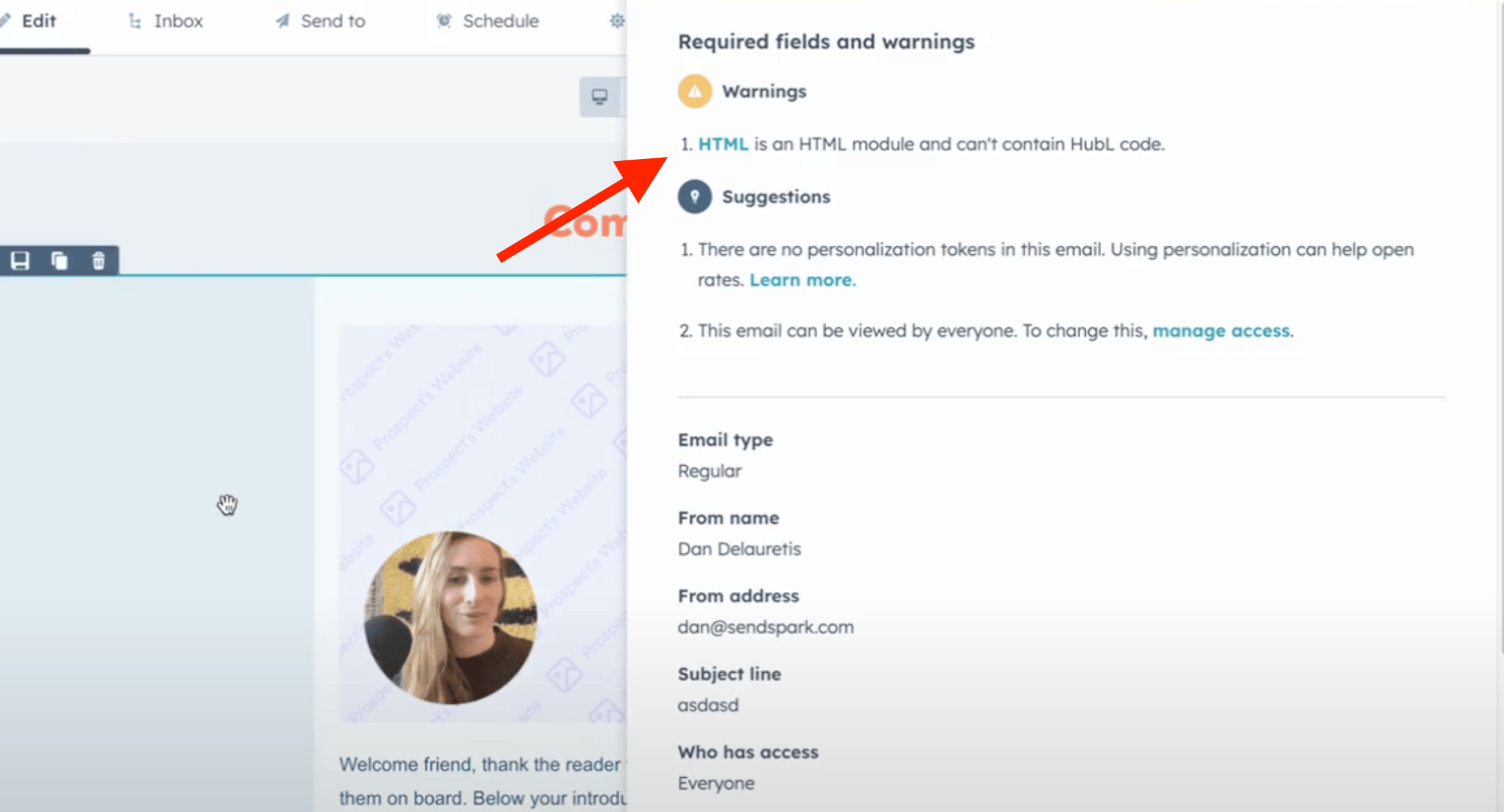
## 🛠️ HubSpot Warning: “This HTML module can contain HubL code” – What to Do
If you're seeing a warning like this when building an email in **HubSpot Marketing Hub**:
“This HTML module can contain HubL code.”
Don’t worry — this is a **false warning** caused by HubSpot's default behavior. **Sendspark snippets do *not* contain any HubL code.**
## 📌 When Does This Happen?
This usually appears after you:
1. Use the **drag-and-drop email builder** in HubSpot.
2. Paste your **Sendspark dynamic video snippet** into a custom HTML block.
3. Exit the email editor and come back later — the warning may show up.
## ✅ How to Fix It
To clear the message:
1. **Remove the existing HTML block** that shows the warning.
2. Go back to your Sendspark campaign and **copy the dynamic video snippet** again.
3. Add a **new HTML block** in the email.
4. Paste the snippet into the new block.
5. Click **“Review and Send”** — the warning should be gone.
✅ Pro Tip: Always preview your email before sending to ensure the video GIF and fallback image display correctly.
***
## Frequently asked questions
No. It's a false warning caused by HubSpot's default behavior. Sendspark snippets do not contain any HubL code, so the message does not indicate an actual issue with your video.
It usually appears after you use the drag-and-drop email builder in HubSpot Marketing Hub, paste your Sendspark dynamic video snippet into a custom HTML block, then exit the email editor and come back later.
Remove the existing HTML block that shows the warning, go back to your Sendspark campaign and copy the dynamic video snippet again, add a new HTML block in the email, paste the snippet into it, and click Review and Send. The warning should be gone.
Yes. Always preview your email before sending to make sure the video GIF and fallback image display correctly.
*Updated July 2026.*
 ## 🛠️ HubSpot Warning: “This HTML module can contain HubL code” – What to Do
If you're seeing a warning like this when building an email in **HubSpot Marketing Hub**:
“This HTML module can contain HubL code.”
Don’t worry — this is a **false warning** caused by HubSpot's default behavior. **Sendspark snippets do *not* contain any HubL code.**
## 📌 When Does This Happen?
This usually appears after you:
1. Use the **drag-and-drop email builder** in HubSpot.
2. Paste your **Sendspark dynamic video snippet** into a custom HTML block.
3. Exit the email editor and come back later — the warning may show up.
## ✅ How to Fix It
To clear the message:
1. **Remove the existing HTML block** that shows the warning.
2. Go back to your Sendspark campaign and **copy the dynamic video snippet** again.
3. Add a **new HTML block** in the email.
4. Paste the snippet into the new block.
5. Click **“Review and Send”** — the warning should be gone.
✅ Pro Tip: Always preview your email before sending to ensure the video GIF and fallback image display correctly.
***
## Frequently asked questions
## 🛠️ HubSpot Warning: “This HTML module can contain HubL code” – What to Do
If you're seeing a warning like this when building an email in **HubSpot Marketing Hub**:
“This HTML module can contain HubL code.”
Don’t worry — this is a **false warning** caused by HubSpot's default behavior. **Sendspark snippets do *not* contain any HubL code.**
## 📌 When Does This Happen?
This usually appears after you:
1. Use the **drag-and-drop email builder** in HubSpot.
2. Paste your **Sendspark dynamic video snippet** into a custom HTML block.
3. Exit the email editor and come back later — the warning may show up.
## ✅ How to Fix It
To clear the message:
1. **Remove the existing HTML block** that shows the warning.
2. Go back to your Sendspark campaign and **copy the dynamic video snippet** again.
3. Add a **new HTML block** in the email.
4. Paste the snippet into the new block.
5. Click **“Review and Send”** — the warning should be gone.
✅ Pro Tip: Always preview your email before sending to ensure the video GIF and fallback image display correctly.
***
## Frequently asked questions