> ## Documentation Index
> Fetch the complete documentation index at: https://help.sendspark.com/llms.txt
> Use this file to discover all available pages before exploring further.
# How to Pause & Resume Videos
> Learn how to pause and resume video recordings using toolbar buttons or hotkeys Alt+Shift+R for seamless control during recording.
To pause a recording, click the **pause** button on the recording toolbar, and a "paused" modal confirms it. To resume, click the pause button again, click anywhere on screen, or press any key. You can also pause and resume with the hotkey **Alt + Shift + R** so viewers never see you doing it.
## Key takeaways
* Pause by clicking the **pause** button on the recording toolbar; a paused modal appears to confirm the recording is stopped.
* Resume by clicking the same pause button, clicking anywhere on the screen, or pressing any key.
* Use the hotkey **Alt (ALT) + Shift (⇧) + R** to pause and resume without the viewer seeing what you're doing.
## How to Pause Recording
To pause your video while recording, simply click the **pause** button on the recording toolbar:
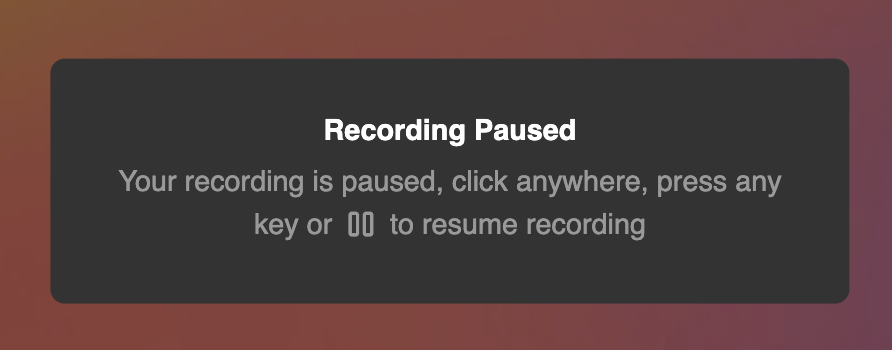
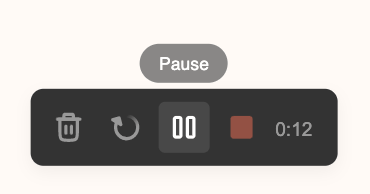 You'll know that your video is paused when you see this paused when you see this modal pop up on your screen.
 ## How to Resume Recording
To resume recording, simply click the same pause button, anywhere on the screen, or any key. This will let you pick up where you left off!
Happy recording!
## Use Hotkeys
Want to pause and resume the recording without the viewer seeing what you're doing?
Use these shortcuts: **Alt (ALT) + Shift (⇧) + R**
## Frequently asked questions
Click the **pause** button on the recording toolbar. A paused modal pops up on your screen to confirm the recording has stopped.
Click the same pause button again, click anywhere on the screen, or press any key. The recording picks up right where you left off.
You'll see a "Recording is Paused" modal appear on your screen. That confirmation means the recording is stopped until you resume it.
Yes. Press **Alt (ALT) + Shift (⇧) + R** to pause and resume. Using the hotkey lets you control the recording without the viewer seeing what you're doing.
*Updated July 2026.*
## How to Resume Recording
To resume recording, simply click the same pause button, anywhere on the screen, or any key. This will let you pick up where you left off!
Happy recording!
## Use Hotkeys
Want to pause and resume the recording without the viewer seeing what you're doing?
Use these shortcuts: **Alt (ALT) + Shift (⇧) + R**
## Frequently asked questions
Click the **pause** button on the recording toolbar. A paused modal pops up on your screen to confirm the recording has stopped.
Click the same pause button again, click anywhere on the screen, or press any key. The recording picks up right where you left off.
You'll see a "Recording is Paused" modal appear on your screen. That confirmation means the recording is stopped until you resume it.
Yes. Press **Alt (ALT) + Shift (⇧) + R** to pause and resume. Using the hotkey lets you control the recording without the viewer seeing what you're doing.
*Updated July 2026.*