> ## Documentation Index
> Fetch the complete documentation index at: https://help.sendspark.com/llms.txt
> Use this file to discover all available pages before exploring further.
# How to Modify Shortcuts on Share Modal
> Learn how to customize Sendspark share modal shortcuts to show only your preferred email platforms and streamline video sharing.
Sendspark's share modal shows shortcuts that generate platform-specific share snippets for different email tools. You can customize it so only the platforms you actually use appear, keeping it uncluttered. Click the **edit/add** button, then click the icon beside each shortcut: a plus icon enables it, while a check icon means it's already enabled (click to disable).
## Key takeaways
* Share modal shortcuts provide platform-specific share snippets that enable dynamic variables (merge tags) and let you track exactly who is watching.
* Customizing the modal lets you show only the shortcuts for the email platforms you actually use, reducing clutter.
* Click the **edit/add** button, then click the icon to the right of each shortcut to toggle it.
* A **plus** icon means the shortcut is disabled (click to enable); a **check** icon means it's enabled (click to disable).
You can edit the email platform shortcuts you see on the Sendspark share modal, so you only see your favorites.
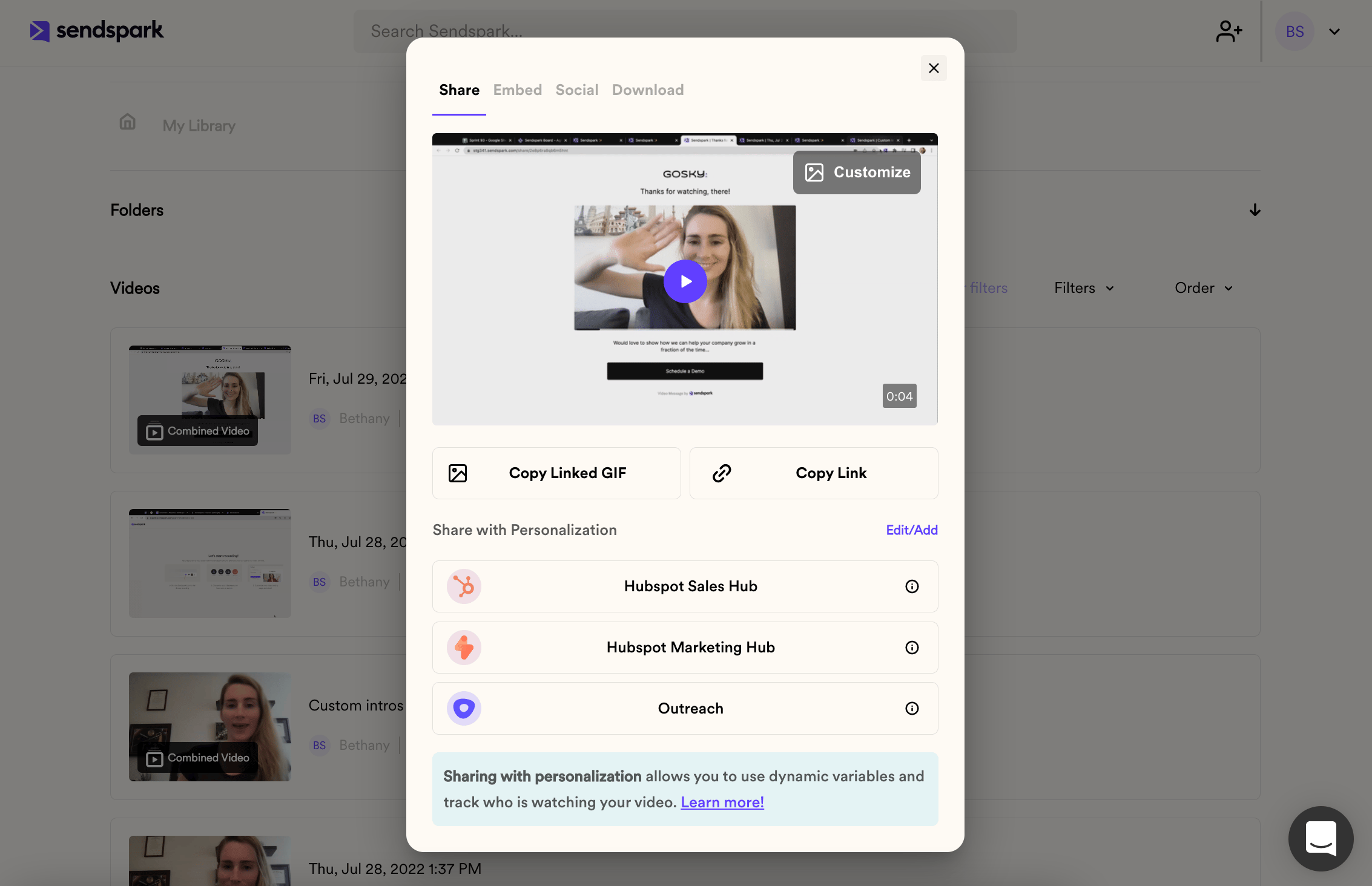 ## What are these shortcuts for?
These shortcuts provide specific share snippets for different email platforms. Specific share snippets come with a few advantages, such as:
1. **Ability to use dynamic variables**. If you'd like to use [merge tags](/use-merge-tags-to-personalize-videos-at-scale) in videos as placeholders for first name, company name, or other variables, you need to use the correct share snippet for your message sending platform.
2. **Ability to track exactly who is watching videos**. When you share with personalization, you can see who is watching your video in your [video analytics.](/how-to-understand-sendspark-video-analytics)
## How do you mange shortcuts?
We recommend customizing your share modal so that you only see shortcuts for the email platform/s you actually use. This will make things a little less cluttered for you.
To customize shortcuts, simply...
1. Click the\*\*"edit/add"\*\*button
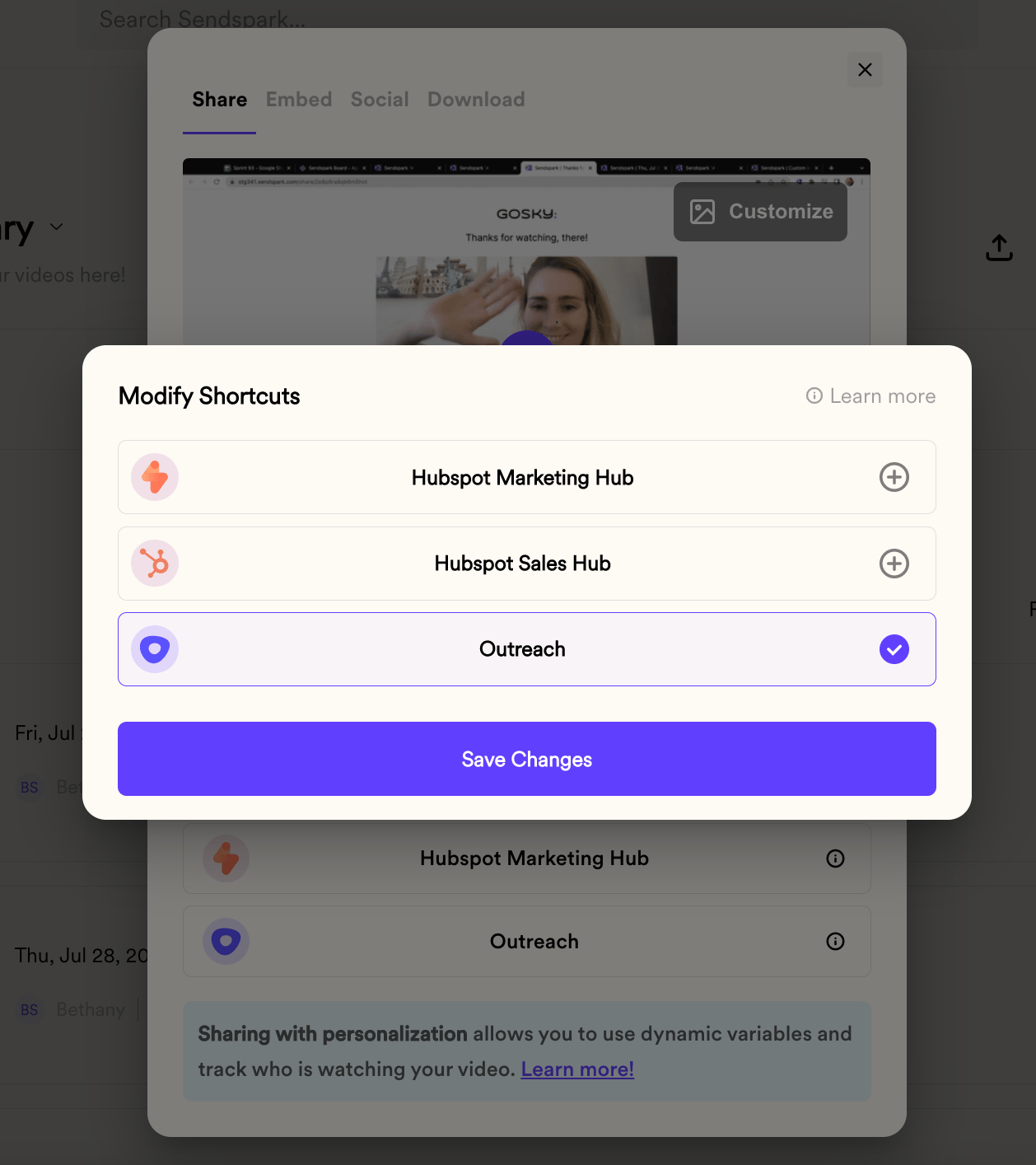
2. Click on the icon to the right of each shortcut. If you see a **"plus" icon**, that means that the shortcut is NOT enabled. You can click on the icon to enable that shortcut. If you see a **"check" icon**, that means that that shortcut is enabled. You can click on the icon to disable that shortcut.
For example, in this screenshot, only the Outreach shortcut is enabled.
## What are these shortcuts for?
These shortcuts provide specific share snippets for different email platforms. Specific share snippets come with a few advantages, such as:
1. **Ability to use dynamic variables**. If you'd like to use [merge tags](/use-merge-tags-to-personalize-videos-at-scale) in videos as placeholders for first name, company name, or other variables, you need to use the correct share snippet for your message sending platform.
2. **Ability to track exactly who is watching videos**. When you share with personalization, you can see who is watching your video in your [video analytics.](/how-to-understand-sendspark-video-analytics)
## How do you mange shortcuts?
We recommend customizing your share modal so that you only see shortcuts for the email platform/s you actually use. This will make things a little less cluttered for you.
To customize shortcuts, simply...
1. Click the\*\*"edit/add"\*\*button
2. Click on the icon to the right of each shortcut. If you see a **"plus" icon**, that means that the shortcut is NOT enabled. You can click on the icon to enable that shortcut. If you see a **"check" icon**, that means that that shortcut is enabled. You can click on the icon to disable that shortcut.
For example, in this screenshot, only the Outreach shortcut is enabled.
 ## Frequently asked questions
Each shortcut provides a platform-specific share snippet. Using the correct snippet lets you insert [merge tags](/use-merge-tags-to-personalize-videos-at-scale) as placeholders for first name, company name, and other variables, and it lets you track exactly who is watching in your [video analytics](/how-to-understand-sendspark-video-analytics).
Click the **edit/add** button, then click the icon to the right of each shortcut. A **plus** icon means the shortcut is not enabled (click it to enable), and a **check** icon means it is enabled (click it to disable).
No. The shortcuts you set apply just to you. Other members of your workspace can modify their own shortcuts independently.
Read the help article for your specific email platform to make sure you're sharing hyper-personalized videos correctly, such as [HubSpot Sales Hub](/hubspot-static-videos-sales-hub), [HubSpot Marketing Hub](/hubspot-marketing-emails-send-dynamic-videos), or [Outreach](/outreach-send-personalized-videos-at-scale).
*Updated July 2026.*
## Frequently asked questions
Each shortcut provides a platform-specific share snippet. Using the correct snippet lets you insert [merge tags](/use-merge-tags-to-personalize-videos-at-scale) as placeholders for first name, company name, and other variables, and it lets you track exactly who is watching in your [video analytics](/how-to-understand-sendspark-video-analytics).
Click the **edit/add** button, then click the icon to the right of each shortcut. A **plus** icon means the shortcut is not enabled (click it to enable), and a **check** icon means it is enabled (click it to disable).
No. The shortcuts you set apply just to you. Other members of your workspace can modify their own shortcuts independently.
Read the help article for your specific email platform to make sure you're sharing hyper-personalized videos correctly, such as [HubSpot Sales Hub](/hubspot-static-videos-sales-hub), [HubSpot Marketing Hub](/hubspot-marketing-emails-send-dynamic-videos), or [Outreach](/outreach-send-personalized-videos-at-scale).
*Updated July 2026.*