> ## Documentation Index
> Fetch the complete documentation index at: https://help.sendspark.com/llms.txt
> Use this file to discover all available pages before exploring further.
# How to Hide The Sendspark Recording Toolbar
> Learn how to hide the Sendspark recording toolbar for polished videos using Chrome extension settings and keyboard shortcuts.
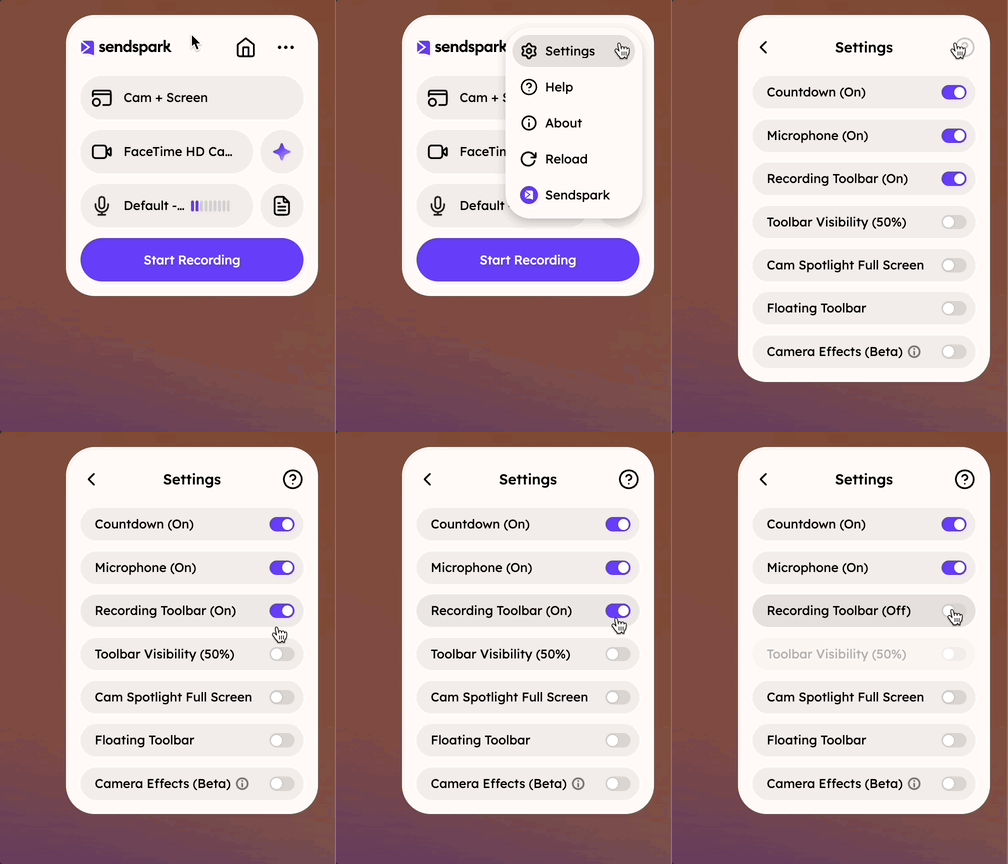
To hide the Sendspark recording toolbar for a polished, toolbar-less video, open the Sendspark Chrome Extension, click Settings, and switch Toolbar (On) to Toolbar (Off). Even with the toolbar hidden, you can still pause and resume recording with the keyboard shortcut Alt (ALT) + Shift (⇧) + R.
## Key takeaways
* The recording toolbar (pause, restart, and delete controls) can be hidden for cleaner, toolbar-less videos.
* Hide it in the Sendspark Chrome Extension: click Settings, then toggle Toolbar (On) to Toolbar (Off).
* With the toolbar hidden, you can still use its features through keyboard shortcuts.
* Pause and resume with Alt (ALT) + Shift (⇧) + R.
Sendspark shows a toolbar while you're recording videos so it's easy to pause, restart, or delete recordings.
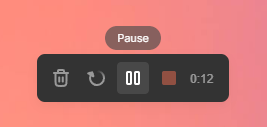 However, if you do not want this toolbar to show up in your videos, you can hide the recording toolbar to get polished, toolbar-less videos.
## How to Hide the Recording Toolbar
1. Launch the [Sendspark Chrome Extension](https://chrome.google.com/webstore/detail/blimjkpadkhcpmkeboeknjcmiaogbkph)
2. Click **Settings**
3. Toggle **Toolbar (On)** to **Toolbar (Off)**
However, if you do not want this toolbar to show up in your videos, you can hide the recording toolbar to get polished, toolbar-less videos.
## How to Hide the Recording Toolbar
1. Launch the [Sendspark Chrome Extension](https://chrome.google.com/webstore/detail/blimjkpadkhcpmkeboeknjcmiaogbkph)
2. Click **Settings**
3. Toggle **Toolbar (On)** to **Toolbar (Off)**
 ## Use Hotkeys
If you hide the toolbar, you can still use the toolbar features with keyboard shortcuts.
* Pause & Resume: **Alt (ALT) + Shift (⇧) + R**
## Frequently asked questions
Launch the Sendspark Chrome Extension, click Settings, and toggle Toolbar (On) to Toolbar (Off). Your recordings will then be captured without the toolbar showing.
Yes. If you hide the toolbar, you can still use the toolbar features with keyboard shortcuts.
Pause and resume with Alt (ALT) + Shift (⇧) + R.
The toolbar makes it easy to pause, restart, or delete recordings, but if you don't want it to appear in your videos you can hide it to get polished, toolbar-less videos.
*Updated July 2026.*
## Use Hotkeys
If you hide the toolbar, you can still use the toolbar features with keyboard shortcuts.
* Pause & Resume: **Alt (ALT) + Shift (⇧) + R**
## Frequently asked questions
Launch the Sendspark Chrome Extension, click Settings, and toggle Toolbar (On) to Toolbar (Off). Your recordings will then be captured without the toolbar showing.
Yes. If you hide the toolbar, you can still use the toolbar features with keyboard shortcuts.
Pause and resume with Alt (ALT) + Shift (⇧) + R.
The toolbar makes it easy to pause, restart, or delete recordings, but if you don't want it to appear in your videos you can hide it to get polished, toolbar-less videos.
*Updated July 2026.*