> ## Documentation Index
> Fetch the complete documentation index at: https://help.sendspark.com/llms.txt
> Use this file to discover all available pages before exploring further.
# How to Get Notified When Someone Watches Your Video
> Learn how to get notified when someone watches your Sendspark video via email, Slack alerts, and webhooks for real-time engagement.
Sendspark can notify you when someone watches your video three ways: an **email** arrives automatically when the first lead watches (no setup needed), **Slack** alerts can be added through Agentic Workflows using the "New Video Watched" trigger, and **webhooks** can push events into your CRM or app. For exact watch percentages, open your Dynamic Video Campaign dashboard.
## Key takeaways
* You get an **email notification** automatically when the first lead watches your video — no setup required.
* Add **real-time Slack alerts** in Agentic Workflows with the **New Video Watched** trigger and a Slack "send a message" action.
* **Webhooks** only send two event types: **Video Played** (clicked play) and **Video Watched 100%** (watched fully).
* The **Dynamic Video Campaign dashboard** is the only place to see exact percentage watched, total view time, play rate, and click-throughs.
With Sendspark, you can stay on top of video engagement by receiving notifications when someone watches your content. Here’s how you can track views and what type of information you’ll get.
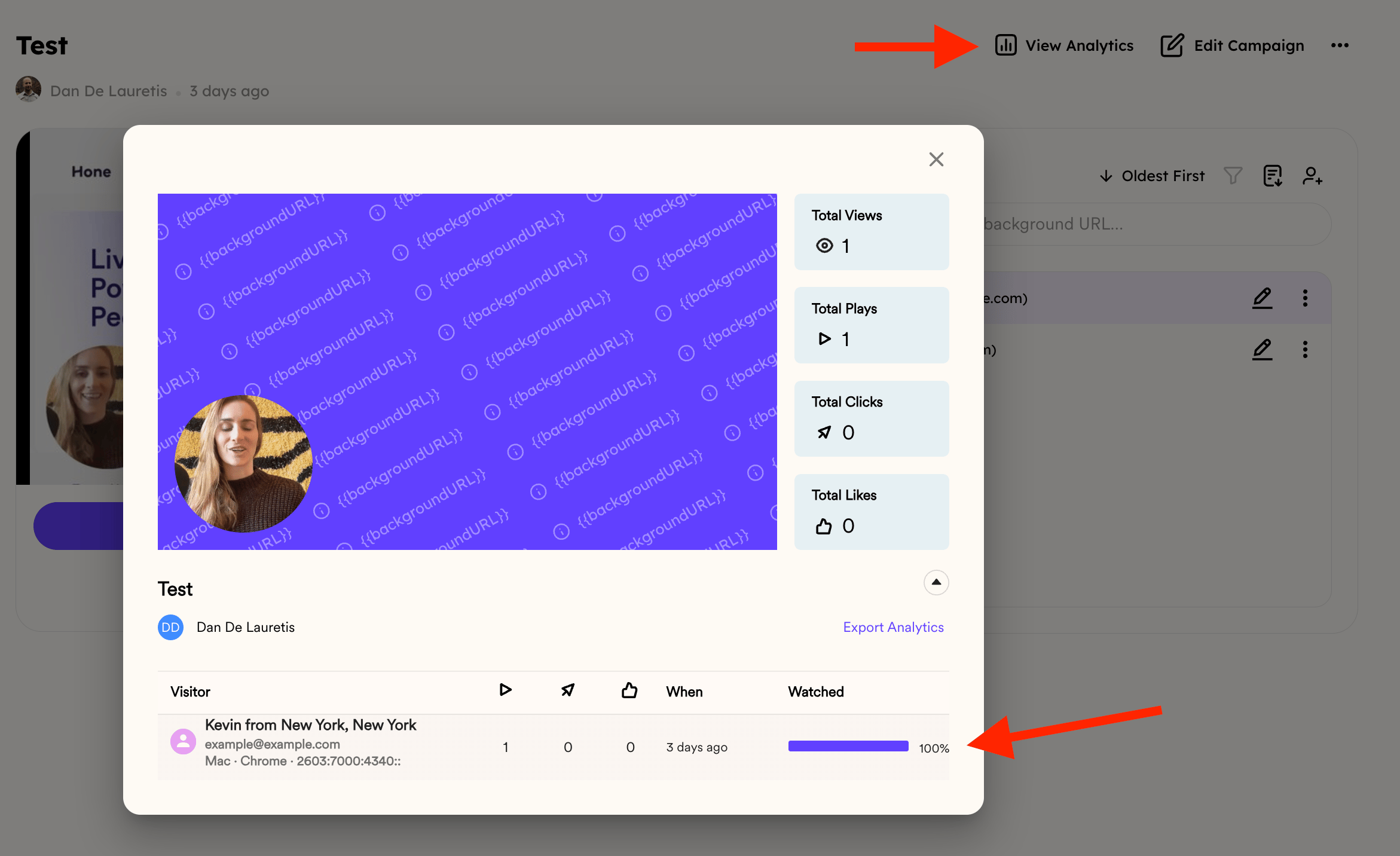
It's important to mention that if you want to see **exact engagement details** — such as the **percentage of the video watched**, total view time, play rate, and click-throughs — you’ll need to open your **Dynamic Video Campaign dashboard**.
👉 This is the only place where you can see how much of the video was watched:
 ***
## Email Notifications
By default, you’ll receive an **email notification** when the first lead clicks and watches your video. No setup required.
***
## Slack Notifications
If you want real-time team alerts, you can connect Sendspark with Slack:
We have a specific [Help Article for that right here](/slack-notifications-for-video-views)
1. Go to **Agentic Workflows**
2. Click **New Automation**
3. Add the trigger: **Sendspark: New Video Watched – All Campaigns**
4. Add the action: **Slack → Send a message to a public channel**
5. Connect your Slack account and pick the channel where you want updates
Now your team will see view notifications instantly in Slack.
***
## Webhooks and Automation Notifications
If you want to send notifications into another system (CRM, custom app, etc.), you can use **webhooks** with the **New Video Watched** trigger.
**Important:** Webhooks only send two types of events:
* **Video Played** → someone clicked play (even if they only watched a few seconds).
* \*\*Video Watched 100%\*\*→ someone watched the video all the way through.
That means if you rely on webhook notifications, you’ll only know if a video was started or fully completed. For detailed watch percentages, you’ll still need to check the campaign analytics.
[Here's a Help Article to show you how to use Webhooks in Sendspark](/webhooks-how-to-create-webhooks-in-sendspark)
***
## Summary
* **Email & Slack** → quick notifications when someone watches.
* **Dashboard analytics** → see exact percentage watched and other engagement stats.
* **Webhooks** → great for automation, but limited to “played” or “fully played” events.
## Frequently asked questions
No. By default you receive an email notification when the first lead clicks and watches your video, with no setup required.
In Agentic Workflows, click **New Automation**, add the trigger **Sendspark: New Video Watched – All Campaigns**, add the action **Slack → Send a message to a public channel**, then connect Slack and choose your channel. See the [Slack notifications article](/slack-notifications-for-video-views) for details.
Webhooks send only two events: **Video Played** (someone clicked play, even for a few seconds) and **Video Watched 100%** (someone watched all the way through). For watch percentages between those, check the campaign analytics.
Open your Dynamic Video Campaign dashboard. It's the only place that shows the percentage of the video watched, along with total view time, play rate, and click-throughs.
*Updated July 2026.*
***
## Email Notifications
By default, you’ll receive an **email notification** when the first lead clicks and watches your video. No setup required.
***
## Slack Notifications
If you want real-time team alerts, you can connect Sendspark with Slack:
We have a specific [Help Article for that right here](/slack-notifications-for-video-views)
1. Go to **Agentic Workflows**
2. Click **New Automation**
3. Add the trigger: **Sendspark: New Video Watched – All Campaigns**
4. Add the action: **Slack → Send a message to a public channel**
5. Connect your Slack account and pick the channel where you want updates
Now your team will see view notifications instantly in Slack.
***
## Webhooks and Automation Notifications
If you want to send notifications into another system (CRM, custom app, etc.), you can use **webhooks** with the **New Video Watched** trigger.
**Important:** Webhooks only send two types of events:
* **Video Played** → someone clicked play (even if they only watched a few seconds).
* \*\*Video Watched 100%\*\*→ someone watched the video all the way through.
That means if you rely on webhook notifications, you’ll only know if a video was started or fully completed. For detailed watch percentages, you’ll still need to check the campaign analytics.
[Here's a Help Article to show you how to use Webhooks in Sendspark](/webhooks-how-to-create-webhooks-in-sendspark)
***
## Summary
* **Email & Slack** → quick notifications when someone watches.
* **Dashboard analytics** → see exact percentage watched and other engagement stats.
* **Webhooks** → great for automation, but limited to “played” or “fully played” events.
## Frequently asked questions
No. By default you receive an email notification when the first lead clicks and watches your video, with no setup required.
In Agentic Workflows, click **New Automation**, add the trigger **Sendspark: New Video Watched – All Campaigns**, add the action **Slack → Send a message to a public channel**, then connect Slack and choose your channel. See the [Slack notifications article](/slack-notifications-for-video-views) for details.
Webhooks send only two events: **Video Played** (someone clicked play, even for a few seconds) and **Video Watched 100%** (someone watched all the way through). For watch percentages between those, check the campaign analytics.
Open your Dynamic Video Campaign dashboard. It's the only place that shows the percentage of the video watched, along with total view time, play rate, and click-throughs.
*Updated July 2026.*