> ## Documentation Index
> Fetch the complete documentation index at: https://help.sendspark.com/llms.txt
> Use this file to discover all available pages before exploring further.
# How To Delete a Video 🗑
> Learn how to delete videos from your Sendspark dashboard, edit page, Chrome extension, or recording toolbar in just a few clicks.
There are a few ways to delete a video in Sendspark. From your dashboard library, click the three dots and choose Delete. From the video's Edit page, click the three dots and choose Delete Video. You can also delete a just-recorded video from the Chrome Extension preview modal or from the Recording Toolbar while recording.
## Key takeaways
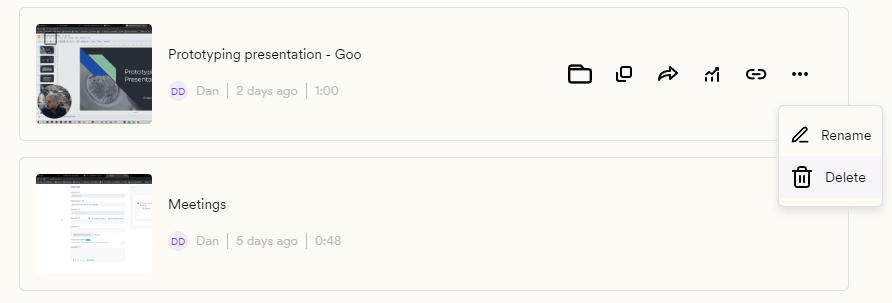
* From your Personal, Team, or Requested Video Library, click the three dots and then Delete.
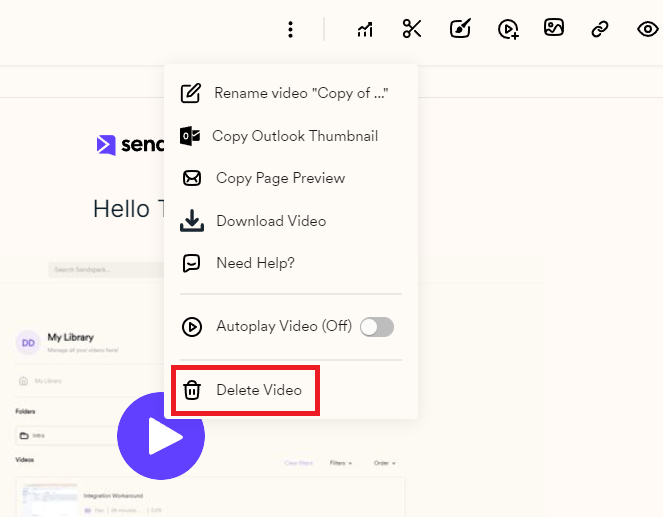
* From the video's Edit page, click the video, click the three dots, and choose Delete Video.
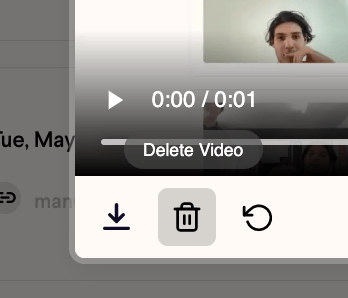
* In the Chrome Extension, click the delete button on the bottom left of the preview modal to remove a video you've just recorded.
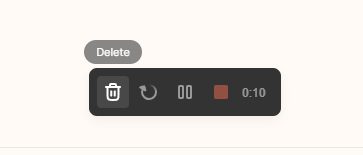
* From the Recording Toolbar, once recording has started and your toolbar is on, you have the option to delete the video you're working on.
Deleting a video is super easy, and there are a few ways to do so.
## **Delete videos from your Dashboard**
From your [Personal Library](https://sendspark.com/my-library), [Team Library](https://sendspark.com/team-library), or [Requested Video Library](https://sendspark.com/requested-videos), you can just click on the three dots and then on **'Delete'**
 ## **Delete videos from the video's Edit page**
Click on the video you want to delete, then click on the three dots and finally go to **'Delete Video'.**
## **Delete videos from the video's Edit page**
Click on the video you want to delete, then click on the three dots and finally go to **'Delete Video'.**
 ## **Delete from the Chrome Extension**
If you want to delete a video you've just recorded, you can click the\*\*'delete'\*\*button on the bottom left of the Sendspark Chrome Extension preview modal.
## **Delete from the Chrome Extension**
If you want to delete a video you've just recorded, you can click the\*\*'delete'\*\*button on the bottom left of the Sendspark Chrome Extension preview modal.
 ## **Delete from the Recording Toolbar**
Once your recording has started, if your Toolbar is on, you'll have the option to delete the video you are working on.
## **Delete from the Recording Toolbar**
Once your recording has started, if your Toolbar is on, you'll have the option to delete the video you are working on.
 And that is it! Don't forget to reach out if you have any more questions!
**The Sendspark Team.**
## Frequently asked questions
From your Personal Library, Team Library, or Requested Video Library, click on the three dots and then click Delete.
Yes. Click on the video you want to delete, then click the three dots and finally choose Delete Video.
Click the delete button on the bottom left of the Sendspark Chrome Extension preview modal.
Yes. Once your recording has started, if your Toolbar is on, you'll have the option to delete the video you are working on from the Recording Toolbar.
*Updated July 2026.*
And that is it! Don't forget to reach out if you have any more questions!
**The Sendspark Team.**
## Frequently asked questions
From your Personal Library, Team Library, or Requested Video Library, click on the three dots and then click Delete.
Yes. Click on the video you want to delete, then click the three dots and finally choose Delete Video.
Click the delete button on the bottom left of the Sendspark Chrome Extension preview modal.
Yes. Once your recording has started, if your Toolbar is on, you'll have the option to delete the video you are working on from the Recording Toolbar.
*Updated July 2026.*