> ## Documentation Index
> Fetch the complete documentation index at: https://help.sendspark.com/llms.txt
> Use this file to discover all available pages before exploring further.
# How to Create Sub-Accounts for Agencies
> Learn how to create sub-accounts for agencies in Sendspark with independent workspaces, billing, and branding for each client.
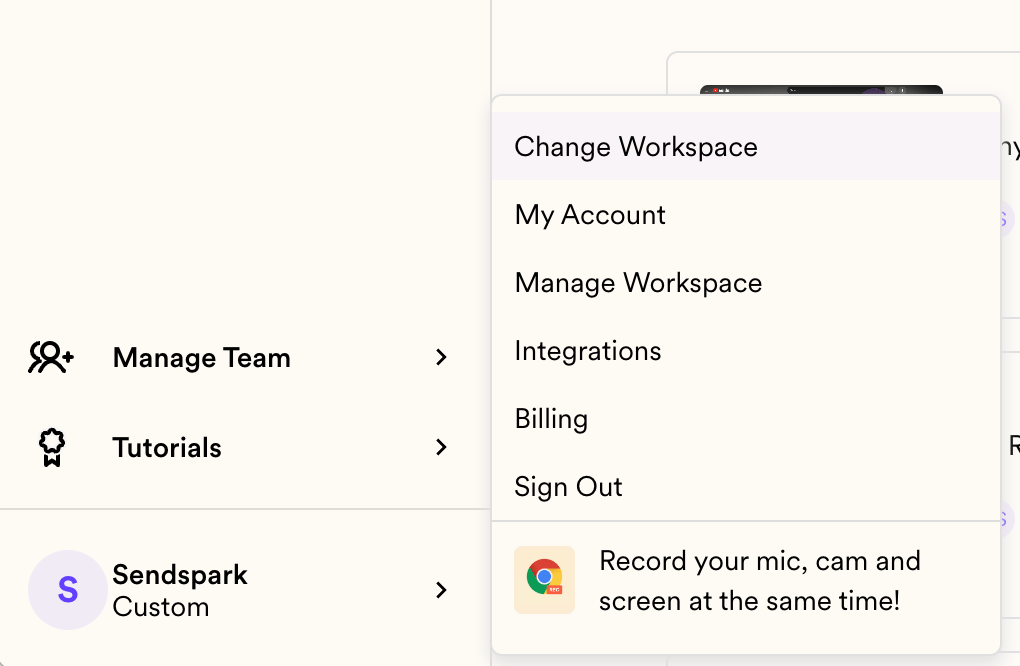
Agencies create client sub-accounts as separate workspaces. Click **Change Workspace** in the bottom-left menu, then **Create Workspace**. Each workspace is fully independent — its own brand styles, assets, team members, and billing — and starts on a free plan you can upgrade and bill to the client. You can switch between all your workspaces at any time.
## Key takeaways
* Create a workspace for your team and for each client via **Change Workspace → Create Workspace** in the bottom-left menu.
* Each workspace is **entirely independent** (separate brand styles, assets, and team members), and you can hop between them.
* New workspaces start on a **free plan** and can be upgraded and billed directly to the client via [billing settings](https://sendspark.com/settings/billing).
* A new workspace is a near-blank slate — no branding, team, billing, templates, or videos carry over (to avoid privacy leaks); only personal account settings like name, email, and recording preferences transfer.
Sendspark makes it easy to create sub-accounts for your clients. In general, this is how it will work for you as an agency owner:
* You can create workspaces for your team and each of your clients
* Each workspace is entirely independent from other workspaces (with different brand styles, assets, and team members), but you will be able to hop between them.
* Each workspace is created as a free plan, and can be upgraded and billed directly to your client by adding payment information in the[billing settings](https://sendspark.com/settings/billing).
## How to Create and Manage Sub-Accounts
Create new workspace by clicking **"Change Workspace"** on the menu on the bottom left of Sendspark
 From here, you will see all workspaces that you are part of.
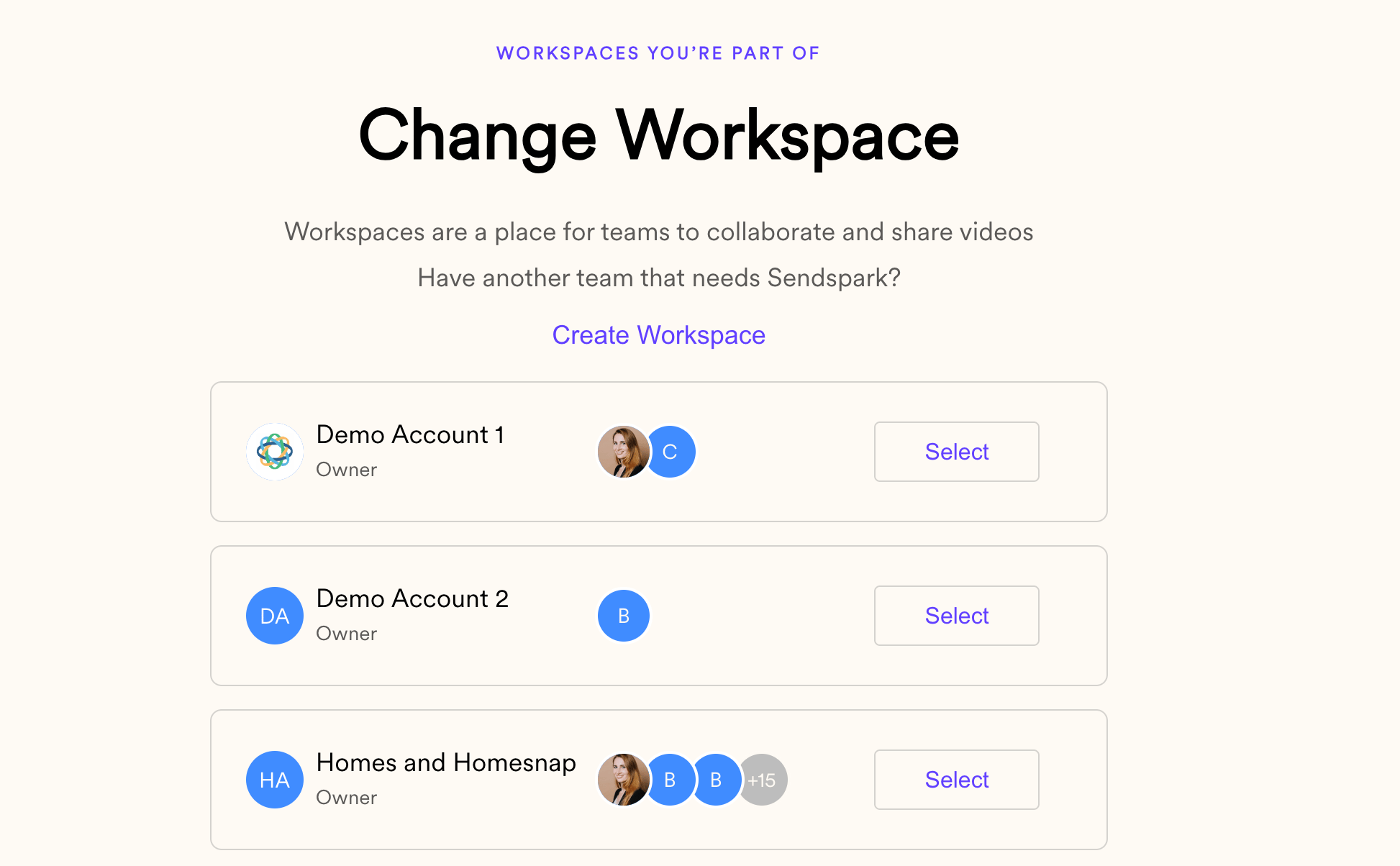 You can click "**Create Workspace**" to create a new workspace, or select an existing workspace to switch into it.
When you create a new workspace, it is created as a nearly blank slate. None of your branding, team members, billing information, templates, videos, or other assets will be imported over. This is so you can create them fresh for your client, and not risk any privacy leaks.
The only information that will be imported over is related to your personal account settings (like name, email address, and some recording preferences) to make your life easier.
This means that when you create a new workspace for a client, you will want to go through the basic onboarding for them:
1. Upload your logo and [set your brand styles](/set-global-styles)
2. Create [templates](/how-to-use-templates) to add to videos after recording
3. Create [folders](/move-videos-between-personal-and-team-libraries) you will use to manage videos
We hope this helps you stay organized and empower your clients to succeed. Happy recording!
***
## Frequently asked questions
Click **Change Workspace** in the bottom-left menu of Sendspark, then click **Create Workspace**. From that same panel you can also switch into any workspace you're part of.
Yes. Each workspace is entirely independent, with its own brand styles, assets, and team members. You can hop between the workspaces you belong to.
Each workspace is created on a free plan and can be upgraded and billed directly to your client by adding payment information in the [billing settings](https://sendspark.com/settings/billing).
No. A new workspace starts as a near-blank slate — none of your branding, team members, billing, templates, or videos are imported, which prevents privacy leaks. Only personal account settings like your name, email, and some recording preferences carry over.
*Updated July 2026.*
You can click "**Create Workspace**" to create a new workspace, or select an existing workspace to switch into it.
When you create a new workspace, it is created as a nearly blank slate. None of your branding, team members, billing information, templates, videos, or other assets will be imported over. This is so you can create them fresh for your client, and not risk any privacy leaks.
The only information that will be imported over is related to your personal account settings (like name, email address, and some recording preferences) to make your life easier.
This means that when you create a new workspace for a client, you will want to go through the basic onboarding for them:
1. Upload your logo and [set your brand styles](/set-global-styles)
2. Create [templates](/how-to-use-templates) to add to videos after recording
3. Create [folders](/move-videos-between-personal-and-team-libraries) you will use to manage videos
We hope this helps you stay organized and empower your clients to succeed. Happy recording!
***
## Frequently asked questions
Click **Change Workspace** in the bottom-left menu of Sendspark, then click **Create Workspace**. From that same panel you can also switch into any workspace you're part of.
Yes. Each workspace is entirely independent, with its own brand styles, assets, and team members. You can hop between the workspaces you belong to.
Each workspace is created on a free plan and can be upgraded and billed directly to your client by adding payment information in the [billing settings](https://sendspark.com/settings/billing).
No. A new workspace starts as a near-blank slate — none of your branding, team members, billing, templates, or videos are imported, which prevents privacy leaks. Only personal account settings like your name, email, and some recording preferences carry over.
*Updated July 2026.*