> ## Documentation Index
> Fetch the complete documentation index at: https://help.sendspark.com/llms.txt
> Use this file to discover all available pages before exploring further.
# How to Create API Keys
> Learn how to create API keys in Sendspark through your account settings using the simple Generate Keys button for easy access.
To create a Sendspark API key, open **API Credentials** from your account menu (or go straight to [sendspark.com/settings/api-credentials](https://sendspark.com/settings/api-credentials)) and click **GENERATE KEYS**. If you see a badge next to the feature, your plan needs an upgrade to access API keys.
## Key takeaways
* Find your keys under **API Credentials** in your account menu, or go directly to [sendspark.com/settings/api-credentials](https://sendspark.com/settings/api-credentials).
* Click **GENERATE KEYS** to create a new key.
* A badge next to a feature's title means an upgrade is required to use it.
* API keys authenticate requests to the Sendspark API, which you can use to [automatically create dynamic videos](/api-automatically-create-dynamic-videos-via-api).
API keys are easily accessible through the API section of your menu.
You can use this link for fast access [https://sendspark.com/settings/api-credentials](https://sendspark.com/settings/api-credentials),
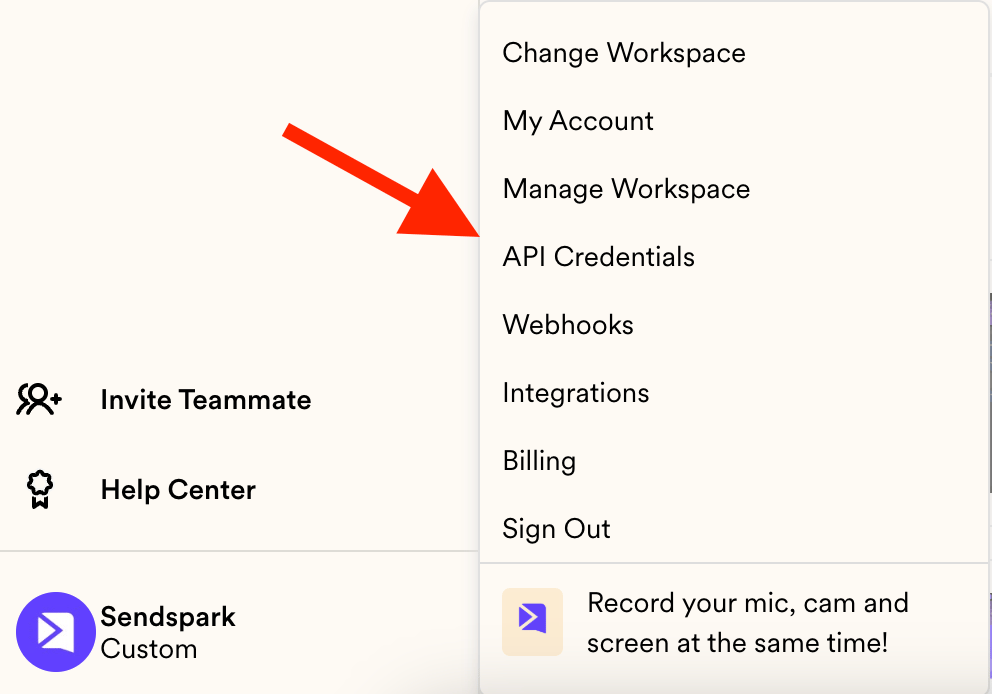
Or you can click on your menu and select API Credentials:
 Once there, you can use the GENERATE KEYS button in order to create a new key:
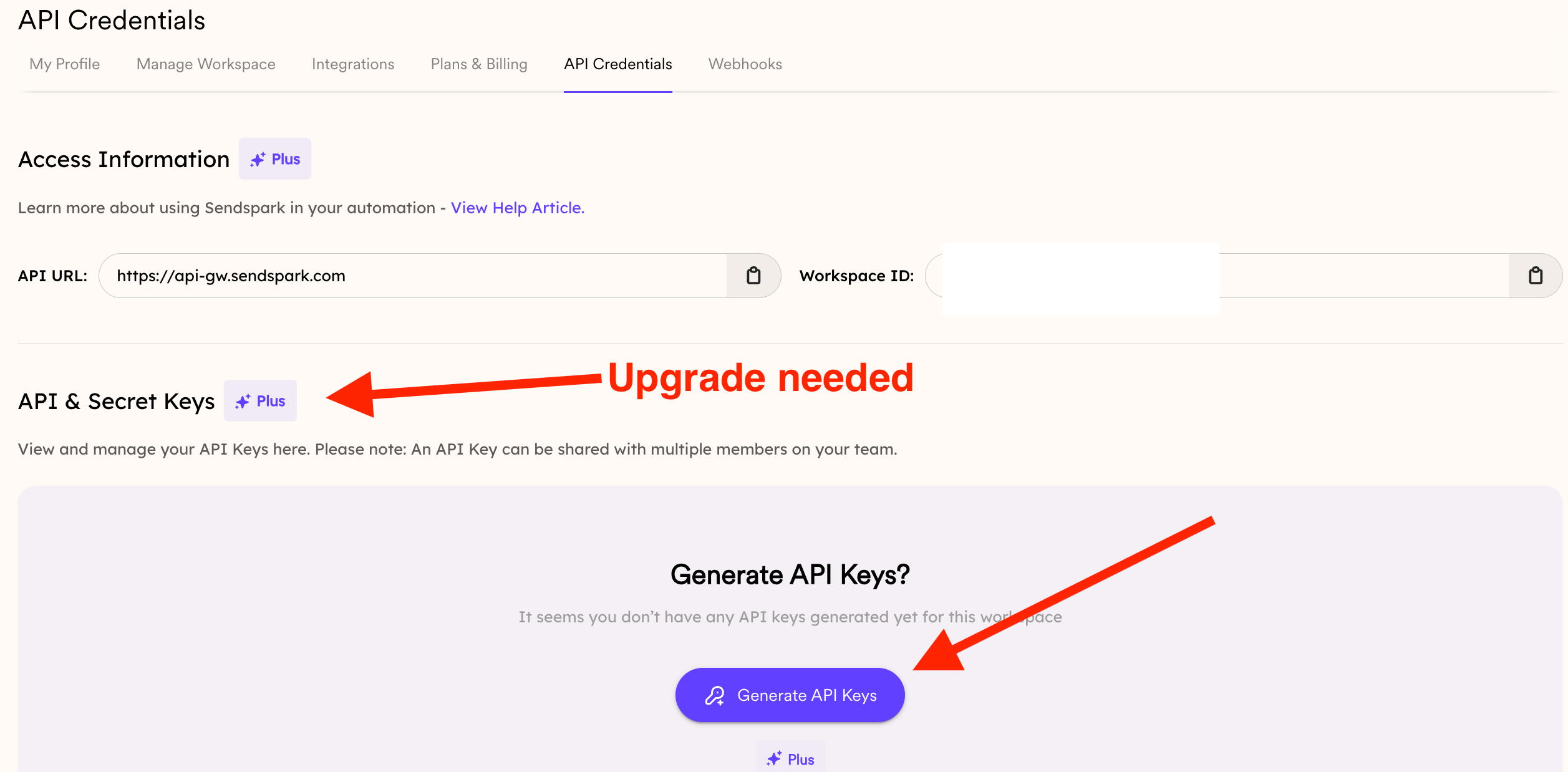 Keep in mind that if you see a badge next to a feature's title, it means an upgrade is required to use it.
If your current plan doesn’t include API Keys and the next tier doesn’t fully meet your needs, please reach out to us to discuss a more tailored option.
## Frequently asked questions
Open **API Credentials** from your account menu, or go directly to [sendspark.com/settings/api-credentials](https://sendspark.com/settings/api-credentials).
On the API Credentials page, click the **GENERATE KEYS** button to create a new key.
A badge next to a feature's title means an upgrade is required to use it. If your plan doesn't include API Keys, you'll need to upgrade to access them.
API keys authenticate your requests to the Sendspark API. For example, you can use them to [automatically create dynamic, AI-personalized videos via the API](/api-automatically-create-dynamic-videos-via-api).
Reach out to us and we can discuss a more tailored option for your needs.
*Updated July 2026.*
Keep in mind that if you see a badge next to a feature's title, it means an upgrade is required to use it.
If your current plan doesn’t include API Keys and the next tier doesn’t fully meet your needs, please reach out to us to discuss a more tailored option.
## Frequently asked questions
Open **API Credentials** from your account menu, or go directly to [sendspark.com/settings/api-credentials](https://sendspark.com/settings/api-credentials).
On the API Credentials page, click the **GENERATE KEYS** button to create a new key.
A badge next to a feature's title means an upgrade is required to use it. If your plan doesn't include API Keys, you'll need to upgrade to access them.
API keys authenticate your requests to the Sendspark API. For example, you can use them to [automatically create dynamic, AI-personalized videos via the API](/api-automatically-create-dynamic-videos-via-api).
Reach out to us and we can discuss a more tailored option for your needs.
*Updated July 2026.*