> ## Documentation Index
> Fetch the complete documentation index at: https://help.sendspark.com/llms.txt
> Use this file to discover all available pages before exploring further.
# 🎥 How to Create a Video Email Signature
> Add a personalized Sendspark video to your email signature to boost reply rates and stand out in every inbox. Easy step-by-step setup guide.
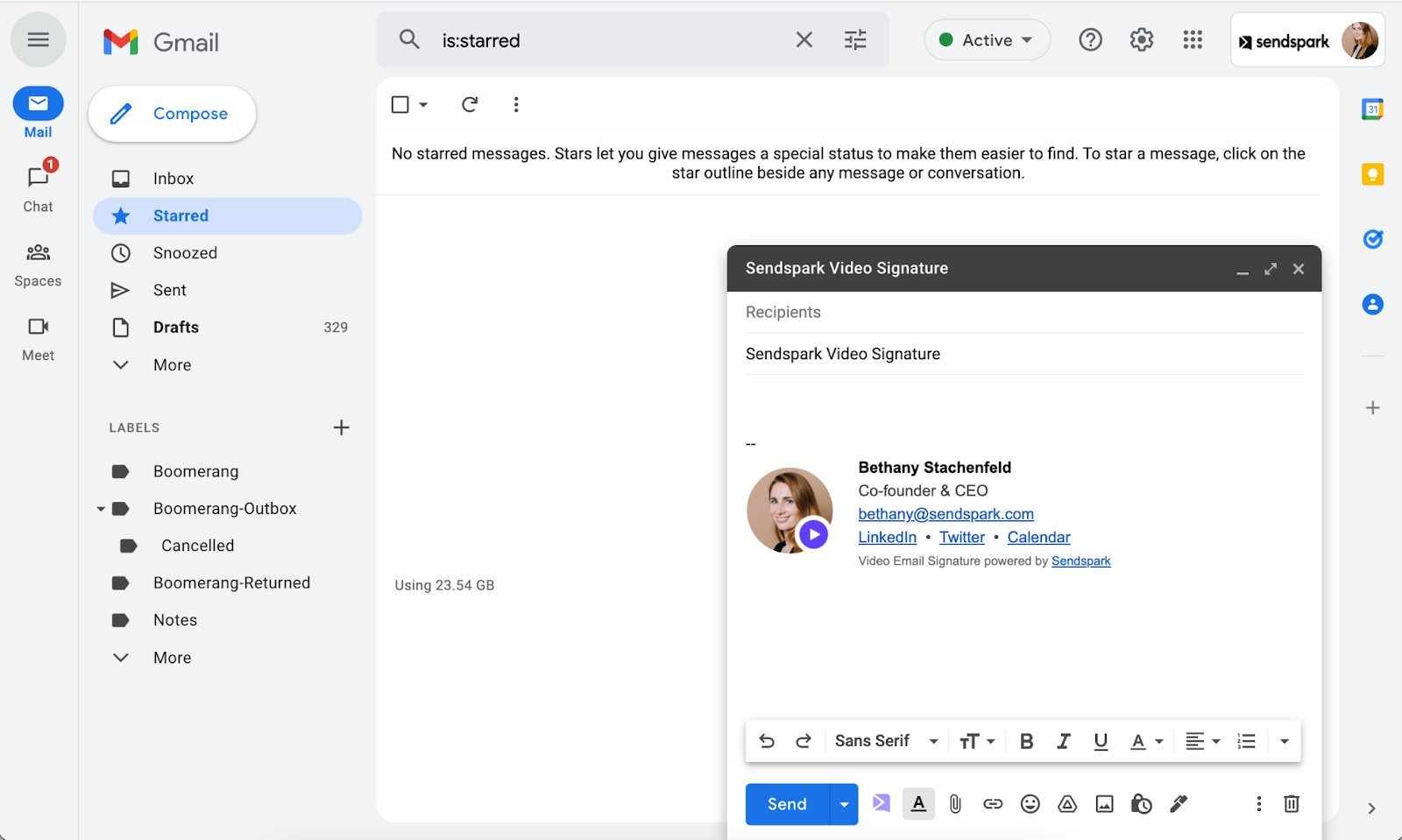
A video email signature adds a short recorded video to every email you send, so you stand out in crowded inboxes and drive more replies without recording a new video each time. Record a 20–40 second video in Sendspark, create a thumbnail from the provided templates, and add the hyperlinked image to your email client's signature.
## Key takeaways
* A video email signature keeps working on every email without you re-recording — even when you're not sending a full personalized video.
* Record a short **20–40 second** video, then customize the video page with a clear call-to-action (calendar link, LinkedIn, website, or "Send Me a Video").
* Create a thumbnail (headshot with a play button) using the Figma template (password: `sendmorevideos`) or the PSD template, and format the signature with the Google Doc template.
* You can re-record inside Sendspark later without changing the link, so the signature stays up to date.
## Want to add a personal touch to every email you send?
A video email signature helps you stand out in crowded inboxes, build trust instantly, and drive more replies — without recording a new video every time.
## ✨ Why Use a Video Email Signature?
If you send a lot of external emails — to customers, prospects, partners, candidates, or investors — a video signature can:
* Help people get to know you before a meeting
* Showcase your personality and communication style
* Increase replies (video can increase responses by up to 400%)
* Drive bookings with a built-in call-to-action
Even when you’re not sending a full personalized video, your signature keeps working for you.
***
## 🎬 Example: What Makes It Powerful?
With a video signature:
* People can see and hear you
* They feel more comfortable replying
* They can click directly to book time with you
It turns a normal email into a warmer introduction.
 ***
## 🛠 How to Create a Video Email Signature
Follow these simple steps:
***
## 1️⃣ Record Your Video
Use Sendspark (free plan available) to record:
* Webcam video
* Screen recording
* Webcam + floating bubble
Keep it short: **20–40 seconds**.
What to include:
* Quick introduction
* Who you help
* How you can help
* A simple next step
***
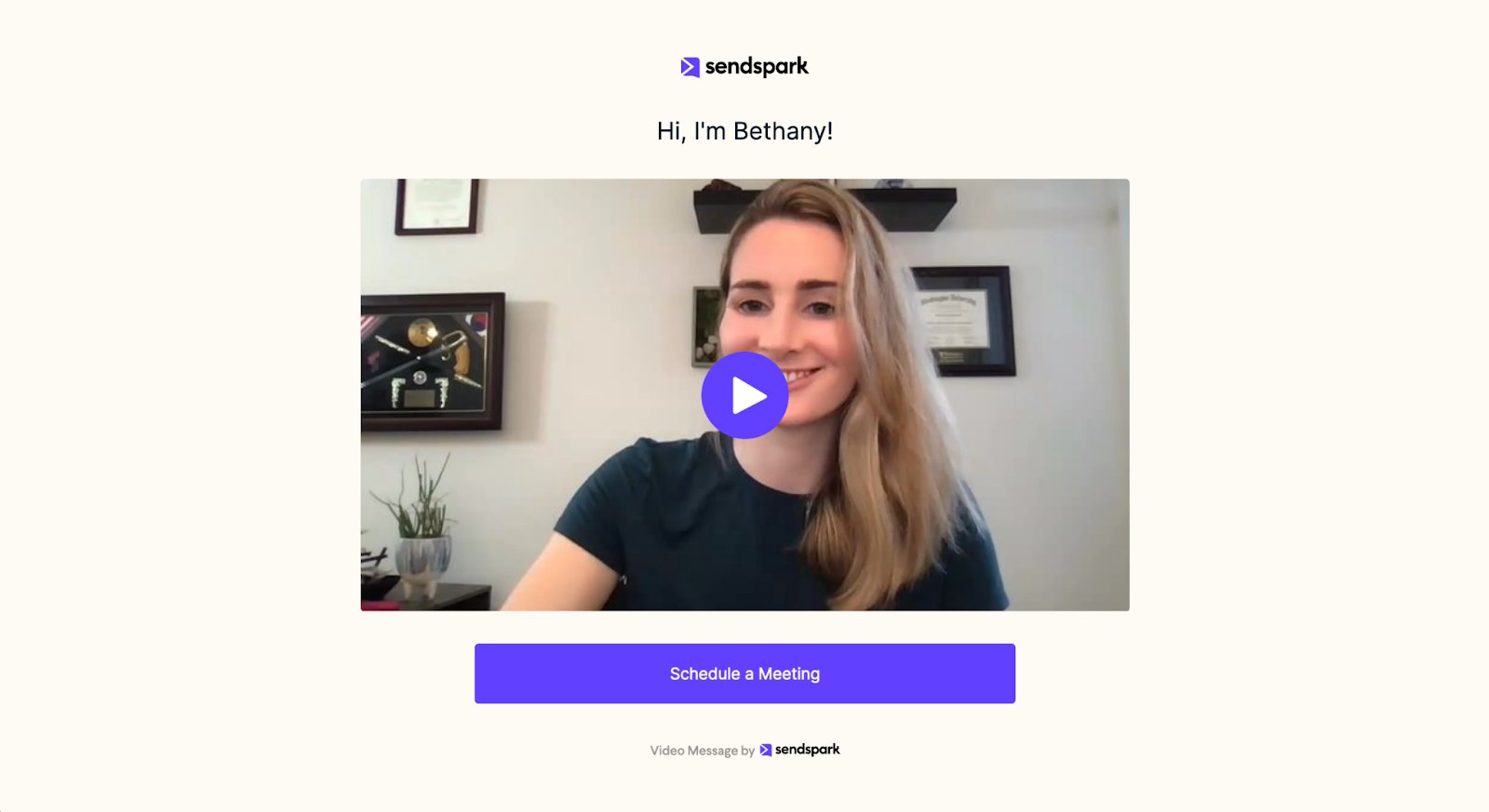
## 2️⃣ Customize Your Video Page
After recording:
* Add a clear call-to-action (CTA)
* Include your calendar link, LinkedIn, website, or “Send Me a Video” link
* Make sure the page reflects your brand
***
## 🛠 How to Create a Video Email Signature
Follow these simple steps:
***
## 1️⃣ Record Your Video
Use Sendspark (free plan available) to record:
* Webcam video
* Screen recording
* Webcam + floating bubble
Keep it short: **20–40 seconds**.
What to include:
* Quick introduction
* Who you help
* How you can help
* A simple next step
***
## 2️⃣ Customize Your Video Page
After recording:
* Add a clear call-to-action (CTA)
* Include your calendar link, LinkedIn, website, or “Send Me a Video” link
* Make sure the page reflects your brand
 ***
## 3️⃣ Create Your Video Thumbnail (Headshot with Play Button)
Your email signature will use an image that links to your video.
Recommended steps:
* Duplicate our Figma template (password: `sendmorevideos`)
* Upload your headshot
* Change the color to your brand color
* Export as a PNG
Prefer Photoshop? Use our PSD template instead.
***
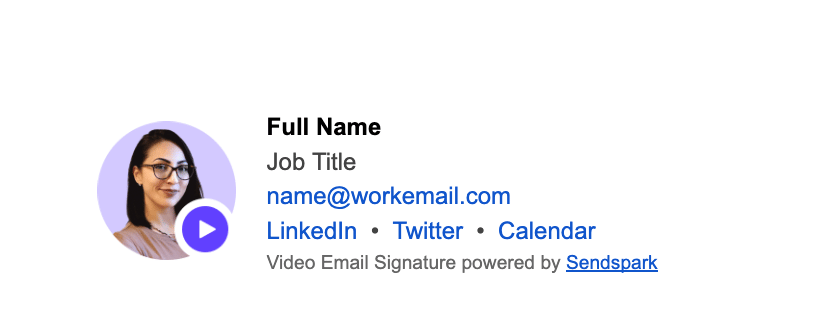
## 4️⃣ Use the Signature Template
* Duplicate the Google Doc template
* Replace the placeholder content with:
* Your name
* Title
* Links
* Video thumbnail (hyperlinked to your Sendspark video)
***
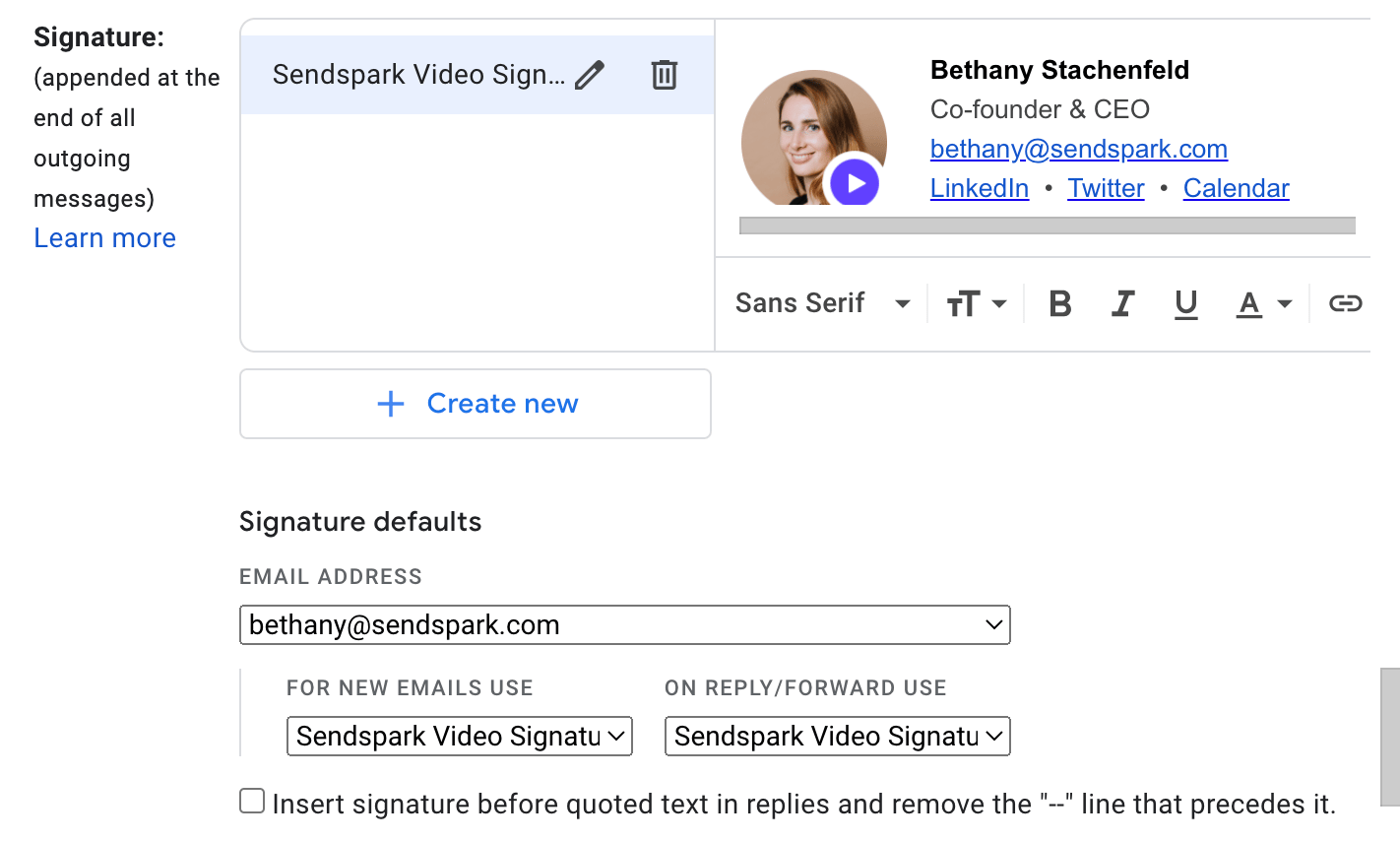
## 5️⃣ Add It to Your Email Client (Example: Gmail)
1. Go to **Settings → See All Settings → Signature**
2. Click **Create New**
3. Name your signature
4. Paste the content from the Google Doc
5. Set signature defaults
6. Click **Save Changes**
***
## 3️⃣ Create Your Video Thumbnail (Headshot with Play Button)
Your email signature will use an image that links to your video.
Recommended steps:
* Duplicate our Figma template (password: `sendmorevideos`)
* Upload your headshot
* Change the color to your brand color
* Export as a PNG
Prefer Photoshop? Use our PSD template instead.
***
## 4️⃣ Use the Signature Template
* Duplicate the Google Doc template
* Replace the placeholder content with:
* Your name
* Title
* Links
* Video thumbnail (hyperlinked to your Sendspark video)
***
## 5️⃣ Add It to Your Email Client (Example: Gmail)
1. Go to **Settings → See All Settings → Signature**
2. Click **Create New**
3. Name your signature
4. Paste the content from the Google Doc
5. Set signature defaults
6. Click **Save Changes**
 Send yourself a test email to make sure formatting looks correct.
***
## 💡 Tips for an Awesome Video Signature
## ✅ Keep it short
20–40 seconds is ideal.
## 👕 Dress season-neutral
Avoid clothing that makes the video feel outdated in a few months.
## 🔁 Update occasionally
You can re-record inside Sendspark without changing the link.
## 🎯 Always include a CTA
Examples:
* Book a meeting
* Connect on LinkedIn
* Visit your website
* Send you a video reply
## 🎉 Let your personality show
This is about being human — not polished or corporate.
***
## 🧰 Helpful Tools
* [Sendspark](https://www.sendspark.com/) – to record and host your video
* [Figma file](https://www.figma.com/file/8gdAHagkPCgLcQC1Qk4uOI/Sendspark---Video-Email-Signature-Template?node-id=0%3A1) (password: sendmorevideos) – to create your video headshot
* [Photoshop file template](https://blog.sendspark.com/hubfs/sendspark-video-email-signature-template.psd) – if you prefer Photoshop to Figma
* [Google doc template](https://docs.google.com/document/d/1EYvFEwJf4NYDAT6awo-mix6t07_0UglG1zJUEwsfH3Q/edit)– to format your video email signature
* [Brandon](https://www.linkedin.com/in/brandonescalante/) – still need help? Shoot us an email with your headshot and primary color, and Brandon has offered to help :)
Need help? Email us your headshot and brand color — we’re happy to assist.
***
## 🚀 Final Thoughts
If you create a video email signature once and it improves every email you send by even 1%, the long-term impact is massive.
Set it up once. Let it work for you every day.
Happy recording! 🎥
***
## Frequently asked questions
Keep it short — **20–40 seconds** is ideal. Include a quick introduction, who you help, how you can help, and a simple next step.
No. That's the point of a video signature — it reuses one video across every email you send, so it keeps working for you even when you're not sending a full personalized video.
Yes. You can re-record inside Sendspark without changing the link, so your signature updates automatically. Dressing season-neutral also helps keep the video from feeling outdated.
A Figma template (password: `sendmorevideos`) and a Photoshop (PSD) template for creating your video thumbnail, plus a Google Doc template for formatting the signature itself. Duplicate the ones you need and replace the placeholder content.
Go to **Settings → See All Settings → Signature**, click **Create New**, name your signature, paste the content from the Google Doc, set your signature defaults, and click **Save Changes**. Send yourself a test email to check the formatting.
*Updated July 2026.*
Send yourself a test email to make sure formatting looks correct.
***
## 💡 Tips for an Awesome Video Signature
## ✅ Keep it short
20–40 seconds is ideal.
## 👕 Dress season-neutral
Avoid clothing that makes the video feel outdated in a few months.
## 🔁 Update occasionally
You can re-record inside Sendspark without changing the link.
## 🎯 Always include a CTA
Examples:
* Book a meeting
* Connect on LinkedIn
* Visit your website
* Send you a video reply
## 🎉 Let your personality show
This is about being human — not polished or corporate.
***
## 🧰 Helpful Tools
* [Sendspark](https://www.sendspark.com/) – to record and host your video
* [Figma file](https://www.figma.com/file/8gdAHagkPCgLcQC1Qk4uOI/Sendspark---Video-Email-Signature-Template?node-id=0%3A1) (password: sendmorevideos) – to create your video headshot
* [Photoshop file template](https://blog.sendspark.com/hubfs/sendspark-video-email-signature-template.psd) – if you prefer Photoshop to Figma
* [Google doc template](https://docs.google.com/document/d/1EYvFEwJf4NYDAT6awo-mix6t07_0UglG1zJUEwsfH3Q/edit)– to format your video email signature
* [Brandon](https://www.linkedin.com/in/brandonescalante/) – still need help? Shoot us an email with your headshot and primary color, and Brandon has offered to help :)
Need help? Email us your headshot and brand color — we’re happy to assist.
***
## 🚀 Final Thoughts
If you create a video email signature once and it improves every email you send by even 1%, the long-term impact is massive.
Set it up once. Let it work for you every day.
Happy recording! 🎥
***
## Frequently asked questions
Keep it short — **20–40 seconds** is ideal. Include a quick introduction, who you help, how you can help, and a simple next step.
No. That's the point of a video signature — it reuses one video across every email you send, so it keeps working for you even when you're not sending a full personalized video.
Yes. You can re-record inside Sendspark without changing the link, so your signature updates automatically. Dressing season-neutral also helps keep the video from feeling outdated.
A Figma template (password: `sendmorevideos`) and a Photoshop (PSD) template for creating your video thumbnail, plus a Google Doc template for formatting the signature itself. Duplicate the ones you need and replace the placeholder content.
Go to **Settings → See All Settings → Signature**, click **Create New**, name your signature, paste the content from the Google Doc, set your signature defaults, and click **Save Changes**. Send yourself a test email to check the formatting.
*Updated July 2026.*