> ## Documentation Index
> Fetch the complete documentation index at: https://help.sendspark.com/llms.txt
> Use this file to discover all available pages before exploring further.
# How to Cancel Sendspark
> Learn how to cancel your Sendspark subscription through the billing portal and what happens to your account and videos after canceling.
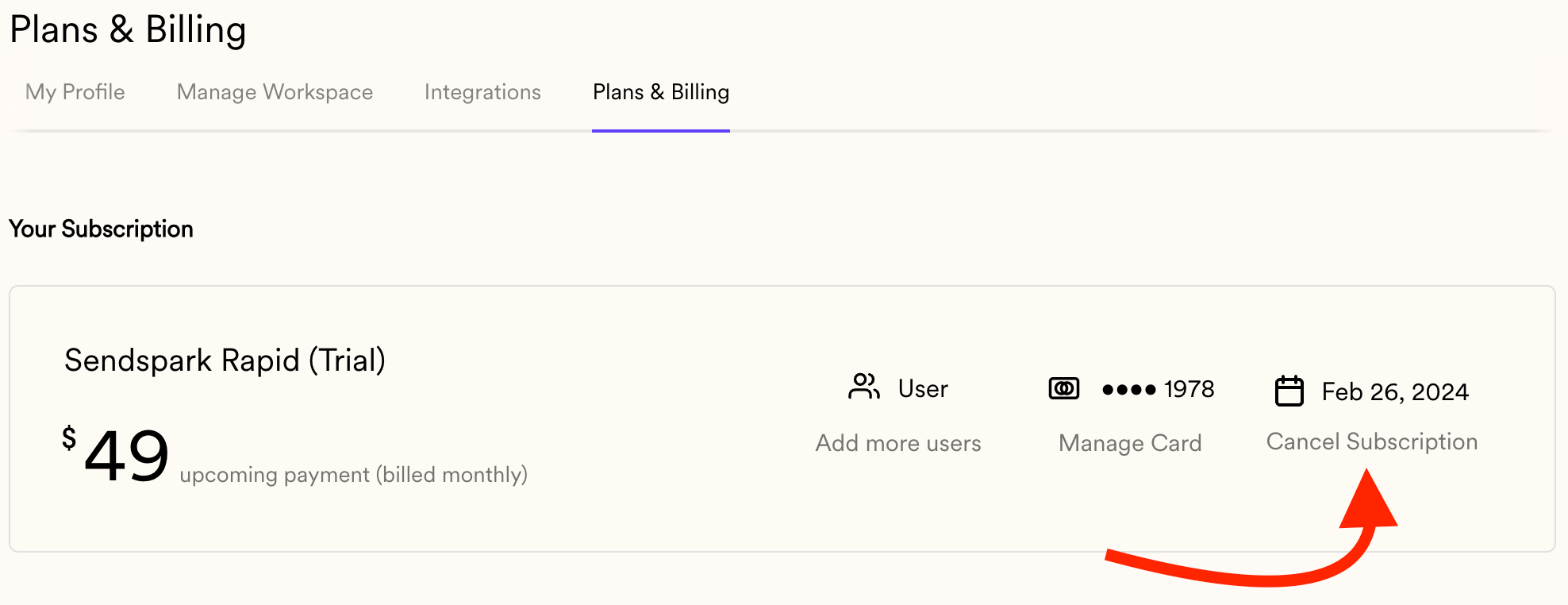
You can cancel your Sendspark subscription anytime from your billing portal. After you cancel, you keep access through the end of your current billing period and won't be charged again. Once the period ends, you can't edit videos or use your account until you reactivate, though videos you've already shared will still play for recipients. Sendspark does not issue refunds.
## Key takeaways
* Cancel anytime in your **billing portal**.
* You keep access **until the end of the current billing period**, then you won't be charged again.
* After cancellation you **can't edit videos or use the account** until you reactivate or choose a plan.
* Videos you've already shared **still play** for recipients; Sendspark **does not issue refunds**.
You can cancel your Sendspark subscription in your [billing portal](https://sendspark.com/settings/billing).
 ## What happens if I cancel before the end of a billing period?
When you cancel your trial or active subscription, then you will still be able to use Sendspark through the remainder of your billing period. At the end of the billing period, you will not be charged again.\
## What happens to my account after my subscription has been cancelled?
Once your subscription is cancelled, you will not be able to use your Sendspark account.
Your existing videos will still play for people you've sent them to, but you will not be able to edit them or do anything in your account until you reactivate or choose another plan.
(Learn more about [Sendspark pricing plans](http://sendspark.com/pricing)).
## Can I get a refund?
Since we offer flexible month-to-month pricing, we do not issue refunds.
## Frequently asked questions
You can cancel your Sendspark subscription in your [billing portal](https://sendspark.com/settings/billing).
No. When you cancel your trial or active subscription, you can still use Sendspark through the remainder of your billing period. At the end of that period, you won't be charged again.
Yes. Your existing videos will still play for the people you've sent them to, but you won't be able to edit them or do anything else in your account until you reactivate or choose another plan.
No. Since Sendspark offers flexible month-to-month pricing, we do not issue refunds.
*Updated July 2026.*
## What happens if I cancel before the end of a billing period?
When you cancel your trial or active subscription, then you will still be able to use Sendspark through the remainder of your billing period. At the end of the billing period, you will not be charged again.\
## What happens to my account after my subscription has been cancelled?
Once your subscription is cancelled, you will not be able to use your Sendspark account.
Your existing videos will still play for people you've sent them to, but you will not be able to edit them or do anything in your account until you reactivate or choose another plan.
(Learn more about [Sendspark pricing plans](http://sendspark.com/pricing)).
## Can I get a refund?
Since we offer flexible month-to-month pricing, we do not issue refunds.
## Frequently asked questions
You can cancel your Sendspark subscription in your [billing portal](https://sendspark.com/settings/billing).
No. When you cancel your trial or active subscription, you can still use Sendspark through the remainder of your billing period. At the end of that period, you won't be charged again.
Yes. Your existing videos will still play for the people you've sent them to, but you won't be able to edit them or do anything else in your account until you reactivate or choose another plan.
No. Since Sendspark offers flexible month-to-month pricing, we do not issue refunds.
*Updated July 2026.*