> ## Documentation Index
> Fetch the complete documentation index at: https://help.sendspark.com/llms.txt
> Use this file to discover all available pages before exploring further.
# Growth-X — Send Personalized Videos at Scale
> Learn how to send personalized Sendspark videos through Growth-X. Integrate Sendspark with Growth-X for LinkedIn video outreach at scale.
To send personalized videos in Growth-X, record or upload one video to Sendspark, customize the landing page and thumbnail with personalization tokens, then click Share and select Growth-X. Paste the snippet into your Growth-X message and send. Sendspark automatically personalizes that single video for each recipient in your LinkedIn outreach.
## Key takeaways
* Create one video in Sendspark and it is automatically personalized for each person you reach out to through Growth-X.
* Use [personalization tokens](/use-merge-tags-to-personalize-videos-at-scale) on the [landing page](/customize-your-video-landing-page) and [thumbnail](/how-to-edit-video-thumbnails) to add each viewer's information automatically.
* Share by clicking **Share**, selecting **Growth-X**, then pasting into your Growth-X message. If Growth-X isn't listed, [modify the share modal](/how-to-modify-shortcuts-on-share-modal).
* Send videos as a follow-up after connecting, not in connection requests. Recipients only see the video preview if they've accepted your LinkedIn connection or InMail request.
## Why Send Personalized Videos in Growth-X
Sending personalized videos in Growth-X can help you see better results from LinkedIn automation. (Nothing beats a personal touch!)
The Sendspark Growth-X integration makes it easy to create one video, and automatically personalize it for each person you're reaching out to via Growth-X.
## How to Send Mass Personalized Videos in Growth-X
Watch the video or follow the steps below!
1. [Record](/record-yourself) or [upload](/upload-a-video-to-sendspark) your video to Sendspark
2. Customize the [video landing page](/customize-your-video-landing-page) and [video thumbnail](/how-to-edit-video-thumbnails) (you can use [personalization tokens](/use-merge-tags-to-personalize-videos-at-scale) to automatically add your viewer's information to the video)
3. Click\*\*"share"\*\*
4. Select **"Growth-X"**(If you don't see Growth-X, follow these steps to [modify the share modal](/how-to-modify-shortcuts-on-share-modal))
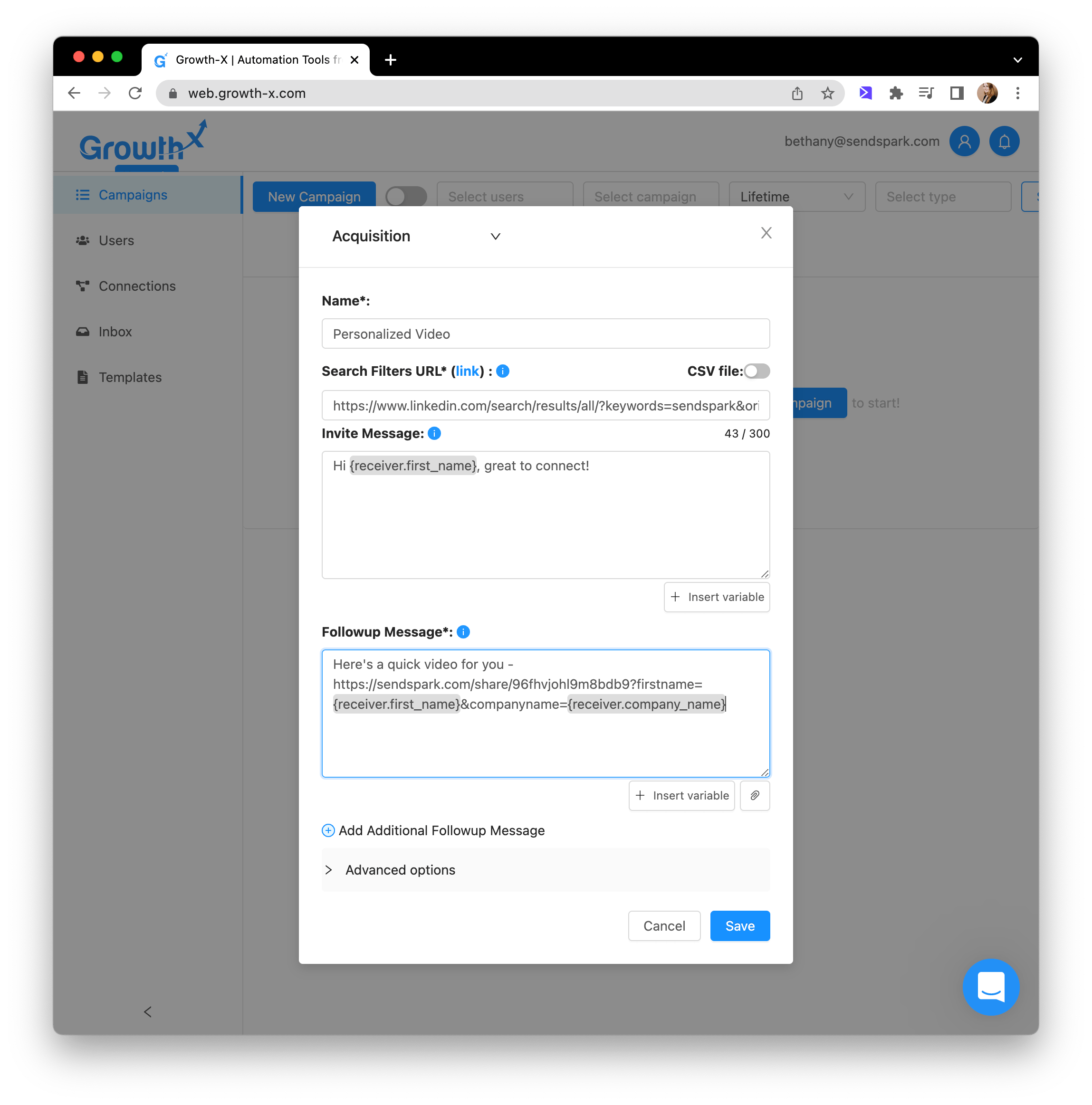
5. Paste into your message on Growth-X
6. Send!
## Note About Sending Videos on LinkedIn
In order for your recipient to see the preview of your video, and not just a link, they must have either (A) accepted your LinkedIn request, or (B) accepted your InMail request.
For this reason, we do NOT recommend sending videos in connection requests. **Videos are better used as a follow up message, after you are already connected.**
## Frequently asked questions
No. You record or upload one video to Sendspark, and it is automatically personalized for each recipient you reach out to through Growth-X. Personalization tokens pull in each viewer's information when they watch.
The Growth-X shortcut may be disabled in your share modal. Follow the steps to [modify the share modal](/how-to-modify-shortcuts-on-share-modal) and enable the Growth-X shortcut so it appears when you click Share.
For a recipient to see the video preview rather than just a link, they must have accepted either your LinkedIn connection request or your InMail request. Until then, LinkedIn shows the raw link.
We don't recommend it. Because the preview only appears once someone has accepted your connection or InMail request, videos work best as a follow-up message after you're already connected.
*Updated July 2026.*
 ## Note About Sending Videos on LinkedIn
In order for your recipient to see the preview of your video, and not just a link, they must have either (A) accepted your LinkedIn request, or (B) accepted your InMail request.
For this reason, we do NOT recommend sending videos in connection requests. **Videos are better used as a follow up message, after you are already connected.**
## Frequently asked questions
## Note About Sending Videos on LinkedIn
In order for your recipient to see the preview of your video, and not just a link, they must have either (A) accepted your LinkedIn request, or (B) accepted your InMail request.
For this reason, we do NOT recommend sending videos in connection requests. **Videos are better used as a follow up message, after you are already connected.**
## Frequently asked questions