> ## Documentation Index
> Fetch the complete documentation index at: https://help.sendspark.com/llms.txt
> Use this file to discover all available pages before exploring further.
# Get Started with Sendspark Business Plan
> Learn how to set up Sendspark Business Plan with admin dashboard, white-label videos, custom domains, and team templates for success.
To get set up after upgrading, use four features: reference the Admin Dashboard for team usage insights, turn off Sendspark badges to white-label your videos, set up a custom domain for a fully branded experience, and create templates your team can reuse. You can configure most of these from your workspace settings.
## Key takeaways
* **Admin Dashboard** ([sendspark.com/admin](https://sendspark.com/admin)) shows total videos, plays, likes, and CTA clicks, videos per team member, and your top 10 best-performing videos.
* **White-label** your videos by toggling off Sendspark badges in [workspace settings](https://app.sendspark.com/settings/workspace), removing the "video message by Sendspark" and "Request videos with Sendspark" badges and other references.
* **Custom domain** lets viewers enjoy a 100% branded experience; set it up in workspace settings (see [setting up CNAME](/use-a-custom-domain-for-videos)).
* **Templates** let you standardize sales outreach, welcome videos, and other communication for your team in the [templates library](https://sendspark.com/templates).
Thank you for upgrading to Sendspark Business! To get started, you can read this article or watch the video below.
## 1. Reference the Admin Dashboard
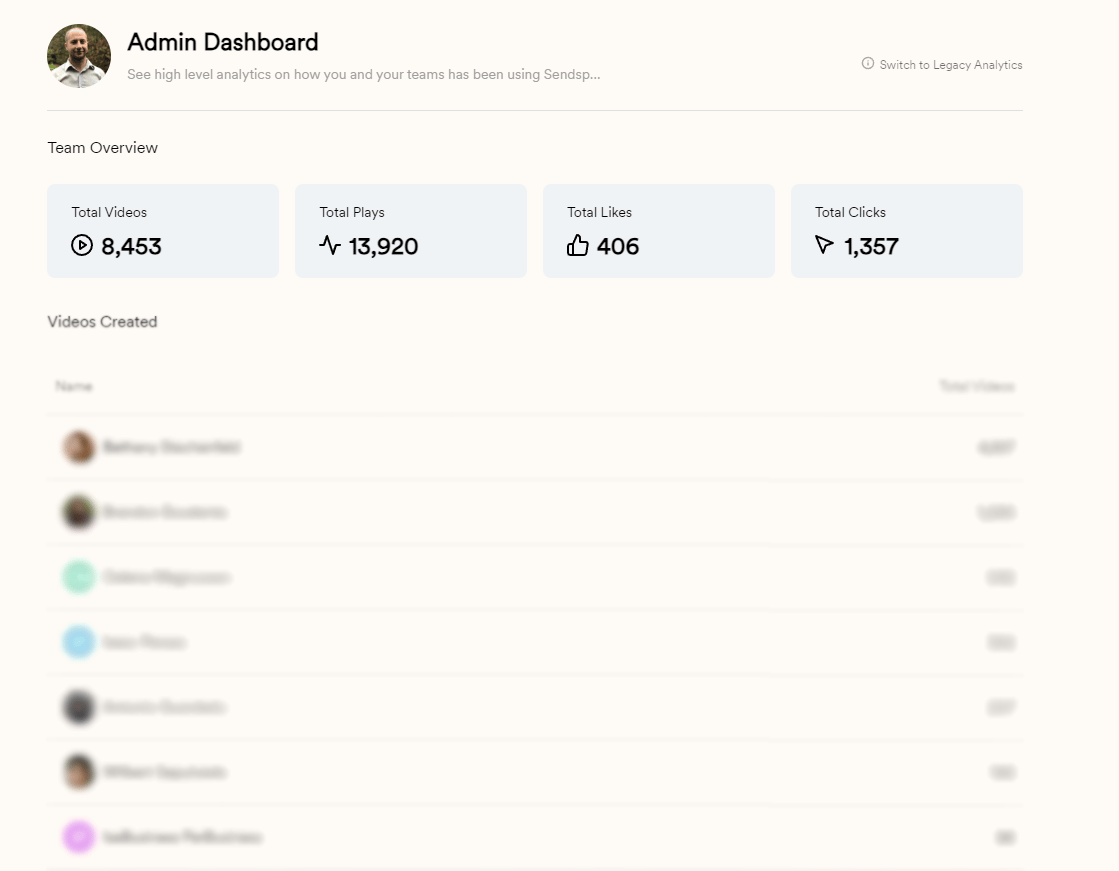
Use your [Admin Dashboard](https://sendspark.com/admin) to gain insight into team usage and best performing videos.
Here, you will see:
* Total videos created, video plays, video likes, and call-to-action clicks for all time
* Total videos created by team member
* Top 10 best performing videos
## 2. Turn Off Sendspark Badges (White-label Videos)
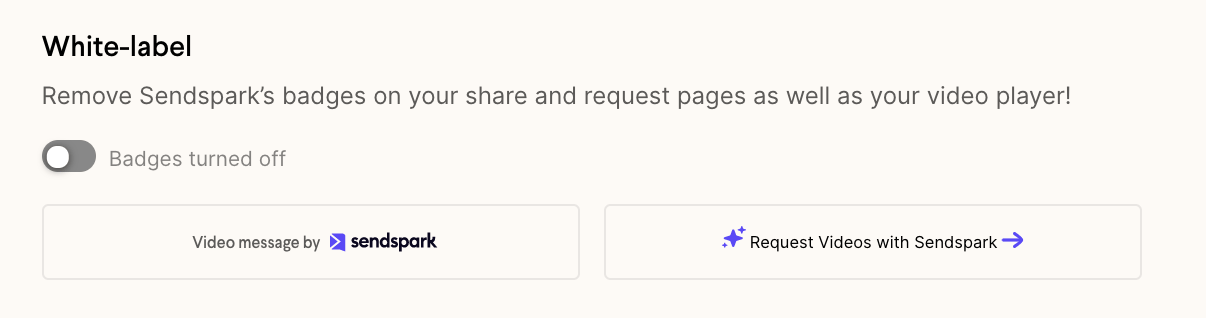
From your [workspace settings](https://app.sendspark.com/settings/workspace), you can toggle off Sendspark badges to white-label Sendspark.
Not only will this remove the "video message by Sendspark" and "Request videos with Sendspark" badges, but it will also hide all references to Sendspark to Sendspark on your video share and request pages. This helps you deliver a beautiful, polished experience to your customers.
## 3. Setup a Custom Domain
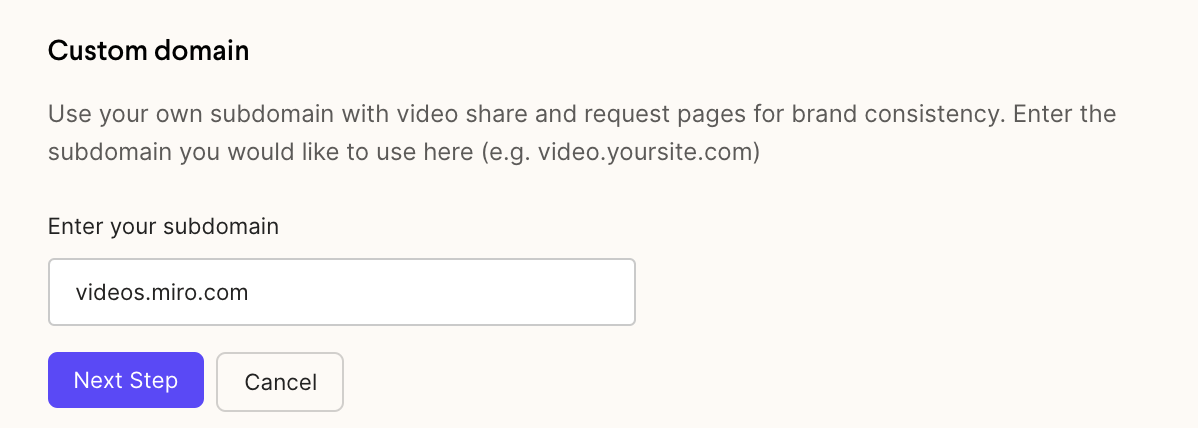
Use your own domain with Sendspark, so your viewers can enjoy a 100% branded experience.
You can also set this up in your [workspace settings](https://app.sendspark.com/settings/workspace). (View a more detailed article on [setting up CNAME here](/use-a-custom-domain-for-videos)).
## 4. Create Templates
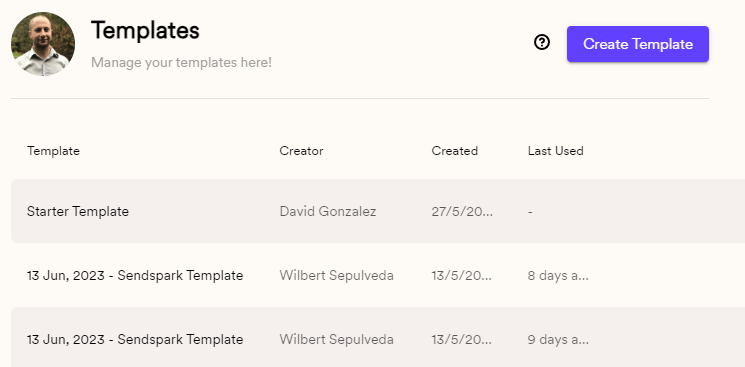
Want to create a template for sales outreach, welcome videos, or other customer communication? Customize the templates that your team members see in you team's [templates library](https://sendspark.com/templates).
## Frequently asked questions
Your [Admin Dashboard](https://sendspark.com/admin) gives insight into team usage and best-performing videos: total videos created, plays, likes, and call-to-action clicks for all time, totals by team member, and your top 10 best-performing videos.
From your [workspace settings](https://app.sendspark.com/settings/workspace), toggle off Sendspark badges. This removes the "video message by Sendspark" and "Request videos with Sendspark" badges and hides other references to Sendspark on your video share and request pages.
Yes. Set up a custom domain from your [workspace settings](https://app.sendspark.com/settings/workspace) so viewers get a 100% branded experience. See the detailed guide on [setting up your CNAME](/use-a-custom-domain-for-videos).
Templates let you create reusable formats for sales outreach, welcome videos, or other customer communication. Customize the ones your team members see in your [templates library](https://sendspark.com/templates).
*Updated July 2026.*
 Here, you will see:
* Total videos created, video plays, video likes, and call-to-action clicks for all time
* Total videos created by team member
* Top 10 best performing videos
## 2. Turn Off Sendspark Badges (White-label Videos)
From your [workspace settings](https://app.sendspark.com/settings/workspace), you can toggle off Sendspark badges to white-label Sendspark.
Here, you will see:
* Total videos created, video plays, video likes, and call-to-action clicks for all time
* Total videos created by team member
* Top 10 best performing videos
## 2. Turn Off Sendspark Badges (White-label Videos)
From your [workspace settings](https://app.sendspark.com/settings/workspace), you can toggle off Sendspark badges to white-label Sendspark.
 Not only will this remove the "video message by Sendspark" and "Request videos with Sendspark" badges, but it will also hide all references to Sendspark to Sendspark on your video share and request pages. This helps you deliver a beautiful, polished experience to your customers.
## 3. Setup a Custom Domain
Use your own domain with Sendspark, so your viewers can enjoy a 100% branded experience.
Not only will this remove the "video message by Sendspark" and "Request videos with Sendspark" badges, but it will also hide all references to Sendspark to Sendspark on your video share and request pages. This helps you deliver a beautiful, polished experience to your customers.
## 3. Setup a Custom Domain
Use your own domain with Sendspark, so your viewers can enjoy a 100% branded experience.
 You can also set this up in your [workspace settings](https://app.sendspark.com/settings/workspace). (View a more detailed article on [setting up CNAME here](/use-a-custom-domain-for-videos)).
## 4. Create Templates
Want to create a template for sales outreach, welcome videos, or other customer communication? Customize the templates that your team members see in you team's [templates library](https://sendspark.com/templates).
You can also set this up in your [workspace settings](https://app.sendspark.com/settings/workspace). (View a more detailed article on [setting up CNAME here](/use-a-custom-domain-for-videos)).
## 4. Create Templates
Want to create a template for sales outreach, welcome videos, or other customer communication? Customize the templates that your team members see in you team's [templates library](https://sendspark.com/templates).
 ## Frequently asked questions