> ## Documentation Index
> Fetch the complete documentation index at: https://help.sendspark.com/llms.txt
> Use this file to discover all available pages before exploring further.
# Filter Videos by Plays, Likes, and CTA Clicked
> Learn how to filter videos by plays, likes, and CTA clicks in Sendspark to quickly identify your most engaging video content.
To filter videos by engagement in Sendspark, navigate to the video library or folder you want, then under **Filters** choose CTA Clicked, Liked, or Played. This shows only videos that have had that activity. Refresh the page to clear the filters.
## Key takeaways
* Filters let you see only videos that have had activity, so you can focus on your most-engaged content.
* **CTA Clicked** shows only videos where a call-to-action button was clicked.
* **Liked** shows only videos that received a thumbs up from a viewer; **Played** shows only videos played by someone other than yourself.
* Refresh the page to clear the filters. You can also [search by title](/how-to-search-videos-in-sendspark) or [filter by creators](/filter-videos-by-creators).
Sendspark makes it easy to filter for videos that have been engaged with, so you can see only videos that have had activity.
## How to Filter Videos
1. Navigate to the correct video library or folder 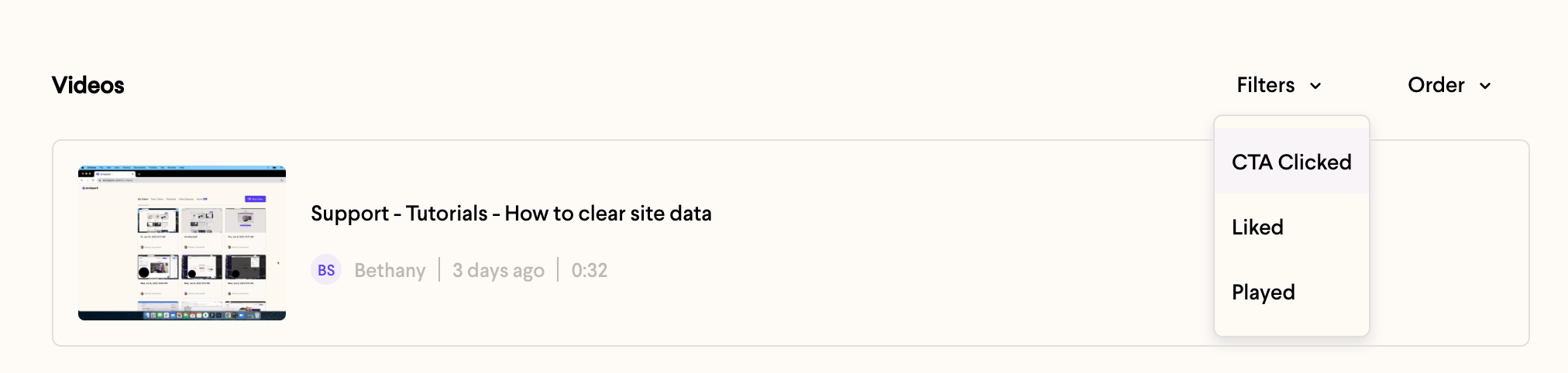 2. Under **Filters**, select the filter you would like to use:
3. \*\*CTA Clicked:\*\*shows only videos that have had a call-to-action button clicked on.
4. **Liked**: shows only videos that have a received a thumbs up from a viewer
5. **Played**: shows only videos that have been played by someone other than yourself
6. Refresh the page to clear filters
## Frequently asked questions
**CTA Clicked** shows only videos that have had a call-to-action button clicked. **Liked** shows only videos that received a thumbs up from a viewer. **Played** shows only videos that have been played by someone other than yourself.
No. The **Played** filter shows videos that have been played by someone other than yourself, so your own views don't cause a video to appear.
Refresh the page to clear any filters you've applied and return to your full video list.
Yes. You can also [search videos by title](/how-to-search-videos-in-sendspark) or [filter by creators](/filter-videos-by-creators) in your Team Library to narrow down your library.
*Updated July 2026.*
2. Under **Filters**, select the filter you would like to use:
3. \*\*CTA Clicked:\*\*shows only videos that have had a call-to-action button clicked on.
4. **Liked**: shows only videos that have a received a thumbs up from a viewer
5. **Played**: shows only videos that have been played by someone other than yourself
6. Refresh the page to clear filters
## Frequently asked questions
**CTA Clicked** shows only videos that have had a call-to-action button clicked. **Liked** shows only videos that received a thumbs up from a viewer. **Played** shows only videos that have been played by someone other than yourself.
No. The **Played** filter shows videos that have been played by someone other than yourself, so your own views don't cause a video to appear.
Refresh the page to clear any filters you've applied and return to your full video list.
Yes. You can also [search videos by title](/how-to-search-videos-in-sendspark) or [filter by creators](/filter-videos-by-creators) in your Team Library to narrow down your library.
*Updated July 2026.*