> ## Documentation Index
> Fetch the complete documentation index at: https://help.sendspark.com/llms.txt
> Use this file to discover all available pages before exploring further.
# Delete a Folder
> Learn how to delete folders in Sendspark by emptying them first, then using the ellipses menu to remove unwanted folder organization.
To delete a folder in Sendspark, first make sure it's empty by deleting the videos inside it or moving them to another folder. Then hover over the folder, click the ellipses that appears, and select **Delete**.
## Key takeaways
* A folder must be empty of all videos before it can be deleted.
* Empty a folder by deleting the videos inside it or moving them into a different folder.
* To delete, hover over the folder, click the ellipses, and select **Delete**.
You can delete folders anytime in Sendspark.
***
**Please note: your folder must be empty of all videos before you delete it.**
To empty your folder, you can either delete the videos inside or move them into a different folder.
***
## How to Delete a Folder
1. **Hover** over the folder you would like to delete
2. Click the **ellipses** that appears
3. Select **Delete**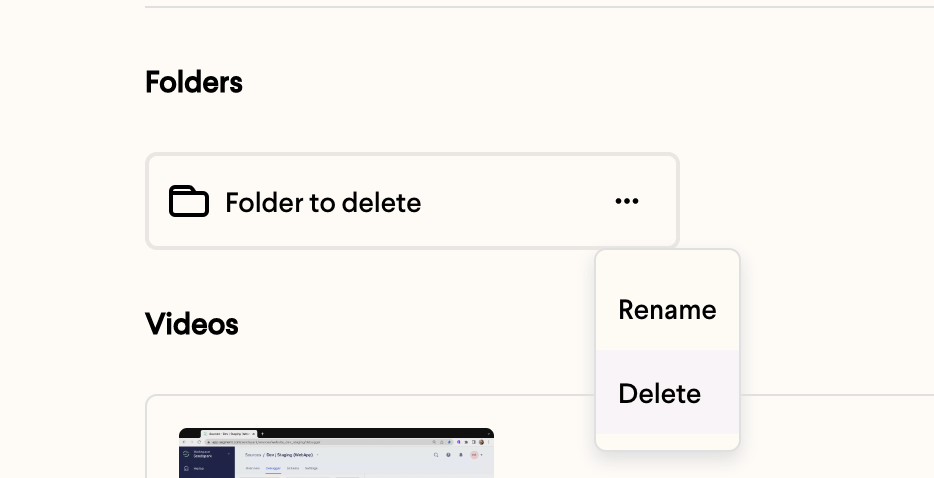 ***
## Frequently asked questions
Your folder must be empty of all videos before you can delete it. Remove or move the videos inside it first, then try deleting the folder again.
You can either [delete the videos](/how-to-delete-a-video) inside the folder or [move them into a different folder](/how-to-move-videos-between-folders).
Because a folder must be empty before it can be deleted, you decide what happens to the videos first — you either delete them or move them somewhere else, so no videos are lost unexpectedly when you delete the folder.
*Updated July 2026.*
***
## Frequently asked questions
Your folder must be empty of all videos before you can delete it. Remove or move the videos inside it first, then try deleting the folder again.
You can either [delete the videos](/how-to-delete-a-video) inside the folder or [move them into a different folder](/how-to-move-videos-between-folders).
Because a folder must be empty before it can be deleted, you decide what happens to the videos first — you either delete them or move them somewhere else, so no videos are lost unexpectedly when you delete the folder.
*Updated July 2026.*