> ## Documentation Index
> Fetch the complete documentation index at: https://help.sendspark.com/llms.txt
> Use this file to discover all available pages before exploring further.
# Bulk Video Downloads with Agentic Workflows
> Learn how to download multiple videos at once using Agentic Workflows, Google Sheets, and JDownloader2 for bulk video campaigns.
To download every video in a Dynamic Video campaign at once, set up an Agentic Workflow that writes each video's download links to a Google Sheet, then use a download manager like JDownloader2 to grab them in bulk. You trigger on the VIDEO READY TO DOWNLOAD event, map the high, medium, and low resolution links, and start generating videos.
## Key takeaways
* You'll need a Dynamic Video campaign, an Agentic Workflow, a Google Sheet, and a download manager such as JDownloader2.
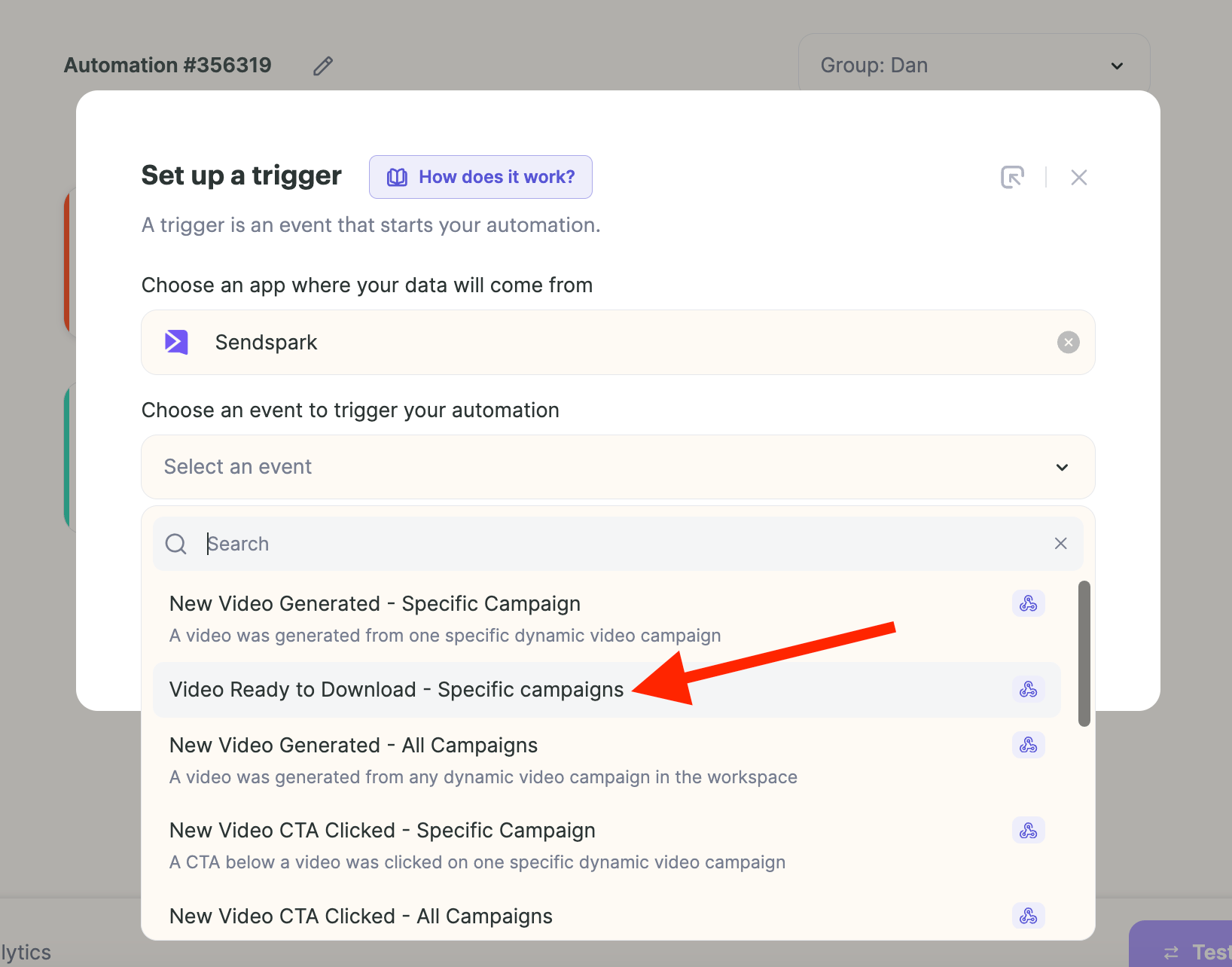
* The trigger is **Sendspark → VIDEO READY TO DOWNLOAD - SPECIFIC CAMPAIGN**, pointed at your chosen Dynamic Campaign.
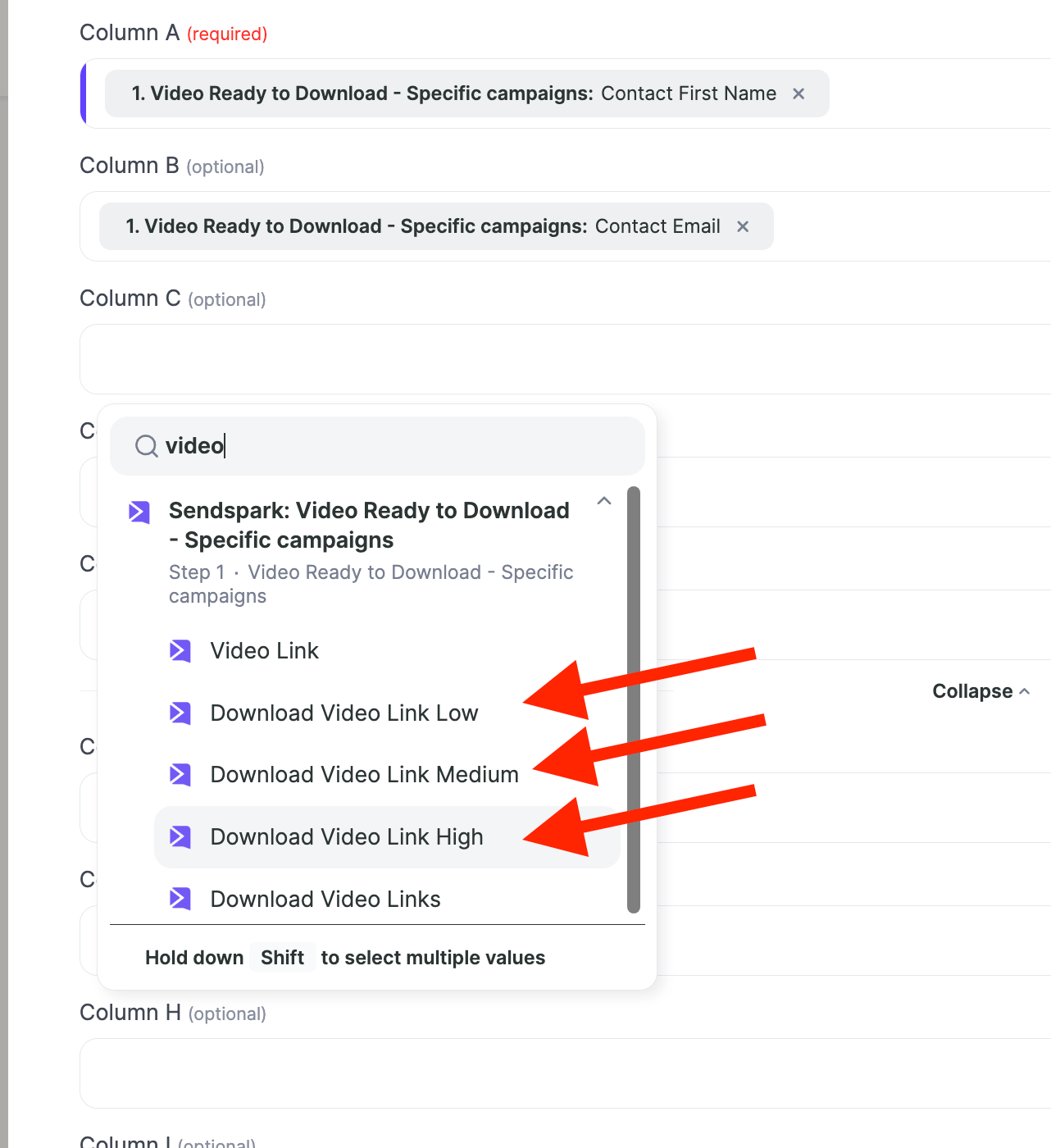
* Include all three resolution columns (high, medium, low) in your Google Sheet so you always get a usable output regardless of camera quality.
* Once the links are in the sheet, copy the download-link column into JDownloader2, which auto-detects them and downloads every file.
If you're running a dynamic video campaign and want to download multiple videos at once, this guide will walk you through a simple way to do it using **Agentic Workflows** and a download manager like **JDownloader2**.
***
## 🛠️ What You’ll Need
* A Dynamic Video Campaign (with *non-generated* videos)
* An Agentic Workflow
* A **Google Sheet** with headers: `email` and `download link`
* A download manager (e.g., [JDownloader2](http://jdownloader.org/))
***
## ✅ Step-by-Step Instructions
## 1. Set Up a Generate Video Trigger
1. Go to [Agentic Workflows](https://sendspark.com/agentic-workflows) and create a new Automation.
2. **Trigger** → Search for **Sendspark --> Select Event: VIDEO READY TO DOWNLOAD - SPECIFIC CAMPAIGN**
3. Choose **your Dynamic Campaign**.
 ## 2. Add an action to follow that Trigger
1. Create Google Sheets file and add, at least, the following headers: First name, Email, High resolution, Medium resolution, Low resolution. (Depending on the quality of your camera and the type of video you produce, it will create different levels of resolution, so it's important to have all three available to make sure you always get an output)
2. Go back to Agentic Workflows and on the second step, look for Google Sheets
3. Select your Google Sheet file, and select the option ADD/UPDATE A ROW:
## 2. Add an action to follow that Trigger
1. Create Google Sheets file and add, at least, the following headers: First name, Email, High resolution, Medium resolution, Low resolution. (Depending on the quality of your camera and the type of video you produce, it will create different levels of resolution, so it's important to have all three available to make sure you always get an output)
2. Go back to Agentic Workflows and on the second step, look for Google Sheets
3. Select your Google Sheet file, and select the option ADD/UPDATE A ROW: 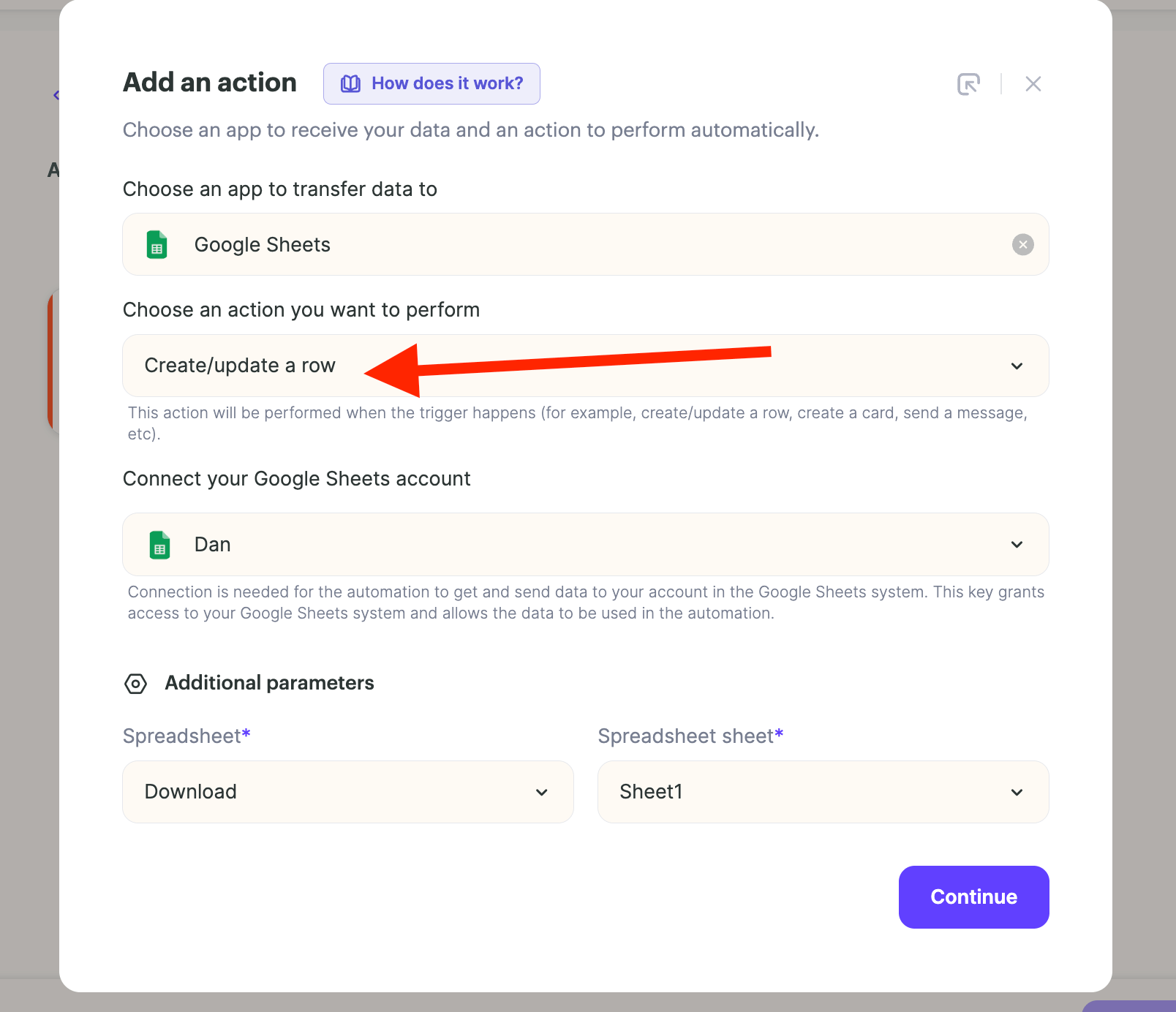 4. Map each column accordingly. Remember to include all 3 Video qualities:
  5. START the Agentic Workflow.
6. Start to generate videos in the dynamic video campaign
***
## 2. Bulk Download via JDownloader2
1. Once links are in your Google Sheet:
* Select and **copy** the entire column of download links.
2. Open **JDownloader2**:
* It will auto-detect the links and list them.
3. Click **Start Download**.
🎉 That’s it! All your video files will begin downloading automatically.
***
## ❓Need Help?
If you run into issues or have any questions, feel free to reach out to our support team. We’re happy to help!
## Frequently asked questions
You'll need a Dynamic Video campaign (with non-generated videos), an Agentic Workflow, a Google Sheet with the right headers, and a download manager such as [JDownloader2](http://jdownloader.org/).
Search for **Sendspark** and select the event **VIDEO READY TO DOWNLOAD - SPECIFIC CAMPAIGN**, then choose your Dynamic Campaign so the workflow fires as each video finishes generating.
Depending on the quality of your camera and the type of video you produce, Sendspark creates different resolution levels. Mapping all three (high, medium, and low) ensures you always have at least one usable download link for every video.
Once your links are in the Google Sheet, select and copy the entire column of download links. Open JDownloader2 and it auto-detects the links from your clipboard and lists them; then click **Start Download** to fetch every file automatically.
*Updated July 2026.*
5. START the Agentic Workflow.
6. Start to generate videos in the dynamic video campaign
***
## 2. Bulk Download via JDownloader2
1. Once links are in your Google Sheet:
* Select and **copy** the entire column of download links.
2. Open **JDownloader2**:
* It will auto-detect the links and list them.
3. Click **Start Download**.
🎉 That’s it! All your video files will begin downloading automatically.
***
## ❓Need Help?
If you run into issues or have any questions, feel free to reach out to our support team. We’re happy to help!
## Frequently asked questions
You'll need a Dynamic Video campaign (with non-generated videos), an Agentic Workflow, a Google Sheet with the right headers, and a download manager such as [JDownloader2](http://jdownloader.org/).
Search for **Sendspark** and select the event **VIDEO READY TO DOWNLOAD - SPECIFIC CAMPAIGN**, then choose your Dynamic Campaign so the workflow fires as each video finishes generating.
Depending on the quality of your camera and the type of video you produce, Sendspark creates different resolution levels. Mapping all three (high, medium, and low) ensures you always have at least one usable download link for every video.
Once your links are in the Google Sheet, select and copy the entire column of download links. Open JDownloader2 and it auto-detects the links from your clipboard and lists them; then click **Start Download** to fetch every file automatically.
*Updated July 2026.*