> ## Documentation Index
> Fetch the complete documentation index at: https://help.sendspark.com/llms.txt
> Use this file to discover all available pages before exploring further.
# Auto-Send Personalized Video Emails in Apollo
> Learn how to automatically send AI-personalized Sendspark videos through Apollo sequences with step-by-step setup instructions.
To auto-send personalized video emails in Apollo, create a Dynamic Video Campaign in Sendspark, paste a Sendspark placeholder into your Apollo sequence email, then build a Sendspark automation that triggers on "Sendspark Video Generated," finds the contact in Apollo, and calls the Apollo API to enroll them in your sequence. Each contact is added automatically once their video is ready.
## Key takeaways
* The setup has three parts: a **Dynamic Video Campaign** in Sendspark, a **Sendspark placeholder** in your Apollo sequence email, and a **Sendspark automation** that enrolls contacts in Apollo.
* Use **"Sendspark Video Generated"** as the trigger so contacts only enroll once their personalized video is ready.
* Enroll contacts by calling the Apollo API endpoint `https://api.apollo.io/api/v1/emailer_campaigns/{YOUR_CAMPAIGN_ID}/add_contact_ids` with a `POST` request.
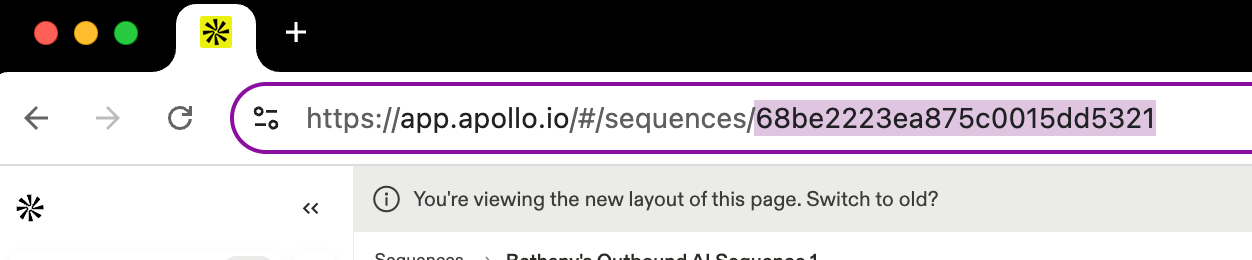
* Find your Apollo campaign ID in the URL of your Apollo sequence, and get your API key from Apollo's Developer Keys page.
In this guide, you’ll learn how to automatically send AI-personalized Sendspark videos through Apollo sequences.
## Step 1: Create a Dynamic Video Campaign in Sendspark
Start by setting up a **[Dynamic Video Campaign](/dynamic-videos-make-videos-with-ai-introductions)** in Sendspark. This is the template video that will be personalized at scale with your contact’s details (name, company, etc.).
***
## Step 2: Add a Sendspark Placeholder into Your Apollo Sequence
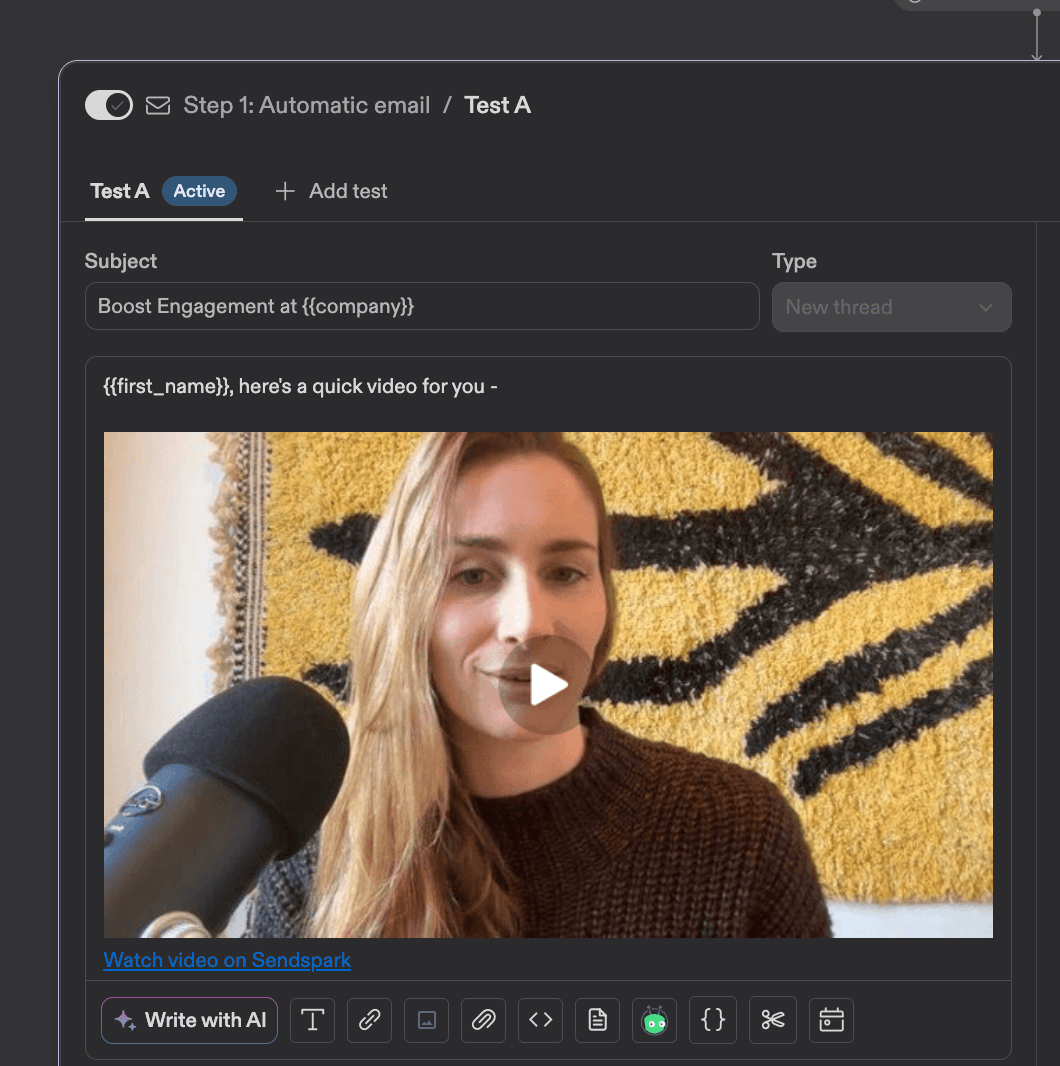
In Apollo, edit your sequence email where you’d like the personalized video to appear. This placeholder will automatically update with each contact’s unique video once it’s generated.
Add this into Apollo by...
1. Going to your Dynamic Video Campaign
2. Clicking "Share Video"
3. Searching for "Apollo"
4. Clicking on the snippet to copy it to your clipboard
5. Pasting into Apollo exactly where you'd like it to appear in your email
***
## Step 3: Build a Sendspark Automation to Enroll Contacts in Apollo
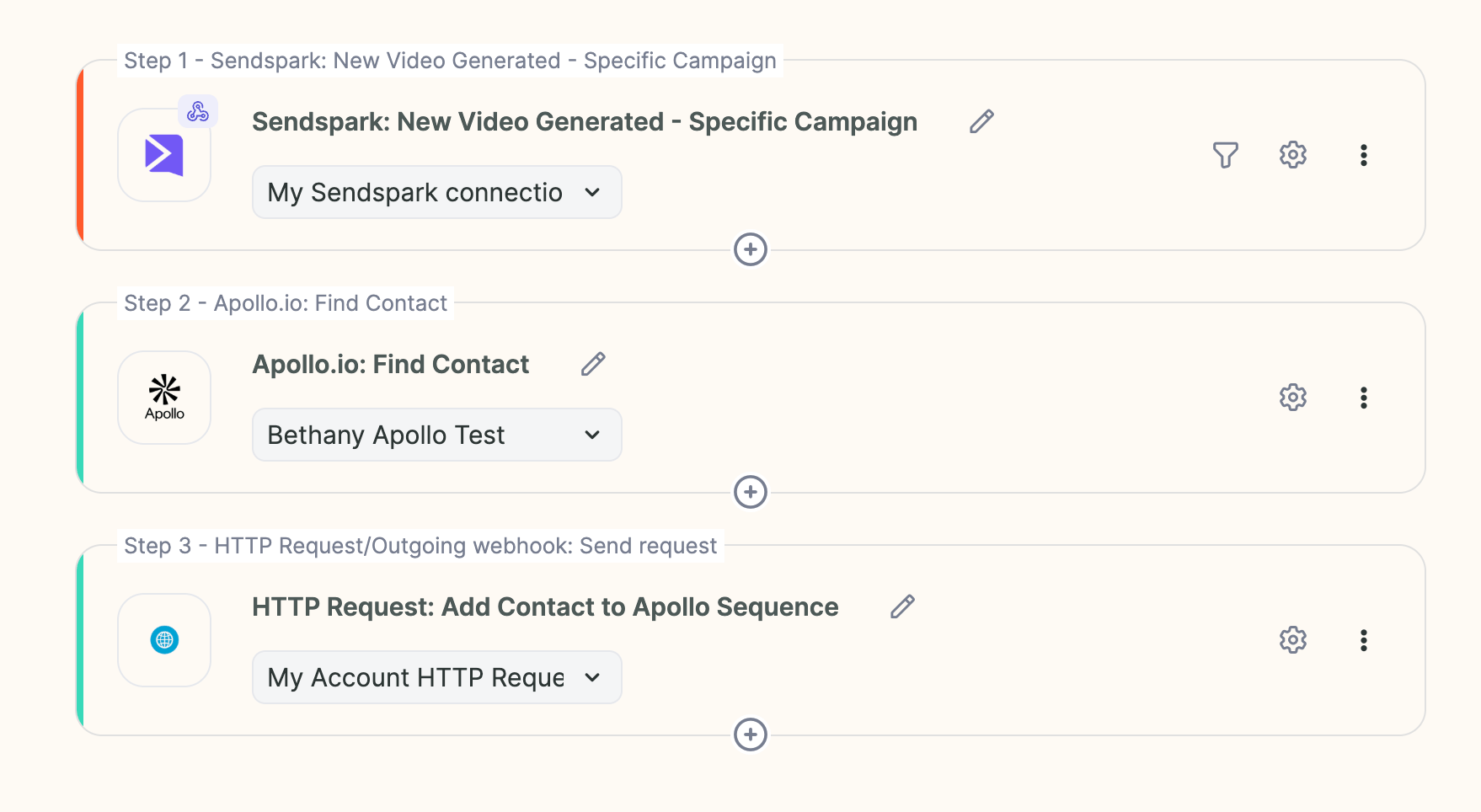
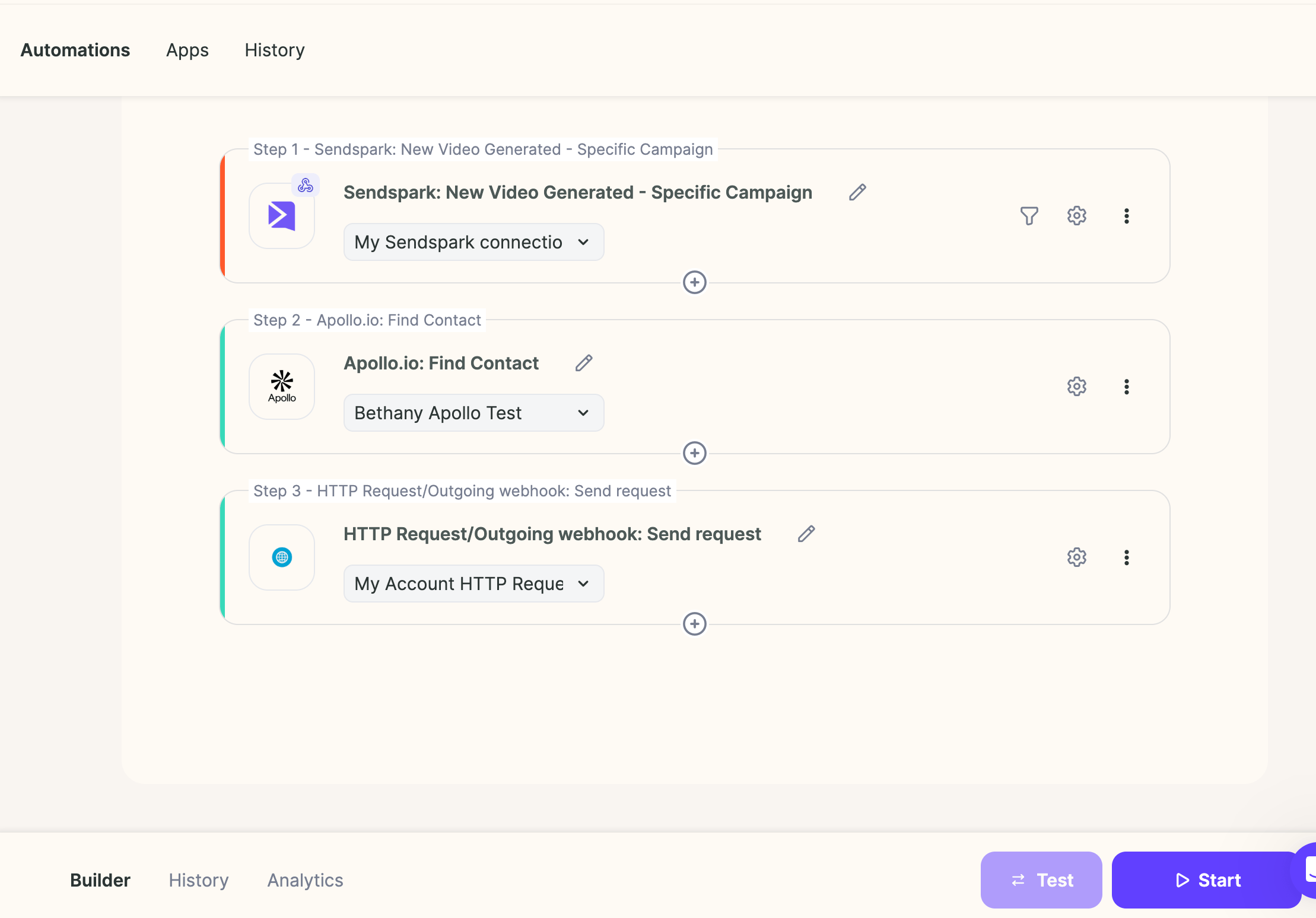
Now we’ll [set up an automation](https://sendspark.com/agentic-workflows) that connects Sendspark with Apollo that looks something like this:
## 1. Choose Your Trigger
* If you already have a trigger (like “Contact added to Apollo list” or “Contact added in HubSpot”), use that.
* Otherwise, simply use **“Sendspark Video Generated”** as the trigger and connect the dynamic video campaign you'd like to use
## 2. Add Step: Apollo.io: Find Contact
* Add a step: **Apollo.io: Find Contact**
* Use the **Sendspark email field** as the search parameter.
## 3. Add Step: HTTP Request/Outgoing webhook: Send request
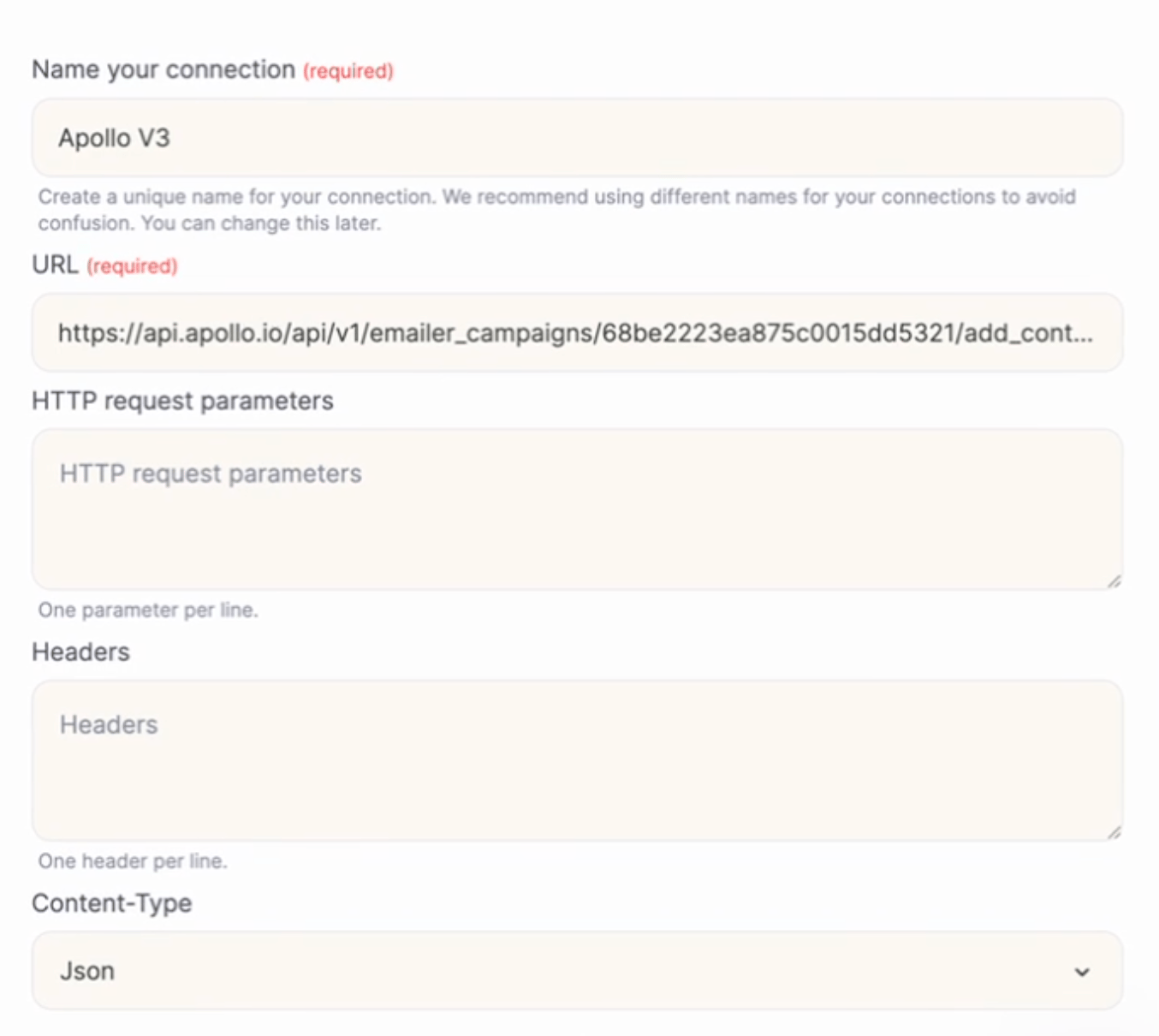
* Create a new step: **HTTP Request/Outgoing webhook: Send request**
* **Paste the following URL**, using the real campaign ID from your Apollo sequence (you can find it in the URL of your Apollo sequence):
**URL**:
```text theme={null}
https://api.apollo.io/api/v1/emailer_campaigns/{YOUR_CAMPAIGN_ID}/add_contact_ids
```
**How to Find Apollo Campaign ID:**
Make sure to select \*\*"Json,"\*\*so everything looks like this:
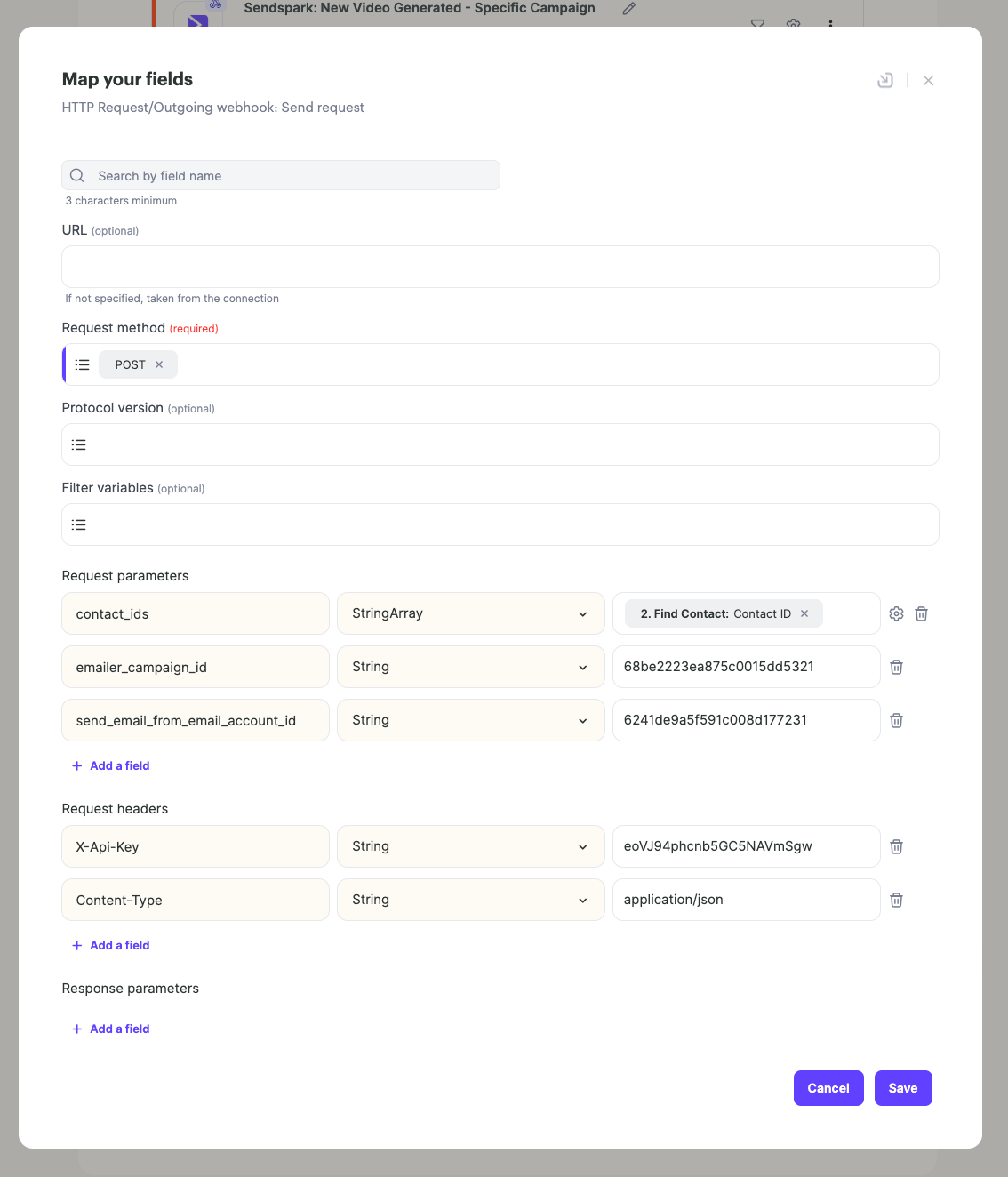
Click **"Continue"** and fill out the rest of the API call:
**Request Method**: `POST`
**Request Parameters**:
* `contact_ids` → `StringArray` → insert this dynamically from the “Find Lead in Apollo” step
* `emailer_campaign_id` → `String` →Your Apollo campaign ID (find this in the URL of your sequence)
* `send_email_from_email_account_id` → `String` →Your connected Apollo email account (you can find this from [Apollo API Docs](https://docs.apollo.io/reference/get-a-list-of-email-accounts))
**Request Headers**:
* `X-Api-Key` → `String` → Get your Aollo API key here: [Apollo Developer Keys](https://developer.apollo.io/keys)
* `Content-Type` → `String` →` application/json`
It should all look something like this:
After you save this step, you have everything you need to make sure that after leads have videos created for them, you are automatically enrolling them in Apollo sequences.
## 4. Start Automation
When all looks good, **"Start"** to start running this automation.
Then test your trigger and make sure that contacts are getting successfully enrolled in sequences!
***
## Bonus: Create Contacts in Apollo If They Don't Already Exist
For the most part, your contacts should already exist in Apollo (because they have a large database). However, if you believe that some contacts might not exist, then you can add logic to [create contacts in Apollo if they don't exist](/create-contacts-in-apollo-if-they-don-t-already-exist).
## Apollo API request at a glance
| Setting | Value |
| ---------------------------------- | ----------------------------------------------------------------------------------- |
| URL | `https://api.apollo.io/api/v1/emailer_campaigns/{YOUR_CAMPAIGN_ID}/add_contact_ids` |
| Method | `POST` |
| `contact_ids` | StringArray, inserted dynamically from the Apollo: Find Contact step |
| `emailer_campaign_id` | Your Apollo campaign ID (found in the URL of your sequence) |
| `send_email_from_email_account_id` | Your connected Apollo email account ID |
| `X-Api-Key` header | Your Apollo API key from [Apollo Developer Keys](https://developer.apollo.io/keys) |
| `Content-Type` header | `application/json` |
## Frequently asked questions
Create a Dynamic Video Campaign in Sendspark, paste a Sendspark placeholder into your Apollo sequence email, then build a Sendspark automation that triggers on "Sendspark Video Generated," finds the contact in Apollo by email, and calls the Apollo API to enroll them in your sequence. Contacts are added automatically once their video is ready.
If you already have a trigger such as "Contact added to Apollo list" or "Contact added in HubSpot," use that. Otherwise use "Sendspark Video Generated" and connect the dynamic video campaign you want to use, so contacts enroll only after their video is ready.
Your Apollo campaign ID appears in the URL of your Apollo sequence. Your API key comes from the [Apollo Developer Keys](https://developer.apollo.io/keys) page, and your connected email account ID is available from the [Apollo API docs](https://docs.apollo.io/reference/get-a-list-of-email-accounts).
Most contacts will already exist because Apollo has a large database. If some might not, you can add logic to [create contacts in Apollo if they don't already exist](/create-contacts-in-apollo-if-they-don-t-already-exist) before enrolling them in the sequence.
*Updated July 2026.*
 5. Pasting into Apollo exactly where you'd like it to appear in your email
  ***
## Step 3: Build a Sendspark Automation to Enroll Contacts in Apollo
Now we’ll [set up an automation](https://sendspark.com/agentic-workflows) that connects Sendspark with Apollo that looks something like this:
***
## Step 3: Build a Sendspark Automation to Enroll Contacts in Apollo
Now we’ll [set up an automation](https://sendspark.com/agentic-workflows) that connects Sendspark with Apollo that looks something like this:
 ## 1. Choose Your Trigger
* If you already have a trigger (like “Contact added to Apollo list” or “Contact added in HubSpot”), use that.
* Otherwise, simply use **“Sendspark Video Generated”** as the trigger and connect the dynamic video campaign you'd like to use
## 1. Choose Your Trigger
* If you already have a trigger (like “Contact added to Apollo list” or “Contact added in HubSpot”), use that.
* Otherwise, simply use **“Sendspark Video Generated”** as the trigger and connect the dynamic video campaign you'd like to use 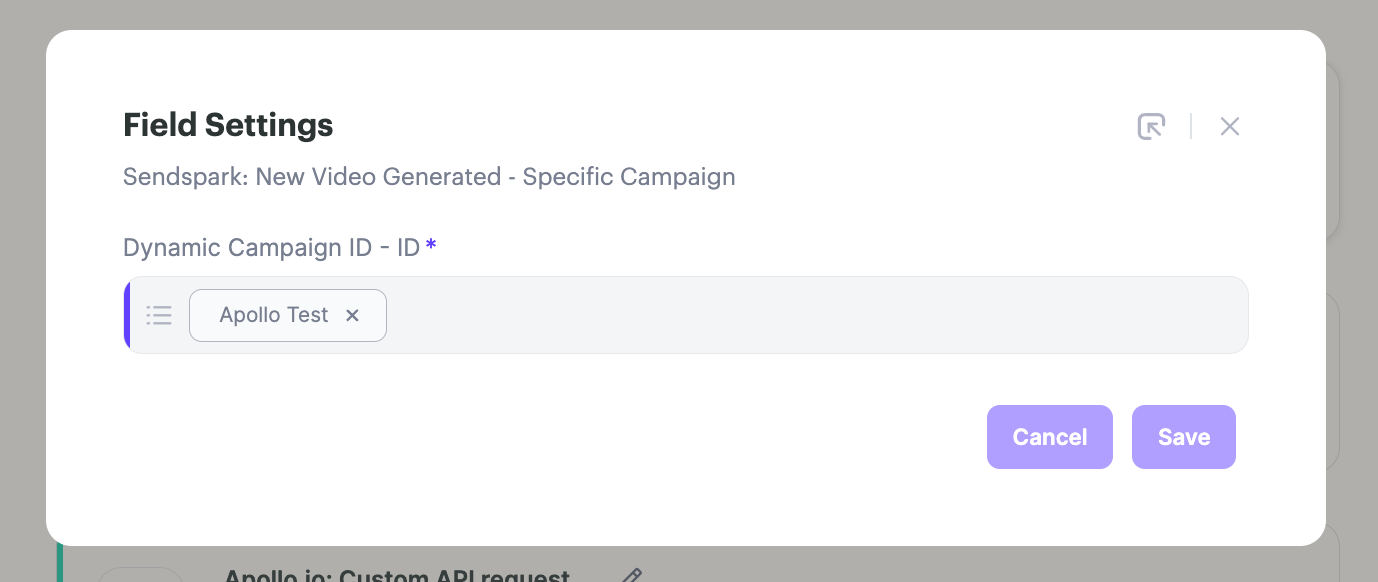 ## 2. Add Step: Apollo.io: Find Contact
* Add a step: **Apollo.io: Find Contact**
* Use the **Sendspark email field** as the search parameter.
## 2. Add Step: Apollo.io: Find Contact
* Add a step: **Apollo.io: Find Contact**
* Use the **Sendspark email field** as the search parameter. 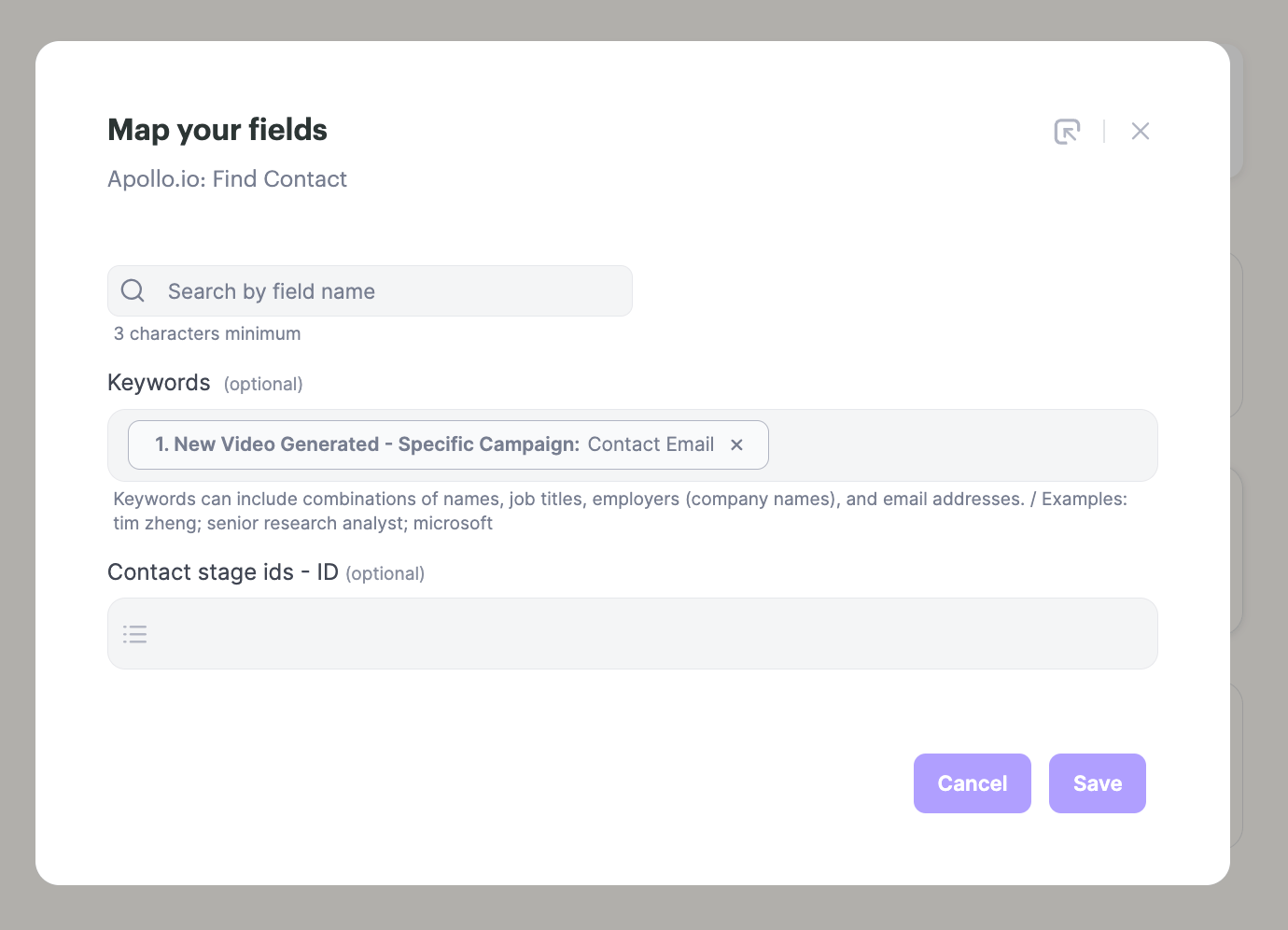 ## 3. Add Step: HTTP Request/Outgoing webhook: Send request
* Create a new step: **HTTP Request/Outgoing webhook: Send request**
* **Paste the following URL**, using the real campaign ID from your Apollo sequence (you can find it in the URL of your Apollo sequence):
**URL**:
```text theme={null}
https://api.apollo.io/api/v1/emailer_campaigns/{YOUR_CAMPAIGN_ID}/add_contact_ids
```
**How to Find Apollo Campaign ID:**
## 3. Add Step: HTTP Request/Outgoing webhook: Send request
* Create a new step: **HTTP Request/Outgoing webhook: Send request**
* **Paste the following URL**, using the real campaign ID from your Apollo sequence (you can find it in the URL of your Apollo sequence):
**URL**:
```text theme={null}
https://api.apollo.io/api/v1/emailer_campaigns/{YOUR_CAMPAIGN_ID}/add_contact_ids
```
**How to Find Apollo Campaign ID:**
 Make sure to select \*\*"Json,"\*\*so everything looks like this:
 Click **"Continue"** and fill out the rest of the API call:
**Request Method**: `POST`
**Request Parameters**:
* `contact_ids` → `StringArray` → insert this dynamically from the “Find Lead in Apollo” step
* `emailer_campaign_id` → `String` →Your Apollo campaign ID (find this in the URL of your sequence)
* `send_email_from_email_account_id` → `String` →Your connected Apollo email account (you can find this from [Apollo API Docs](https://docs.apollo.io/reference/get-a-list-of-email-accounts))
**Request Headers**:
* `X-Api-Key` → `String` → Get your Aollo API key here: [Apollo Developer Keys](https://developer.apollo.io/keys)
* `Content-Type` → `String` →` application/json`
It should all look something like this:
Click **"Continue"** and fill out the rest of the API call:
**Request Method**: `POST`
**Request Parameters**:
* `contact_ids` → `StringArray` → insert this dynamically from the “Find Lead in Apollo” step
* `emailer_campaign_id` → `String` →Your Apollo campaign ID (find this in the URL of your sequence)
* `send_email_from_email_account_id` → `String` →Your connected Apollo email account (you can find this from [Apollo API Docs](https://docs.apollo.io/reference/get-a-list-of-email-accounts))
**Request Headers**:
* `X-Api-Key` → `String` → Get your Aollo API key here: [Apollo Developer Keys](https://developer.apollo.io/keys)
* `Content-Type` → `String` →` application/json`
It should all look something like this:
 After you save this step, you have everything you need to make sure that after leads have videos created for them, you are automatically enrolling them in Apollo sequences.
## 4. Start Automation
When all looks good, **"Start"** to start running this automation.
After you save this step, you have everything you need to make sure that after leads have videos created for them, you are automatically enrolling them in Apollo sequences.
## 4. Start Automation
When all looks good, **"Start"** to start running this automation.
 Then test your trigger and make sure that contacts are getting successfully enrolled in sequences!
***
## Bonus: Create Contacts in Apollo If They Don't Already Exist
For the most part, your contacts should already exist in Apollo (because they have a large database). However, if you believe that some contacts might not exist, then you can add logic to [create contacts in Apollo if they don't exist](/create-contacts-in-apollo-if-they-don-t-already-exist).
## Apollo API request at a glance
| Setting | Value |
| ---------------------------------- | ----------------------------------------------------------------------------------- |
| URL | `https://api.apollo.io/api/v1/emailer_campaigns/{YOUR_CAMPAIGN_ID}/add_contact_ids` |
| Method | `POST` |
| `contact_ids` | StringArray, inserted dynamically from the Apollo: Find Contact step |
| `emailer_campaign_id` | Your Apollo campaign ID (found in the URL of your sequence) |
| `send_email_from_email_account_id` | Your connected Apollo email account ID |
| `X-Api-Key` header | Your Apollo API key from [Apollo Developer Keys](https://developer.apollo.io/keys) |
| `Content-Type` header | `application/json` |
## Frequently asked questions
Then test your trigger and make sure that contacts are getting successfully enrolled in sequences!
***
## Bonus: Create Contacts in Apollo If They Don't Already Exist
For the most part, your contacts should already exist in Apollo (because they have a large database). However, if you believe that some contacts might not exist, then you can add logic to [create contacts in Apollo if they don't exist](/create-contacts-in-apollo-if-they-don-t-already-exist).
## Apollo API request at a glance
| Setting | Value |
| ---------------------------------- | ----------------------------------------------------------------------------------- |
| URL | `https://api.apollo.io/api/v1/emailer_campaigns/{YOUR_CAMPAIGN_ID}/add_contact_ids` |
| Method | `POST` |
| `contact_ids` | StringArray, inserted dynamically from the Apollo: Find Contact step |
| `emailer_campaign_id` | Your Apollo campaign ID (found in the URL of your sequence) |
| `send_email_from_email_account_id` | Your connected Apollo email account ID |
| `X-Api-Key` header | Your Apollo API key from [Apollo Developer Keys](https://developer.apollo.io/keys) |
| `Content-Type` header | `application/json` |
## Frequently asked questions